
Opus Clip and Reap both bill by the minute of source video you feed in, so they compare cleanly. On yearly billing, Reap Creator gives 10 hours a month for $9.99 a month, about $0.017 per source minute. Opus Clip Pro gives 5 hours a month for $14.50 a month, about $0.048. Reap is cheaper per minute on every plan. Opus Clip takes much longer videos, cuts much longer clips and hands off to Premiere Pro and DaVinci Resolve. Every price below is the US dollar price, read from each vendor’s own pages on 7 November 2026.
Disclosure: ScaleReach publishes this comparison and competes with both tools. I did not pay for either plan for this post, and I did not run the same video through both, so there is no output-quality verdict here. There are no affiliate links. Every fact comes from a page the vendor controls, linked and dated.
The 60-second verdict
Pick Reap if price per source minute decides it, you need captions or dubbing beyond English (100+ caption languages, 80+ dubbing languages), or you want a scheduler, API and MCP access on the cheapest paid plan.
Pick Opus Clip if your recordings run longer than 3 hours, you want clips longer than 3 minutes, or you finish clips in Premiere Pro or DaVinci Resolve.
Watch out for: Reap caps AI clipping at 3 hours per video. Opus Clip’s $15 Starter has no scheduler, no yearly option and 9:16 output only.
Bottom line: for spoken-word video under 3 hours, Reap sells two to three and a half times the minutes for the money. For long streams, long-form clips or an editor hand-off, Opus Clip is the one that fits.
Opus Clip vs Reap at a glance
| Opus Clip | Reap | |
|---|---|---|
| What you pay for | Source minutes (1 credit = 1 minute of video imported) | Source minutes (1 media credit = 1 minute of clipping) |
| Free plan | 60 processing minutes a month, watermark, no editing, export within 3 days | 1 hour a month, watermark, 720p, 9:16 only, projects expire after 7 days |
| Cheapest paid, monthly | Starter $15, 150 minutes | Creator $16.99, 10 hours (600 minutes) |
| Cheapest paid, yearly | Pro $14.50/month ($174 a year), 300 minutes a month | Creator $9.99/month ($119.88 a year), 10 hours a month |
| Longest source video | 10 hours | 3 hours for AI clipping (minimum 1 minute) |
| Clip lengths | 0 to 1 min, up to 10 to 15 min | Under 30 s, up to 90 s to 3 min |
| Upload size | 10GB (Free, Starter), 30GB (Pro) | 5GB (Free), 10GB (Creator, Studio) |
| Output ratios | 9:16 on Free and Starter; Pro adds 1:1 and 16:9 | 9:16 on Free; paid adds 16:9, 1:1 and 4:5 |
| Caption languages | 20+ (Starter card) | 100+, including Hinglish, Romanized Urdu and Arabizi |
| Dubbing | On Pro | 80+ languages, 2 hours a month on Creator, 5 on Studio |
| Scheduler | Pro and up | Every paid plan |
| Premiere / DaVinci export | Pro | Not listed on Reap’s pricing page |
| API and MCP | Video editing API, scheduler API and MCP connector on Pro | REST API, CLI and MCP on every paid plan; Free gets one MCP connection |
| Seats | Pro: 2 per pack, up to 4 | Creator 1, Studio up to 3 |
Sources: opus.pro/pricing, Opus Clip’s help articles on credits, plans and video length; reap.video/pricing (Monthly and Annually toggles), Reap’s help articles on the credit system, clipping limits and MCP. All read 2026-11-07.
How much does Reap cost in 2026?
| Plan | Monthly | Yearly | Clipping per month | Export |
|---|---|---|---|---|
| Free | $0 | $0 | 1 hour, watermarked | 720p, 9:16 only |
| Creator | $16.99 | $9.99 a month ($119.88 a year) | Up to 10 hours | 1080p, no watermark |
| Studio | $45 | $29 a month ($348 a year) | Up to 20 hours | 4K, no watermark |
| Enterprise | Custom | Custom | Custom | 4K |
Source: reap.video/pricing, read 7 November 2026 on both the Monthly and Annually toggles. The page opens on Annually and says “Save up to 40% on annual billing”.
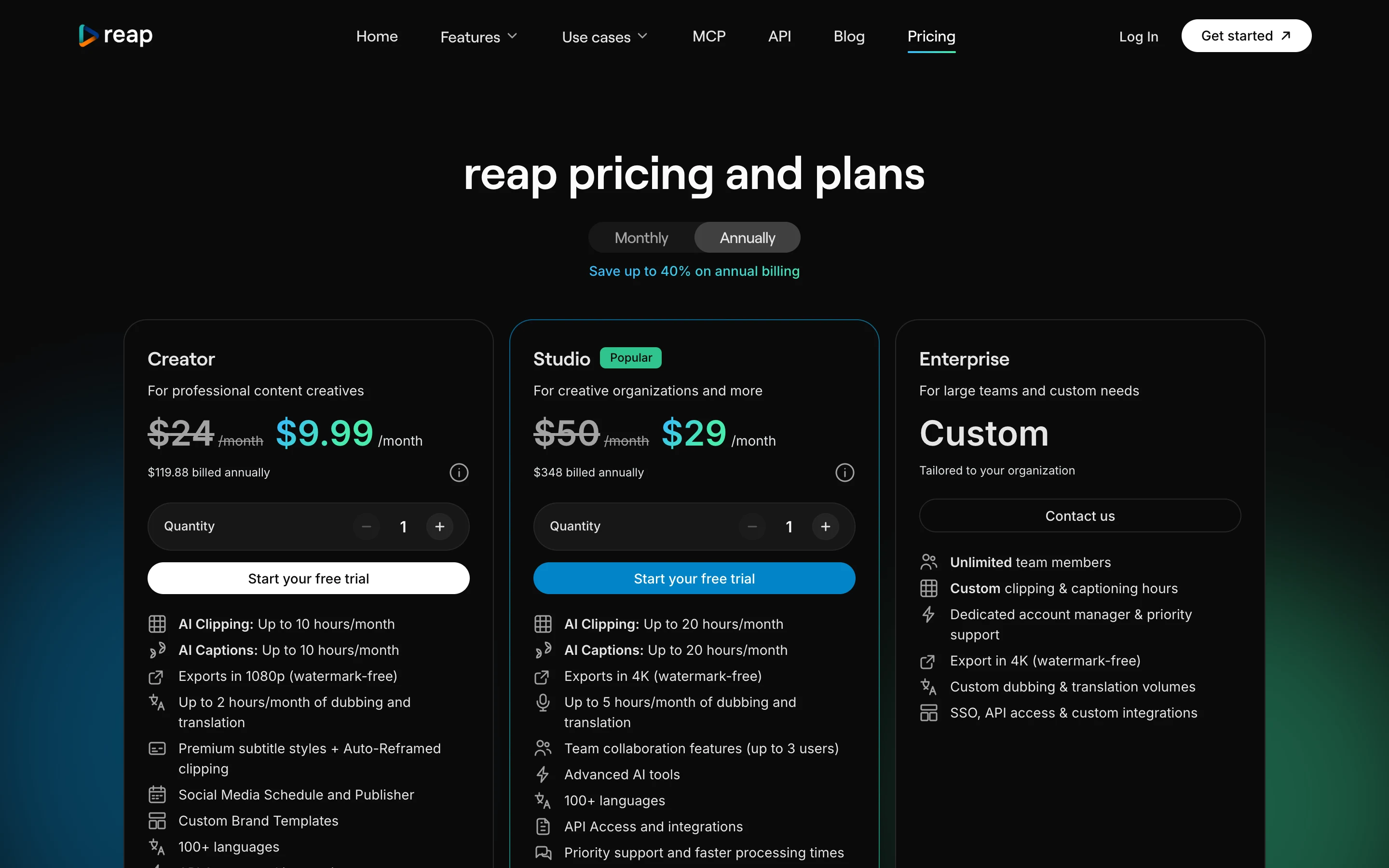
Three things on that page are easy to misread:
- The struck-through $24 and $50 are not the monthly prices. They show on both toggles. Switch to Monthly and the cards read “$16.99 billed monthly” for Creator and “$45 billed monthly” for Studio. Our October Reap review could only see the annual view and did not publish a monthly price.
- Credits expire differently by billing period. On the Monthly toggle each paid card says credits “expire in 30 days”. On Annually it says they “expire in 13 months”. Reap’s help centre counts Creator as 600 credits and Studio as 1,200 credits of monthly usage, and its API docs say usage counters reset each billing cycle. Neither page says whether a yearly plan gets the whole year’s credits at once, so ask before you count on that.
- Clipping and reframing are priced differently. Reap’s credit guide charges 1 media credit per minute for clipping and captions, and 2 per minute for reframing and editor processing. It does not say whether the auto-reframe inside a clipping project adds the second rate, so check your balance after the first video.
Dubbing draws on a separate pool of AI credits (half a credit per minute dubbed), which cannot be topped up. Extra media credits come in packs of 100 that never expire but only spend while you have an active paid plan. I did not find the top-up price on the pages I read.
How much does Opus Clip cost in 2026?
| Plan | Monthly | Yearly | Credits | Notable |
|---|---|---|---|---|
| Free | $0 | $0 | 60 a month | Watermark, no editing, up to 1080p, clips must be exported within 3 days |
| Starter | $15 | Not offered | 150 a month | Virality Score, auto-post to Shorts, TikTok and Reels, 1 brand template, no scheduler |
| Pro | $29 | $14.50 a month ($174 a year) | 300 a month per pack (3,600 over 12 months on yearly) | Scheduler, 6 social account connections, 2 seats per pack, Premiere and DaVinci export, video dubbing, MCP connector |
| Business | Custom | Custom | Custom | API and custom integrations, priority processing |
Source: opus.pro/pricing and Opus Clip’s plans article, read 7 November 2026. Prices are unchanged since our Opus Clip vs Submagic comparison on 28 October.
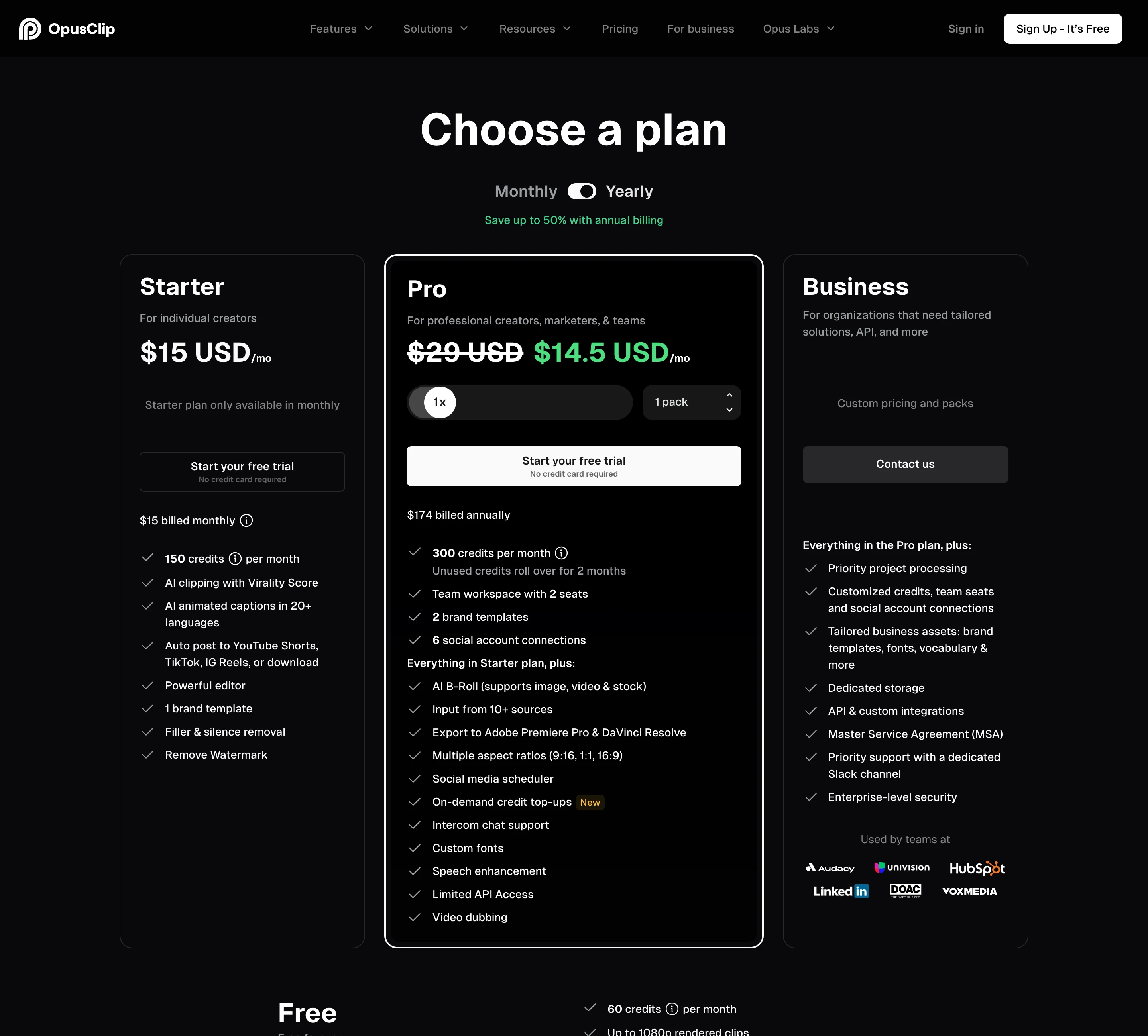
Per Opus Clip’s credits article, a credit is one minute of the original video. Videos under a minute round up to 1 credit and partial minutes round down. Posting to X costs 3 credits per clip per X account. Monthly credits expire after 60 days, so they carry over one extra month. Yearly plans get 3,600 credits up front, valid for 12 months. Our guide to whether Opus Clip credits expire covers the edge cases.
Is Reap cheaper than Opus Clip per source minute?
Yes, on every plan and both billing periods. Both tools meter the same unit, so this is a straight division of the plan price by its monthly minutes.
| Plan | Billing | Price a month | Source minutes a month | Cost per source minute |
|---|---|---|---|---|
| Reap Creator | Yearly | $9.99 | 600 | about $0.017 |
| Reap Studio | Yearly | $29 | 1,200 | about $0.024 |
| Reap Creator | Monthly | $16.99 | 600 | about $0.028 |
| Reap Studio | Monthly | $45 | 1,200 | about $0.038 |
| Opus Clip Pro | Yearly | $14.50 | 300 | about $0.048 |
| Opus Clip Pro | Monthly | $29 | 300 | about $0.097 |
| Opus Clip Starter | Monthly | $15 | 150 | $0.10 |
Prices from each vendor’s pricing page, read 7 November 2026. The figures assume you use every minute. Reap’s hours are “up to” figures, and the reframing rate above could raise its real cost per minute.
The gap is widest at the bottom. For $15 to $17 a month without a yearly commitment, Opus Clip Starter gives 150 minutes and Reap Creator gives 600. On yearly billing, Reap Creator costs less than Opus Clip Pro and gives twice the minutes.
Which handles longer videos and longer clips?
Opus Clip, on both counts.
- Source length. Opus Clip’s help centre says it supports videos up to 10 hours, and you can process just part of a longer one. Reap’s help centre puts the maximum for AI clipping at 3 hours, with a 1-minute minimum and a recommendation of 10 minutes or more.
- Clip length. Opus Clip offers clip length buckets from 0 to 1 minute up to 10 to 15 minutes on every plan. Reap’s longest bucket is 90 seconds to 3 minutes.
- File size. Opus Clip takes local files up to 10GB on Free and Starter and 30GB on Pro, which also accepts public .mp4 links. Reap takes 5GB on Free and 10GB on paid plans.
If you record 4-hour livestreams or want 8-minute highlight segments for YouTube, Reap’s limits rule it out without splitting the file first.
Free plans: which one can you actually use?
Both renew every month and both give you about an hour of source video.
- Opus Clip Free: 60 processing minutes a month, watermarked, no editing, up to 1080p, 9:16 only. Clips stop being exportable after 3 days.
- Reap Free: 1 hour of clipping and captioning a month, watermarked, 720p, 9:16 only, basic caption styles. Projects expire after 7 days.
Opus Clip’s free exports are sharper. Reap’s free projects last longer, and Reap’s free plan includes one MCP connection, so you can test it from an AI agent without paying. Opus Clip lists its MCP connector from Pro.
What about captions, dubbing and languages?
This is Reap’s strongest area on paper. Its pricing page lists captions in 100+ languages, including romanized scripts such as Hinglish, Romanized Urdu and Arabizi, subtitle translation into 100+ languages, and dubbing into 80+ languages. We compare romanized captions across tools in our guide to Hinglish captions.
Opus Clip’s Starter card lists animated captions in 20+ languages, and video dubbing is a Pro feature on its pricing table.
Reap’s own pages disagree on one point. Its clipping page marks AI dubbing “Early Access” and says the AI “clones your voice”. Its dubbing page says it “does not clone or reproduce the original speaker’s voice”, and the pricing table lists voice cloning as “Coming soon”. The dubbing page also limits each dubbed video to 10 minutes and 2 GB. For how dubbing compares across tools, see our roundup of natural-sounding AI dubbing for Shorts.
Which is better for posting to TikTok, Shorts and Reels?
Reap gives more on its cheapest paid plan. Creator includes Reap’s social media scheduler and publisher, with TikTok, Reels, Shorts and LinkedIn as destinations, and Studio adds X and Facebook. Reap’s comparison table also lists a content calendar and a bulk scheduler. Reap’s help centre lists YouTube, TikTok, Instagram, Facebook Pages and LinkedIn profiles and pages, and says you can connect several accounts.
Opus Clip splits it. Starter can auto-post to YouTube Shorts, TikTok and Instagram Reels, but has no scheduler. Pro adds the scheduler, 6 social account connections and posting to several profiles per platform. Posting to X costs credits on Opus Clip.
I did not test posting on either tool. TikTok limits posts from apps that have not passed its audit to private accounts, so confirm that a test post lands public before you queue a month of clips. We explain that rule in which clip tools auto-post to TikTok, Reels and Shorts.
What does Opus Clip do better than Reap?
- Long sources: 10 hours against Reap’s 3.
- Long clips: up to 15 minutes against Reap’s 3.
- Editing hand-off: Pro exports to Adobe Premiere Pro and DaVinci Resolve. Reap’s pricing page does not list a project-file export.
- Bigger uploads and more import options on Pro: 30GB files and public .mp4 links.
- More AI editing on Pro: speech enhancement, bad-take removal, eye contact correction and AI video B-roll are all listed.
- Prompt clipping you can confirm on the plan page: Pro lists topic search and prompt to clip. Reap’s pricing table lists prompt-first clipping, but its own help centre calls steering clips with a prompt a “Private beta” that you request access to.
- Credit refunds on bad results: Opus Clip’s help centre lists reprocessing a video for a credit refund as a Pro feature that trial users do not get.
What does Reap do better than Opus Clip?
- Price per source minute: about $0.017 on Creator yearly against $0.048 on Opus Clip Pro yearly.
- A cheaper way to get many minutes month to month: 600 minutes for $16.99 against 150 for $15.
- Languages: 100+ caption languages with romanized scripts, and 80+ dubbing languages.
- Everything on the first paid plan: scheduler, brand templates, API, CLI and MCP all start on Creator. Opus Clip gates the scheduler, API and MCP connector to Pro.
- More output shapes: 4:5 in addition to 9:16, 16:9 and 1:1 on every paid plan. Opus Clip has no 4:5 and keeps Starter at 9:16.
- 4K on Studio: listed as Studio’s export resolution. Opus Clip’s table lists “4K schedule and download” under Business.
- Longer project retention: 60 days on Creator and 120 on Studio, per Reap’s project expiry article.
How do the Opus Clip and Reap MCP servers compare?
Both let an AI agent such as Claude or Cursor clip and publish for you.
Reap’s MCP server is at mcp.reap.video/mcp and signs you in with OAuth, so there is no API key to paste. It works on every plan, with one connection on Free. Its MCP page says it exposes 30 tools, while Reap’s llms.txt file says 29. In October our Reap review described an API-key sign-in and a 10-tool list; both have changed.
Opus Clip lists its MCP connector, video editing API and scheduler API on Pro, and its Business card adds API and custom integrations. Our MCP comparison puts both next to Submagic and ScaleReach.
Do refunds differ?
Partly, and neither pricing page states a subscription refund policy.
Reap refunds credits if you cancel a project while it is still processing. I found no subscription refund policy on its pricing page, its subscription help articles, or the fees and billing sections of its terms (updated 15 March 2026). Its help centre says monthly plans renew automatically unless you cancel before the next billing cycle.
Opus Clip’s pricing page does not state a refund policy either, and I did not re-read its terms for this post. Our Opus Clip cancellation guide covers how its refunds and cancellations work.
Which one fits a weekly podcast?
Take a one-hour weekly show: about 240 minutes of footage a month across four episodes.
- Opus Clip: Starter’s 150 minutes are not enough. Pro’s 300 fits, at $29 a month or $14.50 a month yearly, with the scheduler included.
- Reap: Creator’s 600 minutes fit with room for a second show, at $16.99 a month or $9.99 a month yearly, with the scheduler included.
Reap is cheaper for this show at either billing period. The answer flips if an episode runs past 3 hours, or if you cut long segments for YouTube rather than short clips. Run one episode through each free plan before you commit: both cover a full hour.
Where ScaleReach fits, briefly, since we publish this: it bills per source minute like both tools. Pro is $18 a month for 400 minutes ($0.045 a minute) or $12.50 a month billed yearly ($0.031), with scheduling and uploads up to 3 hours. That is cheaper than Opus Clip and more expensive than Reap per minute. See our pricing page, ScaleReach vs Opus Clip, or the full ranking of Opus Clip alternatives by price per minute.
FAQ
Is Reap cheaper than Opus Clip?
Yes, per source minute on every plan. Reap Creator is $9.99 a month billed yearly or $16.99 monthly for up to 10 hours, about $0.017 to $0.028 a minute. Opus Clip Pro is $14.50 a month billed yearly or $29 monthly for 300 minutes, about $0.048 to $0.097. Opus Clip Starter is $15 for 150 minutes. Prices read 7 November 2026.
What is Reap’s monthly price?
Reap Creator is $16.99 billed monthly and Studio is $45 billed monthly, on the Monthly toggle of reap.video/pricing read 7 November 2026. The struck-through $24 and $50 shown beside the prices appear on both toggles and are not what you pay. Yearly billing is $9.99 and $29 a month, billed $119.88 and $348 a year.
Which handles longer videos, Opus Clip or Reap?
Opus Clip. Its help centre supports videos up to 10 hours, and clip lengths go up to 15 minutes. Reap’s help centre caps AI clipping at 3 hours per video, with clips up to 3 minutes. Upload limits are 30GB on Opus Clip Pro and 10GB on Reap’s paid plans.
Do Opus Clip and Reap both have a free plan?
Yes, and both renew monthly. Opus Clip Free gives 60 processing minutes a month with a watermark, up to 1080p, no editing and a 3-day export window. Reap Free gives 1 hour a month with a watermark, 720p, 9:16 only, and projects that expire after 7 days. Reap’s free plan also includes one MCP connection.
Does Reap support more languages than Opus Clip?
Yes, on its own pages. Reap lists captions in 100+ languages, including romanized scripts like Hinglish, and dubbing in 80+ languages. Opus Clip’s Starter card lists animated captions in 20+ languages, with video dubbing on Pro. Reap’s clipping page marks dubbing “Early Access”, and its dubbing page says the dubbed voice is not a clone of the speaker.
Do Opus Clip and Reap have an MCP server?
Yes, both. Reap’s hosted server at mcp.reap.video/mcp uses OAuth sign-in, works on every plan and allows one connection on Free; Reap lists 30 tools on its MCP page and 29 in its llms.txt. Opus Clip lists its MCP connector, video editing API and scheduler API on Pro. Neither was tested for this post.
The bottom line
Reap is the cheaper tool per source minute, by a wide margin at every plan and billing period, and it puts the scheduler, API and MCP access on its first paid plan. It also covers far more caption and dubbing languages. Its limits are a 3-hour cap per video, clips no longer than 3 minutes, and credit terms that differ between monthly and yearly billing without saying how yearly credits arrive.
Opus Clip costs more per minute but handles 10-hour recordings and 15-minute clips, exports to Premiere Pro and DaVinci Resolve, and lists more AI editing on Pro. Choose Reap for short-form clips from spoken-word video under 3 hours. Choose Opus Clip for long streams, long segments or an editor hand-off.
If a number here looks wrong, email hevin@scalereach.ai and we will correct it and note the change.
Changelog
November 2026. First published. All Opus Clip and Reap figures read from their own pages on 7 November 2026, including Reap’s Monthly toggle, which shows $16.99 and $45.
Last reviewed: November 2026 Next planned refresh: February 2027
Hevin K runs ScaleReach, an AI clip maker that competes with Opus Clip and Reap. There is no affiliate relationship with either. Every fact about them comes from pages they control, linked and dated, and neither tool was run on our own videos for this post.

