
Opus Clip and Klap both turn long videos into vertical shorts, and at two price points they cost exactly the same: $29 billed monthly, or $14.50 a month billed yearly. For that money, Opus Clip Pro gives you 300 minutes of source video a month. Klap Basic gives you 100 generated clips a month. So the real question is which unit runs out first for the videos you make. Every price below is the US price, read from each vendor’s own pages on 7 November 2026.
Disclosure: ScaleReach publishes this comparison and competes with both tools. I did not pay for either plan for this post, and I did not run the same video through both, so there is no output-quality verdict here. There are no affiliate links. Every fact comes from a page the vendor controls, linked and dated.
The 60-second verdict
Pick Opus Clip if you want a cheap month-to-month start ($15 for 150 minutes on Starter), you clip recordings longer than 3 hours, or you need Premiere Pro and DaVinci Resolve export, dubbing or prompt-based clipping on Pro.
Pick Klap if your videos are long but you only want a handful of clips from each. Klap bills per clip generated, not per source minute, and every paid plan includes the virality score, scheduling to five platforms and unlimited social accounts.
Watch out for: Opus Clip’s $15 Starter has no scheduler and no yearly option. Klap has no free plan you can export from: the trial covers one video, and downloading or posting needs a paid plan.
Bottom line: at the same price, Opus Clip sells 300 source minutes and Klap sells 100 clips. If you would generate fewer than one clip per three minutes of footage, Klap stretches further. If you clip densely, Opus Clip does.
Opus Clip vs Klap at a glance
| Opus Clip | Klap | |
|---|---|---|
| What you pay for | Source minutes (1 credit = 1 minute of video imported) | Clips generated (each short counts as one clip) |
| Free option | 60 credits a month, watermark, no editing, clips not exportable after 3 days | 1 video with no card; you can preview and edit, but downloading or posting needs a paid plan |
| Cheapest paid, monthly | Starter $15, 150 credits | Basic $29, 100 clips |
| Cheapest paid, yearly | Pro $14.50/month ($174 a year), 300 credits | Basic $14.50/month ($174 a year), 100 clips |
| Longest source video | Up to 10 hours | Up to 3 hours |
| Virality score | Starter and up | Every plan |
| Social posting | Starter auto-posts to YouTube Shorts, TikTok, Reels. Scheduler and 6 accounts on Pro | Scheduling and publishing to TikTok, YouTube, Instagram, LinkedIn and Facebook on every plan, unlimited accounts |
| Premiere / DaVinci export | XML export on Pro | Not listed on Klap’s pricing page or homepage |
| Video dubbing | On Pro | Not listed on Klap’s pricing page or homepage |
| Languages | Animated captions in 20+ languages | Edits and transcribes in 99+ languages |
| API | Limited API access on Pro, full API on Business | Self-serve, priced per call |
| Refund policy on the pricing page | Not stated | Stated in the pricing FAQ (details below) |
Sources: opus.pro/pricing, Opus Clip’s help centre on credits and video length, all read 2026-11-07; klap.app/pricing (pricing cards and FAQ) and the klap.app homepage FAQ, read 2026-11-07.
How much does Klap cost in 2026?
Klap has three paid plans, all with the same feature list. The only thing that changes between them is the number of clips.
| Plan | Monthly | Yearly | Clips | Per clip (monthly / yearly) |
|---|---|---|---|---|
| Basic | $29 | $14.50 a month ($174 a year) | 100 a month | $0.29 / $0.145 |
| Pro | $79 | $39.50 a month ($474 a year) | 300 a month | $0.26 / $0.13 |
| Pro+ | $189 | $94.50 a month ($1,134 a year) | 1,000 a month | $0.19 / $0.095 |
Source: klap.app/pricing, read 7 November 2026. Klap’s FAQ says the prices “were last updated on November 4, 2026”. Per-clip figures are the plan price divided by the clip limit, so they assume you use every clip.
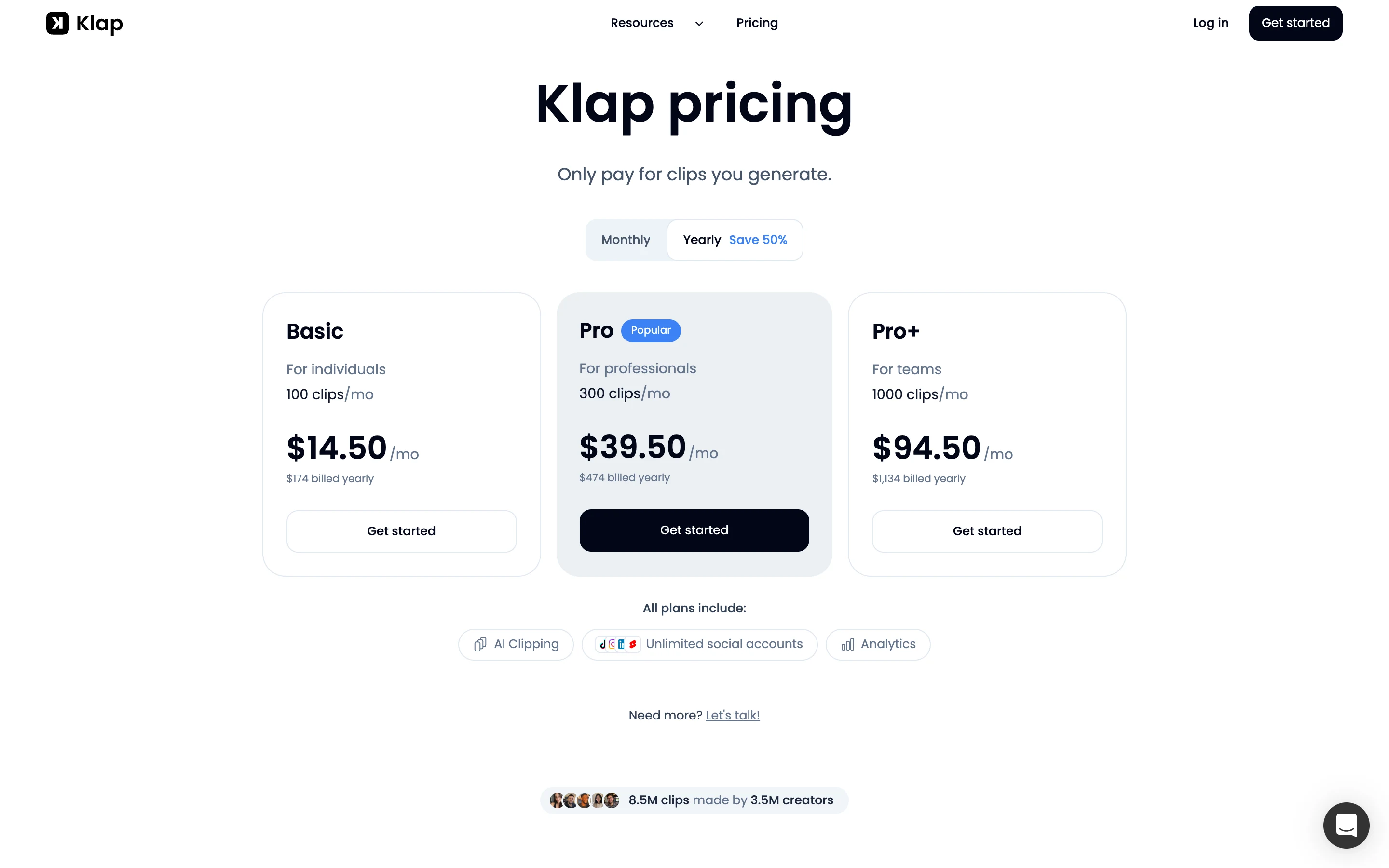
What Klap’s pricing FAQ says every plan includes: AI clipping with a virality score, active-speaker reframing, animated captions, 99+ languages, scheduling and publishing to TikTok, YouTube, Instagram, LinkedIn and Facebook, unlimited social accounts, post analytics, and an editor with b-roll and hook titles. Source videos can run up to 3 hours, and paid exports carry no watermark.
Two details that matter for the math:
- Every generated clip counts. The FAQ says “each short Klap generates counts as one clip”. Source length does not use up the plan.
- Yearly plans pay out up front. You get the whole year’s clips at once: 1,200, 3,600 or 12,000.
Our earlier Klap pages, read on 29 September, list the yearly prices as $14, $39 and $94. The current page is 50 cents higher on each plan. The monthly prices have not changed.
How much does Opus Clip cost in 2026?
| Plan | Monthly | Yearly | Credits | Notable |
|---|---|---|---|---|
| Free | $0 | $0 | 60 a month | Watermark, no editing, up to 1080p, clips not exportable after 3 days |
| Starter | $15 | Not offered | 150 a month | Virality Score, auto-post to Shorts, TikTok and Reels, 1 brand template, no scheduler |
| Pro | $29 | $14.50 a month ($174 a year) | 300 a month per pack (3,600 over 12 months on yearly) | Scheduler, 6 social accounts, 2 seats, Premiere and DaVinci export, video dubbing, MCP connector |
| Business | Custom | Custom | Custom | API and custom integrations, dedicated storage, priority support |
Source: opus.pro/pricing, read 7 November 2026. Opus Clip’s prices are unchanged since our Opus Clip vs Submagic comparison on 28 October.
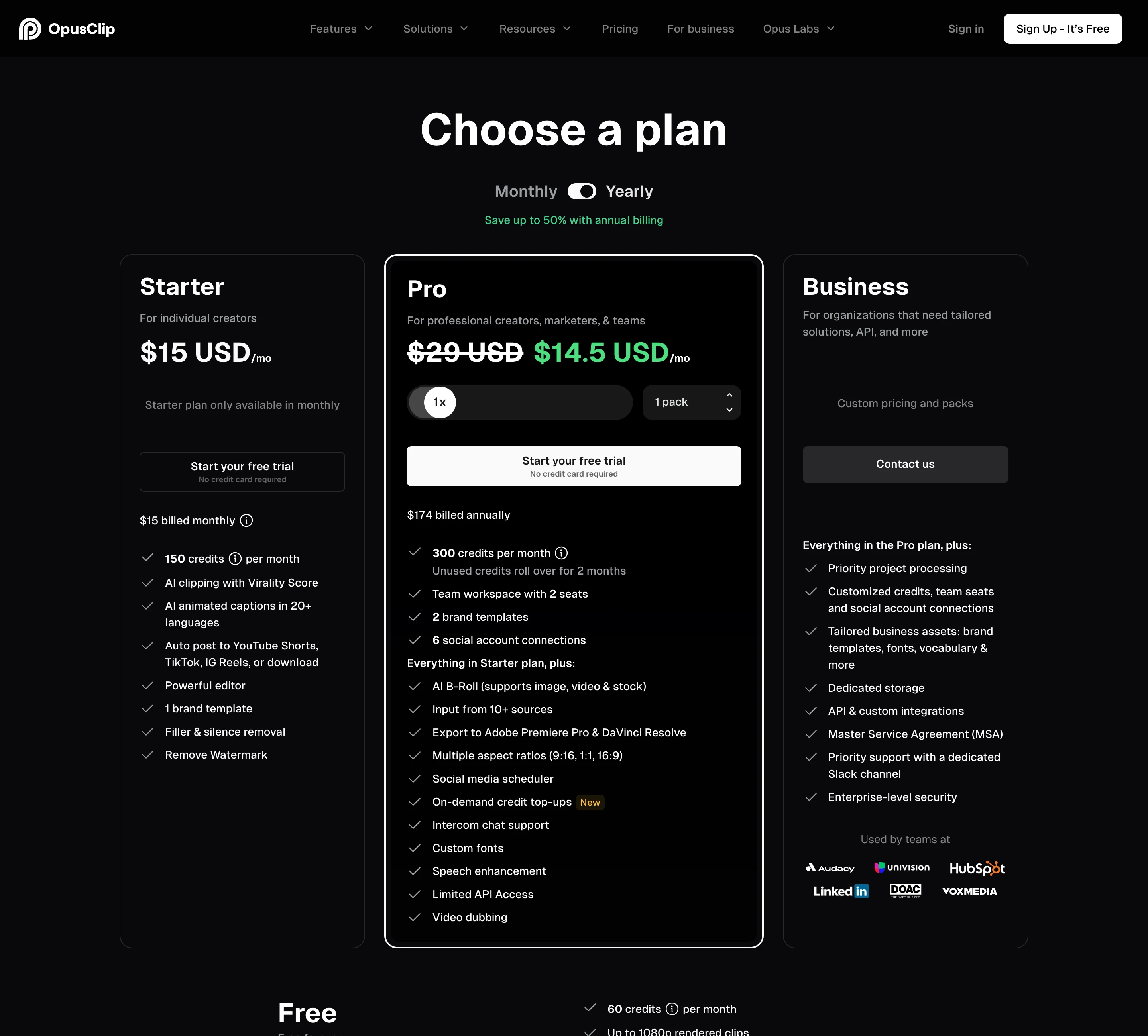
Per Opus Clip’s credits article, a credit is one minute of the original video. Videos under a minute round up to 1 credit and partial minutes round down. Posting to X costs 3 credits per clip per X account. You can process only part of a video with the timeframe slider, which spends fewer credits.
Is Klap cheaper than Opus Clip?
At the same price, they sell different things, so it depends on how many clips you take from each minute of footage.
| Plan | Price | What you get |
|---|---|---|
| Opus Clip Starter, monthly | $15 | 150 source minutes |
| Opus Clip Pro, monthly | $29 | 300 source minutes |
| Klap Basic, monthly | $29 | 100 clips |
| Opus Clip Pro, yearly | $14.50 a month | 300 source minutes |
| Klap Basic, yearly | $14.50 a month | 100 clips |
The break-even is one clip per three minutes of source. Some examples at $14.50 a month yearly:
- A 60-minute podcast where you want 10 clips. On Opus Clip it costs 60 of your 300 credits, so five episodes fit. On Klap it costs 10 of your 100 clips, so ten episodes fit. Klap stretches further.
- A 30-minute talk where you want 20 clips. On Opus Clip it costs 30 credits, so ten talks fit. On Klap it costs 20 clips, so five talks fit. Opus Clip stretches further.
The catch on Klap is that you do not fully control the clip count. Its homepage gives two rules of thumb that disagree: one says “a one-minute long video produces about 5 video clips”, while its FAQ says a 3-minute video becomes 5 clips. I could not verify how many clips Klap generates from a typical hour of footage, so check your first video before you buy a yearly plan.
The catch on Opus Clip is the entry plan. Starter is the cheapest way into either tool at $15, but it has no scheduler and no yearly price. The like-for-like plan against Klap Basic is Opus Clip Pro.
Which handles longer videos?
Opus Clip. Its help centre says it supports videos up to 10 hours, and you can process just part of a longer one. Klap’s pricing FAQ caps source videos at 3 hours.
Upload size is listed only for Opus Clip: local files up to 10GB on Free and Starter, and up to 30GB on Pro, which also accepts public .mp4 links. Klap’s homepage says you can drop a file or paste a YouTube link, and its pricing page does not list a file-size cap.
Opus Clip’s per-minute billing makes very long recordings expensive, though. A 3-hour livestream costs 180 credits on Opus Clip. On Klap it costs only the clips it generates.
Free plans: which one can you actually use?
Opus Clip’s is a real free plan. You get 60 credits a month, which is one hour of source video, with a watermark, no editing, and clips that stop being exportable after 3 days. It renews each month.
Klap’s is a one-video trial. The pricing FAQ says you can try it free on 1 video with no credit card, preview and edit the clips, but “downloading and posting clips needs a paid plan”. You can judge Klap’s clip picks from the trial. You cannot publish them.
Which is better for posting to TikTok, Shorts and Reels?
Klap gives more on its cheapest plan. Every paid plan, including the $29 Basic, lists scheduling and publishing to TikTok, YouTube, Instagram, LinkedIn and Facebook with unlimited social accounts and post analytics.
Opus Clip splits it. Starter at $15 can auto-post to YouTube Shorts, TikTok and Instagram Reels, but has no scheduler. Pro adds the scheduler, 6 social account connections and clip analytics. Neither tool was tested for posting reliability for this post.
What does Opus Clip do better than Klap?
- Longer sources: 10 hours against Klap’s 3.
- A cheaper monthly entry: $15 against $29, and a renewing free plan.
- Editing hand-off: Pro exports XML to Adobe Premiere Pro and DaVinci Resolve. Klap does not list a project-file export on its pricing page or homepage.
- Prompt-based clipping: Pro’s AI copilot adds topic search and prompt to clip on top of picking a timeframe and clip length.
- More AI editing on Pro: video dubbing, speech enhancement, bad-take removal, eye contact correction and AI B-roll are all listed on Pro.
What does Klap do better than Opus Clip?
- Billing for long videos: source length does not use up your plan, so a 3-hour recording costs the same as a 20-minute one if it yields the same clips.
- Everything on every plan: the virality score, scheduling to five platforms, unlimited social accounts and analytics are on Basic. Opus Clip gates the scheduler to Pro and caps it at 6 accounts.
- Languages: Klap says it edits and transcribes in 99+ languages. Opus Clip’s pricing page lists animated captions in 20+ languages.
- A published refund policy. More on that below.
- A pay-per-call API. The Klap API is self-serve at $0.44 per input video, $0.32 per short and $0.48 per export. Opus Clip lists limited API access on Pro and full API access on custom-priced Business. Both offer an MCP connector for AI agents: Klap’s is listed on klap.app/mcp, Opus Clip’s on Pro.
Do unused credits or clips roll over?
On Opus Clip, partly. Its credits article says monthly credits expire after 60 days, so they carry over one extra month. Yearly plans get 3,600 credits up front, valid for 12 months. Our guide to whether Opus Clip credits expire covers the edge cases.
On Klap, the pricing FAQ says clips “refill every billing period”, and yearly plans receive the full year’s clips at once. It does not say whether unused monthly clips carry over, so I am not claiming either way.
Klap and Opus Clip refunds: what each page says
Klap’s pricing FAQ states its refund terms. On a monthly plan you can ask for a refund any time in your first month, and for up to your last 3 months in a row if you have not used Klap. On a yearly plan you get a full refund in your first month, then 1/12 of the yearly price back for each full month you have not used Klap, up to your last 3 in a row. You cancel first, then take the refund on your billing page or ask support. The full terms are in section 10 of Klap’s terms.
That is a change from what our Klap review describes, where Trustpilot and ProductHunt reviewers reported trouble getting refunds. I have not tested Klap’s refund flow under the new terms.
Opus Clip’s pricing page does not state a refund policy, and I did not re-read its terms for this post. Our Opus Clip cancellation guide covers how its refunds and cancellations work.
Which one fits a weekly podcast?
Take a one-hour weekly show: about 240 minutes of footage a month across four episodes.
- Opus Clip: Starter’s 150 credits are not enough. Pro’s 300 fits, at $29 a month or $14.50 a month yearly, with the scheduler included.
- Klap: Basic’s 100 clips cover the month if each episode yields 25 clips or fewer, at $29 a month or $14.50 a month yearly. If episodes yield more, Pro’s 300 clips cost $79 a month or $39.50 a month yearly.
Same price, then, unless Klap generates more than 25 clips per episode. Run one episode through each tool’s free option before you commit: Opus Clip’s free credits cover the full hour, and Klap’s trial covers one video.
Where ScaleReach fits, briefly, since we publish this: it bills per source minute like Opus Clip. Pro is $18 a month for 400 minutes ($0.045 a minute) or $12.50 a month billed yearly ($0.031), with scheduling and uploads up to 3 hours. See ScaleReach vs Klap for the side-by-side, or our pricing page. If you are leaving Klap rather than choosing, the five best Klap alternatives and the full ranking of Opus Clip alternatives by price per minute cover more tools.
FAQ
Is Klap cheaper than Opus Clip?
They cost the same at two price points but sell different units. Klap Basic and Opus Clip Pro are both $29 monthly or $14.50 a month billed yearly. Klap gives 100 generated clips, Opus Clip 300 minutes of source video. Klap stretches further if you take fewer than one clip per three minutes of footage. Opus Clip also has a cheaper $15 Starter plan with 150 minutes. Prices read 7 November 2026.
Does Klap have a free plan like Opus Clip?
No. Klap offers a free trial on 1 video with no credit card. You can preview and edit the clips, but downloading and posting them needs a paid plan. Opus Clip’s free plan renews every month with 60 credits, which is 60 minutes of source video, and exports carry a watermark and expire after 3 days.
Which handles longer videos, Opus Clip or Klap?
Opus Clip. Its help centre says it supports videos up to 10 hours, and you can process part of a longer one. Klap caps source videos at 3 hours. On cost, Klap is easier on long recordings because source length does not use up its plan, while Opus Clip charges 1 credit per minute.
Can Opus Clip and Klap both schedule posts?
Yes, with different gates. Every paid Klap plan lists scheduling and publishing to TikTok, YouTube, Instagram, LinkedIn and Facebook, with unlimited social accounts. Opus Clip Starter auto-posts to YouTube Shorts, TikTok and Instagram Reels but has no scheduler. The scheduler and 6 social account connections start on Pro.
Does Klap give refunds?
Yes, under terms stated on its pricing page. Monthly plans can be refunded any time in the first month, and for up to the last 3 unused months in a row. Yearly plans get a full refund in the first month, then 1/12 of the price back per unused full month, up to the last 3 in a row. Read 7 November 2026.
Do Opus Clip credits and Klap clips roll over?
Opus Clip’s monthly credits expire after 60 days, so they carry over one extra month, and yearly credits arrive up front and last 12 months. Klap says clips refill every billing period and yearly plans get the whole year’s clips at once. Klap’s pages do not say whether unused monthly clips carry over.
The bottom line
Opus Clip is the better pick for very long recordings, editing hand-off to Premiere Pro or DaVinci Resolve, and a cheap way in. Its $15 Starter and renewing free plan cost less to try, and Pro adds prompt-based clipping and dubbing. Its weak spots are a Starter with no scheduler and per-minute billing that makes 3-hour recordings expensive.
Klap is the better pick when you want a few clips from a lot of footage and want posting to five platforms from the first paid plan. It now publishes a refund policy on its pricing page. Its weak spots are a 3-hour source cap, a trial you cannot export from, and a clip count you do not fully control. At $29 or $14.50 a month, choose by whether your footage or your clip count runs out first.
If a number here looks wrong, email hevin@scalereach.ai and we will correct it and note the change.
Changelog
November 2026. First published. All Opus Clip and Klap figures read from their own pages on 7 November 2026.
Last reviewed: November 2026 Next planned refresh: February 2027
Hevin K runs ScaleReach, an AI clip maker that competes with Opus Clip and Klap. There is no affiliate relationship with either. Every fact about them comes from pages they control, linked and dated, and neither tool was run on our own videos for this post.

