
Six of the eight AI clip tools I checked say they will post a clip to TikTok, Instagram Reels and YouTube Shorts for you. That part is easy to find. What most comparison tables leave out is what each platform does with the post when it arrives. TikTok restricts every post from an app it has not audited to private viewing. In our own production data, the one TikTok post that reached TikTok’s API came back with exactly that error. Of 155 posts we attempted, 150 published, and none of them were on TikTok.
Disclosure: I run ScaleReach, which is one of the eight tools, so weigh that. There are no affiliate links. Every competitor fact below comes from that vendor’s own pricing page or help centre, read on 29 September 2026. I did not test the other seven schedulers hands-on for this post. Where a vendor’s own pages contradict each other, I say so instead of picking one. Our own numbers come from a read-only query of our production database, run the same day.
The 60-second verdict
If you want one tool to clip and post to all three, ScaleReach, Opus Clip, Vizard, Klap, Submagic and Riverside all list TikTok, Instagram and YouTube on their own pages. VEED says it does not post at all. Descript posts to regular YouTube but not to Shorts.
If you want scheduling, not just “post now”, check the plan. Opus Clip Starter can only post immediately; scheduling starts at Pro. Klap includes scheduling on every plan.
If TikTok is the platform that matters, ask the vendor whether its TikTok app has passed TikTok’s audit. An unaudited app can only publish private posts. ScaleReach’s TikTok app has not passed that audit yet.
Bottom line: “auto-posts to TikTok, Reels and Shorts” describes the tool. Whether the post goes public is decided by each platform’s API rules. Test one real post per platform before you queue a month of clips.
Which AI clipping tools auto-post to TikTok, Reels and Shorts?
One row per tool. Each cell comes from a page the vendor controls, read 29 September 2026.
| Tool | TikTok | YouTube Shorts | Lowest plan that posts | Scheduling | Accounts | |
|---|---|---|---|---|---|---|
| ScaleReach | Yes, private-only until TikTok’s audit | Reels (professional accounts) | Yes | Starter | Starter and up | Starter 1, Pro 5, Agency unlimited |
| Opus Clip | Yes, Feed or Inbox draft | Reels (Business or Creator) | Yes | Starter (post now only) | Pro and up | 6 on Pro, 12 with an add-on |
| Vizard | Yes | Yes (Business or Creator) | Yes | Creator (Free connects 1 TikTok account) | Creator and up | Creator 6, Business 20 |
| Klap | Yes | Yes | Yes (homepage) | Every paid plan | Every paid plan | Unlimited |
| Submagic | Yes | Yes | Yes | Pro | Pro and up | Pro 1 per platform, Business 3 |
| Riverside | Yes | Yes | Yes | Pro (publish) | Grow and up | Not verified |
| VEED | No | No | No | — | No | — |
| Descript | No | No | No, regular YouTube only | — | No | — |
Sources, all verified 29 September 2026: ScaleReach pricing and our own app; Opus Clip’s social account FAQ, TikTok guide and pricing; Vizard’s pricing and connecting accounts; Klap’s homepage and pricing; Submagic’s publishing guide and pricing; Riverside’s content planner and pricing; VEED’s sharing help article; Descript’s YouTube export help.
Prices are left out of this table on purpose. The Opus Clip alternatives roundup normalises them to cost per source minute, and repeating them here would add another copy that can go stale.
What the table flattens, vendor by vendor:
- Opus Clip has the widest platform list. Its scheduler covers YouTube, TikTok Feed, Instagram Reels, Facebook Pages, LinkedIn, X (beta), Pinterest, Threads and Bluesky. Two of its own pages disagree on that list, though, and one caps you at 6 accounts with no add-on mentioned. It says it cannot schedule Facebook Reels “due to a limitation by Meta”. From 24 September 2026, each X post costs 3 credits instead of 1.
- Vizard publishes the most detailed limits page of the group. It spells out a TikTok limit of 2 videos per minute across all accounts. YouTube channels cannot be connected with only “Manager” permission. LinkedIn has to be reauthorised every year. One Vizard page offers “Start Scheduling Free” while its pricing lists scheduling as a Creator feature.
- Klap lists TikTok, YouTube, Instagram and LinkedIn on its homepage and includes unlimited social accounts on every plan. Its pricing page icons leave YouTube out, and Klap has no public help centre to settle it.
- Submagic’s help centre, updated 5 September 2026, lists YouTube, TikTok, Facebook, Instagram, LinkedIn and X. Its scheduler landing page still says LinkedIn, Facebook and X are “coming soon”.
- Riverside splits the feature in two: posting straight to platforms starts on Pro, and calendar scheduling starts on Grow. Its live pricing page showed a “staging environment” banner when I read it, so re-check the tiers before you buy.
- VEED’s help centre says it “requires users to manually upload exported videos to external platforms”. One VEED marketing article claims direct publishing. I went with the help centre.
- Descript exports straight to YouTube, but its own help page states “YouTube Shorts are not supported”.
What is the difference between “post now” and scheduling?
“Post now” sends the clip the moment you click. Scheduling puts it on a calendar and sends it at a time you choose. The gap matters more than it sounds. The reason to automate is to queue a week of clips in one sitting, and a post-now-only plan brings back the daily manual step you were trying to remove.
On Opus Clip the split sits at the plan boundary. Its FAQ says “For Starter plan users, you can only post real time posts”, so scheduling starts at Pro. On ScaleReach, scheduling is included from Starter with one connected account, and the Free plan cannot connect accounts at all. On Riverside the split is Pro for publishing and Grow for scheduling.
Why do auto-posted TikToks end up private?
Usually because the app doing the posting has not passed TikTok’s audit. Every third-party tool posts through TikTok’s Content Posting API, and TikTok’s developer docs set four rules that every tool inherits:
- Unaudited apps post privately. “All content posted by unaudited clients will be restricted to private viewing mode” (TikTok, Content Posting API). Unaudited apps can also let no more than 5 users post in any 24-hour window.
- “Upload” is not “post”. TikTok has two flows. Direct Post publishes to the profile. Upload drops the video into the creator’s TikTok inbox as a draft, and a person then has to open TikTok and finish the post. Opus Clip exposes both, as “Feed” and “Inbox”.
- The creator must pick the privacy setting. TikTok’s sharing guidelines say users must choose the privacy level from a dropdown with no default value. A tool is not allowed to silently post as public.
- There is a daily cap you do not control. Direct Post is limited to roughly 15 posts per creator account per day, and that cap is shared across every app posting to the account.
Here is how that plays out for us. ScaleReach uses Direct Post, fetches the creator’s settings first, and lets the creator choose privacy, all as TikTok requires. Our TikTok app is still unaudited. The only TikTok post in our live data that reached TikTok’s API failed with the error code unaudited_client_can_only_post_to_private_accounts. Until the audit clears, a ScaleReach post to TikTok can only go to an account set to private. If TikTok is your main channel, download the clip and post it by hand for now.
TikTok’s developer site blocks automated fetching, so I read these rules through a search index of TikTok’s own pages rather than a live page load. Our production error log confirms the first rule independently.
What do Instagram and YouTube require before a tool can post?
Both platforms put their own gates in front of every scheduler. Most “my post never showed up” problems trace back to one of them.
| Platform | Account a tool can post to | What quietly goes wrong | Daily limit |
|---|---|---|---|
| TikTok | Any account whose creator authorises the app | Unaudited apps publish privately; “Upload” mode leaves a draft in the inbox | About 15 Direct Posts per creator, shared across apps |
| Professional accounts only (Business or Creator) | Personal accounts cannot connect; expired login tokens fail the post | 100 API posts per 24 hours per Meta’s guide; an older Meta reference page says 50 | |
| YouTube | A channel you own or fully manage | Uploads from an unverified API project are locked to private | 100 uploads a day per API project by default |
Sources, verified 29 September 2026: Meta’s content publishing guide and media reference, YouTube’s videos.insert reference and API getting-started page, and TikTok’s developer docs.
Instagram. Meta’s publishing API works only with professional accounts, and Opus Clip and Vizard both repeat the rule in their help centres. Switch the account to Creator or Business in Instagram’s settings before you connect it. Reels posted through the API can run from 3 seconds to 15 minutes and up to 300 MB, and Meta recommends 9:16. The daily limit is the one number Meta contradicts itself on. Its current guide says 100 API-published posts in a rolling 24 hours, while an older reference page still says 50. Vizard’s help centre quotes 50. For a creator posting a few Reels a day, neither number is close.
YouTube. Two rules decide whether a clip becomes a public Short. First, YouTube’s API reference says every video uploaded “from unverified API projects created after 28 July 2020 will be restricted to private viewing mode.” Second, YouTube classifies a video as a Short when it is square or vertical and up to three minutes long. Opus Clip and Vizard both repeat the three-minute rule in their own help pages. The quota is less obvious. The default allowance is 100 uploads a day per API project. That is the tool’s whole allocation, shared across all its users, not yours, so larger tools have to apply to YouTube for more.
What happened when we auto-posted 155 clips?
This is ScaleReach’s own publishing record, from a read-only query of our production database on 29 September 2026. It covers every post record still in the database, created between 4 April and 1 September 2026, across 5 workspaces.
| Platform | Posted | Failed | Cancelled | What the failures were |
|---|---|---|---|---|
| YouTube Shorts | 109 | 2 | 8 | YouTube returned no upload URL |
| Instagram Reels | 40 | 1 | 1 | Expired login token |
| Threads | 1 | 1 | 0 | A bug on our side |
| TikTok | 0 | 1 | 1 | unaudited_client_can_only_post_to_private_accounts |
That is 150 published out of 155 attempted, or 96.8%. The other 11 records were cancelled by the user or are still pending. All five failures came from our own workspace.
Timing held up well. Across the 120 posts that were scheduled for a set time, the median post went out under 10 seconds after its slot, and 90% went out within a minute.
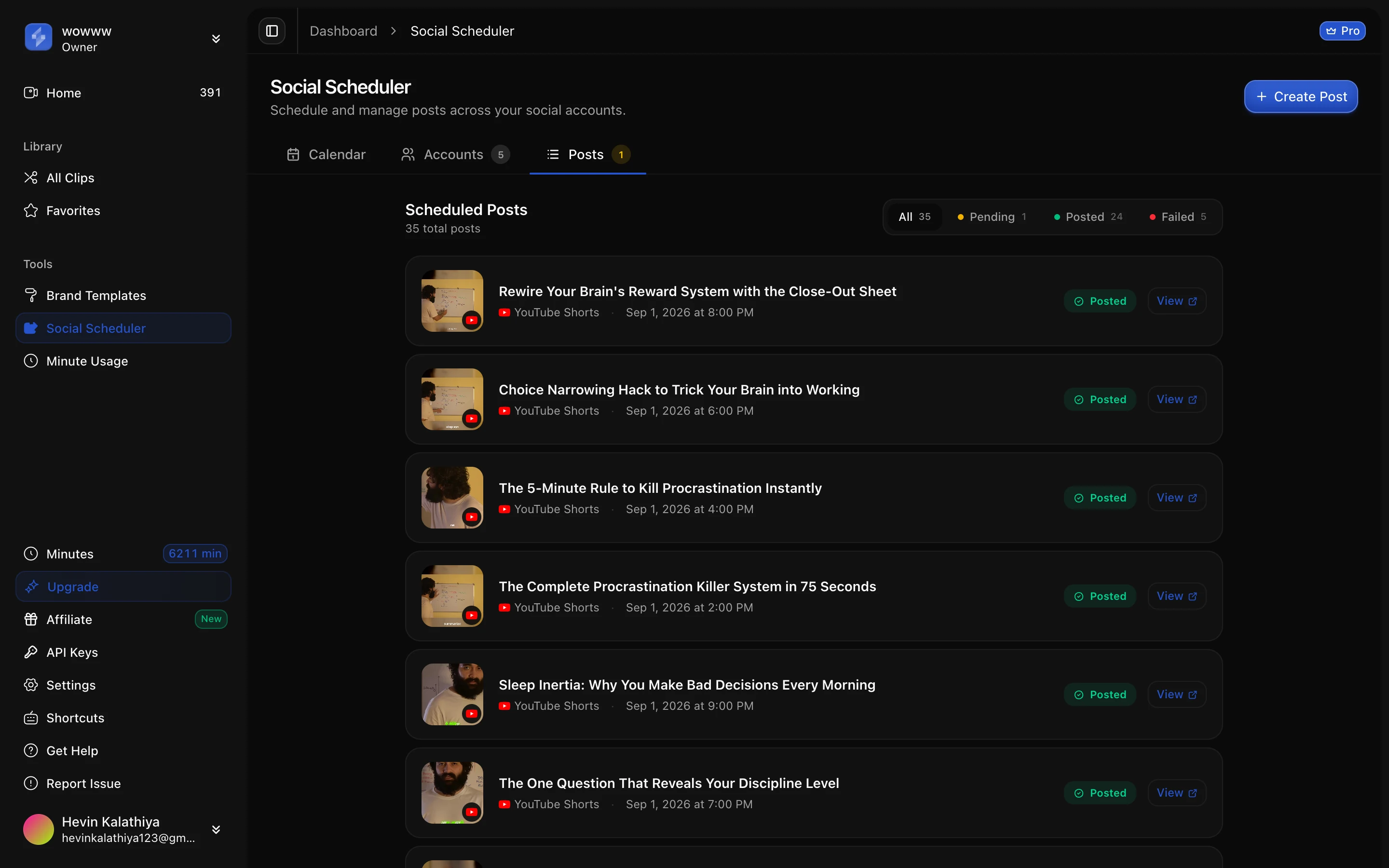
Three caveats, stated plainly:
- The sample is small. It is five workspaces. YouTube and Instagram are well exercised. Threads has two attempts and TikTok has none that succeeded. Facebook Pages and LinkedIn can be connected, but no live post record is on either, so treat both as unproven.
- The table undercounts. A post record is deleted along with its clip when the clip expires under our storage policy, so older posts drop out. These are the records still present, not an all-time total.
- X is not live. The integration exists in our backend, but the app shows it as “Coming Soon” and you cannot connect an X account yet.
The expired-token failure is the one most worth planning for, because every platform does it. Login tokens expire. When one does, a retry cannot fix it; you have to reconnect the account. Our scheduler now marks the account expired, stops offering it for new posts, and fails the post with a message telling you to reconnect, instead of retrying into the same error.
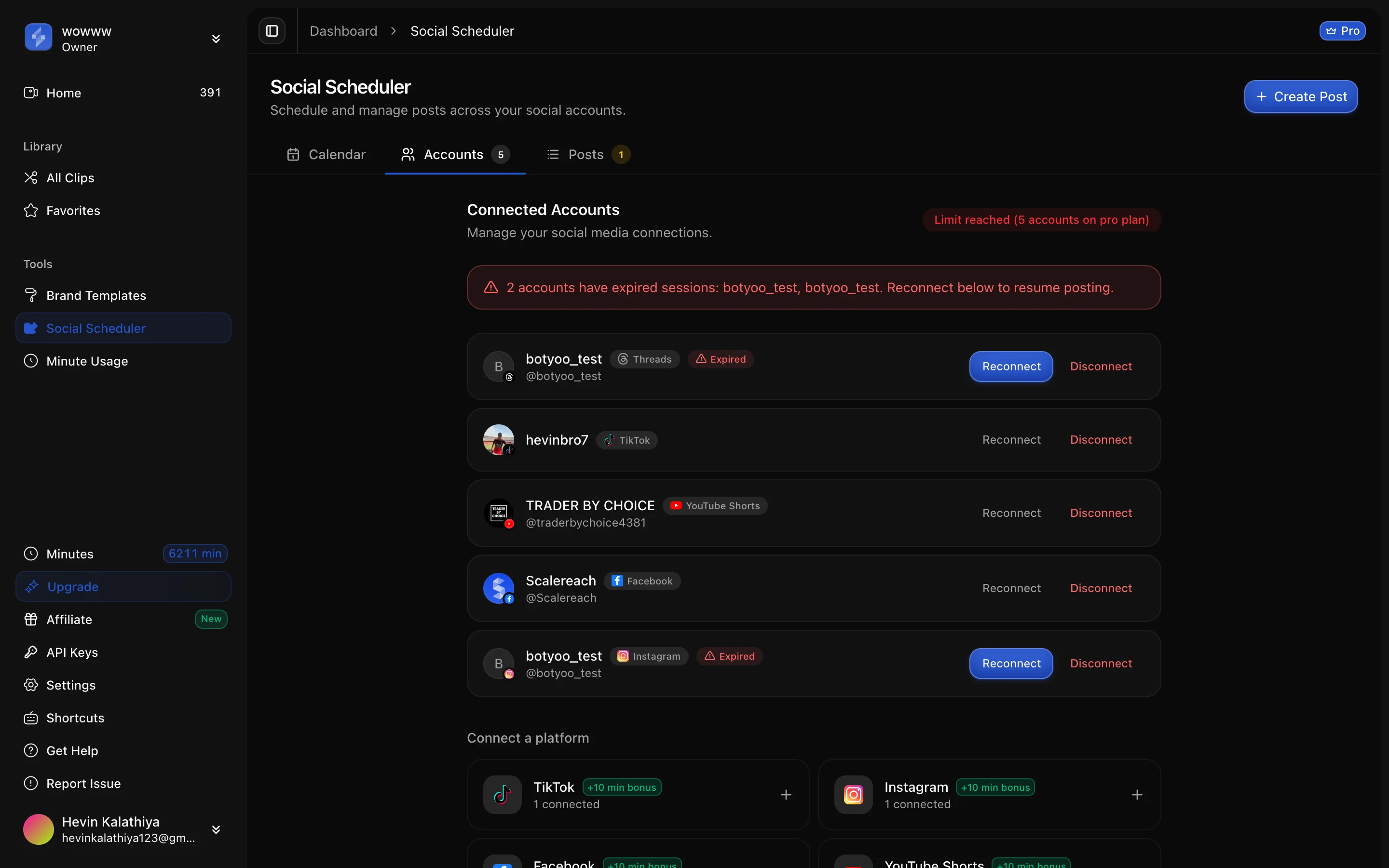
How to test a clip scheduler before you trust it
Five checks, in the order they tend to bite:
- Ask where TikTok posts land. Public feed, private, or a draft in the TikTok inbox. If the vendor cannot say whether its TikTok app has been audited, assume private.
- Check which plan schedules, not just which plan posts. “Post to social” on a pricing page can mean post-now only.
- Count accounts against your channels. One TikTok, one Instagram and one YouTube is already three accounts, which is past what some entry plans allow.
- Convert Instagram to a professional account first. Otherwise the connection fails before any clip is involved.
- Send one real post per platform and check it on the platform itself. Once the first post lands, the connection is proven. After that, the scheduler’s status list is enough. Our help guide on scheduling clips recommends the same habit.
Before you queue anything, check whether each clip fits where it is going. YouTube only counts square or vertical videos of up to three minutes as Shorts, and the right length differs by platform.
FAQ
Which AI clip tools auto-post to TikTok, Instagram Reels and YouTube Shorts?
Six of the eight tools checked list all three on their own pages: ScaleReach, Opus Clip, Vizard, Klap, Submagic and Riverside. VEED’s help centre says it has no direct posting, and Descript publishes to regular YouTube but states that Shorts are not supported. The plan you need differs. Klap schedules on every paid plan, Opus Clip schedules from Pro, Submagic publishes from Pro, and ScaleReach schedules from Starter. All of this was read from vendor pages on 29 September 2026.
Why did my auto-posted TikTok video go private?
Most likely the app that posted it has not passed TikTok’s audit. TikTok restricts all content posted by unaudited apps to private viewing and caps them at 5 posting users per day. Two other causes: the tool used TikTok’s Upload flow, which leaves a draft in your TikTok inbox to finish by hand, or “Only me” was selected as the privacy level. ScaleReach’s own TikTok app is unaudited today, so its TikTok posts can only go to private accounts.
Can I auto-post Reels to a personal Instagram account?
No. Meta’s publishing API only works with Instagram professional accounts, meaning Business or Creator, and every scheduler in this comparison inherits that rule. Switch the account type to Creator or Business in Instagram’s settings, then connect it to the tool. Separately, login tokens expire, so an account that posted fine last month can fail until you reconnect it. That was the cause of our only Instagram failure.
Do I need a paid plan to auto-post clips?
Usually, yes. ScaleReach’s Free plan cannot connect social accounts. Scheduling starts on Starter, at $12 a month or $10 a month billed annually, with one account. Opus Clip Starter can post immediately but cannot schedule until Pro. Vizard’s Free plan connects a single TikTok account and lists scheduling as a Creator feature. Submagic publishing starts on Pro. Klap includes scheduling on every paid plan.
How many clips can I auto-post per day?
More than most creators need. TikTok caps Direct Post at roughly 15 posts per creator account per day, shared across every app. Meta’s guide allows 100 API-published Instagram posts per 24 hours, although an older Meta page says 50. YouTube’s default quota is 100 uploads a day per API project, which is shared across a tool’s users. Tools add their own limits, such as Vizard’s 2 TikTok videos per minute.
Does ScaleReach auto-post to TikTok?
Not publicly yet. ScaleReach connects to TikTok through its official Direct Post API, but our TikTok app has not passed TikTok’s audit, so posts can only publish to private accounts. In our live data, no TikTok post has completed. Auto-posting is proven on YouTube Shorts (109 posts) and Instagram Reels (40 posts). For TikTok, download the clip and post it manually until the audit clears.
The bottom line
Most AI clip tools will now post for you, and the tables that compare them mostly stop at platform logos. The logos are the least informative part. What decides whether a clip goes public is set by the platforms: TikTok’s audit, Instagram’s professional-account rule, YouTube’s API verification and Shorts definition. Then the plan decides whether you can actually schedule or only post now.
So pick the tool on the platforms you actually post to. Then prove each connection with one real post before you queue a month of clips. On ours, that means YouTube Shorts and Instagram Reels are ready today and TikTok is not, which is the kind of thing a vendor should tell you before you pay rather than after.
Every competitor fact here was read from the vendor’s own page on 29 September 2026, and our own figures come from our production database on the same day. If one is wrong, tell us at sales@scalereach.ai and we will correct it in the open.
Changelog
September 2026 update. First published. Competitor posting features, plan tiers and account limits were read from each vendor’s own pricing and help pages on 29 September 2026. Platform API rules come from TikTok’s, Meta’s and Google’s developer documentation on the same date; TikTok’s pages were read via a search index because the site blocks automated fetching. ScaleReach publishing figures come from a read-only production query on 29 September 2026 and replace the 27 July 2026 figures cited on our scheduler tool page. The two sets differ because post records are deleted when their clips expire.
Last reviewed: September 2026 Next planned refresh: December 2026 Update hooks: whether ScaleReach’s TikTok app passes TikTok’s audit; whether X moves from “Coming Soon” to live; whether Meta settles the 100 versus 50 Instagram limit; whether Submagic, Klap or Riverside resolve the contradictions noted above.
About the author
Hevin K runs ScaleReach, an AI clip maker that turns long videos into captioned vertical clips and schedules them to YouTube Shorts, Instagram Reels and other platforms. The publishing figures in this post come from ScaleReach’s own production database, dated where they are cited, including the ones that don’t flatter us.
