
Opus Clip and Descript both cut long videos into short clips, but they bill and work in opposite ways. Opus Clip is a clipper with one meter: 1 credit per minute of source video, 150 credits for $15 a month on Starter. Descript is a text-based video editor with two meters: media minutes for the footage you bring in and AI credits for the AI tools, including Create Clips. Descript is cheaper per minute of footage on every plan ($0.013 on Creator yearly against Opus Clip’s $0.048 on Pro yearly), but that figure only covers ingest. Every price below is the US price, read from each vendor’s own pages on 31 October 2026.
Disclosure: ScaleReach publishes this comparison and competes with both tools. I did not pay for either plan for this post, and I did not run the same video through both, so there is no output-quality verdict here. There are no affiliate links. Every fact comes from a page the vendor controls, linked and dated.
The 60-second verdict
Pick Opus Clip if your job is turning podcasts, webinars or streams into shorts and getting them posted. It takes a YouTube link, scores clips with a Virality Score, and its $15 Starter plan auto-posts to YouTube Shorts, TikTok and Instagram Reels.
Pick Descript if you edit the long video too. You edit by editing the transcript, export timelines to Premiere, Final Cut Pro or Pro Tools from Creator up, and clipping is one AI tool inside that editor.
Watch out for: Descript cannot import a YouTube URL, cannot publish YouTube Shorts directly, and does not publish a fixed credit cost for its AI tools. Opus Clip’s cheapest plan has no scheduler and no yearly option.
Bottom line: Opus Clip sells a clip pipeline. Descript sells an editor that can make clips. Pick by which one your week is short on.
Opus Clip vs Descript at a glance
| Opus Clip | Descript | |
|---|---|---|
| What it is | Long-to-short AI clipper | Text-based video and audio editor with AI tools |
| What you pay for | Source minutes (1 credit = 1 minute) | Seats, each with media minutes and AI credits |
| Cheapest paid plan, monthly | Starter $15, 150 credits | Hobbyist $24 per person, 600 media minutes, 400 AI credits |
| Cheapest paid plan, yearly | Pro $14.50/month ($174 a year), 300 credits | Hobbyist $16 per person a month, same allowances |
| Free plan | 60 credits a month, watermark, no editing, clips exportable for 3 days | 60 media minutes a month, 100 one-time AI credits, 720p with watermark |
| Unused allowance | Monthly credits expire after 60 days; yearly credits last 12 months | Media minutes and AI credits reset each cycle, no rollover |
| Video sources | YouTube, LinkedIn, public .mp4 links, local upload | Local upload, Zoom, Google Drive, recording in the app. No YouTube URLs |
| Longest source | Up to 10 hours | Not stated as a length; upload size up to 1 GB (Free), 10 GB (Hobbyist), 20 GB (Creator) |
| Clip selection | Virality Score, clip length ranges, prompt to clip on Pro | Create Clips: 1 to 20 clips per run, 10 seconds to 5 minutes, optional topic or goal |
| Social posting | Starter auto-posts to Shorts, TikTok, Reels. Pro adds a scheduler and 6 accounts | Exports to YouTube (not Shorts) and podcast hosts. No social scheduler |
| Timeline export | XML to Premiere Pro and DaVinci Resolve on Pro | Premiere, Final Cut Pro, Pro Tools, Logic, Audition, Reaper on Creator and Business |
Sources: opus.pro/pricing, Opus Clip’s help centre on credits, video sources and video length; descript.com/pricing, Descript’s help centre on media minutes and AI credits, importing, Create Clips and exporting to YouTube. All read 2026-10-31.
How much does Descript cost in 2026?
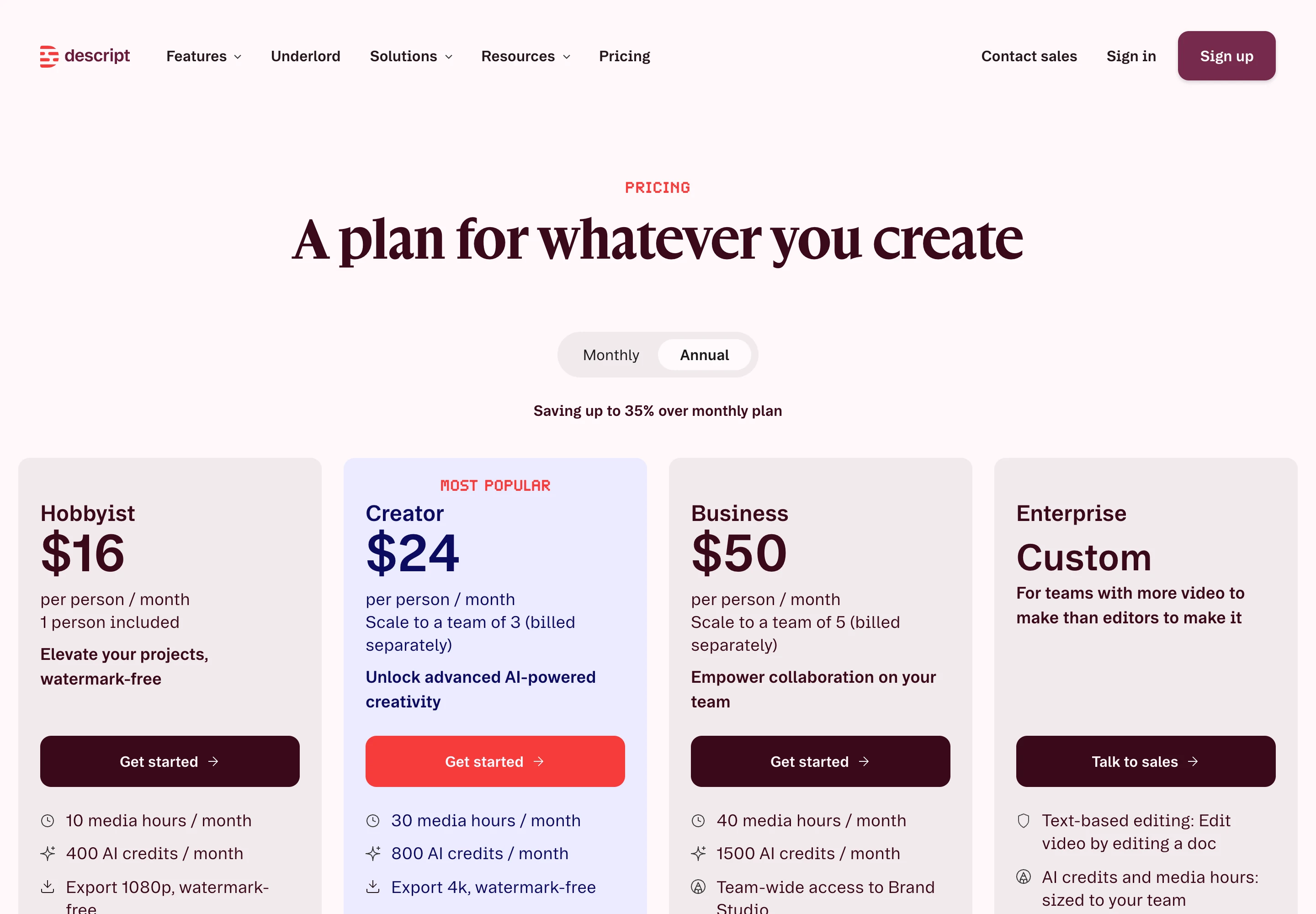
Descript prices per person, and each seat brings its own media minutes and AI credits. US prices on descript.com/pricing, read 31 October 2026:
| Plan | Yearly (per person a month) | Monthly (per person) | Media minutes a month | AI credits a month | Seats | Export |
|---|---|---|---|---|---|---|
| Free | $0 | $0 | 60 | 100 one-time | 1 | 720p, watermark |
| Hobbyist | $16 | $24 | 600 (10 hours) | 400 | 1 | 1080p |
| Creator | $24 | $35 | 1,800 (30 hours) | 800 | 1 to 3 | 4K |
| Business | $50 | $65 | 2,400 (40 hours) | 1,500 | Up to 5 | 4K |
| Enterprise | Custom | Custom | Custom | Custom | Custom | 4K |
The page opens on the yearly view (“Saving up to 35% over monthly plan”), so the large numbers on the cards are yearly rates. Top-ups for extra minutes and credits are one-time purchases.
How much does Opus Clip cost in 2026?
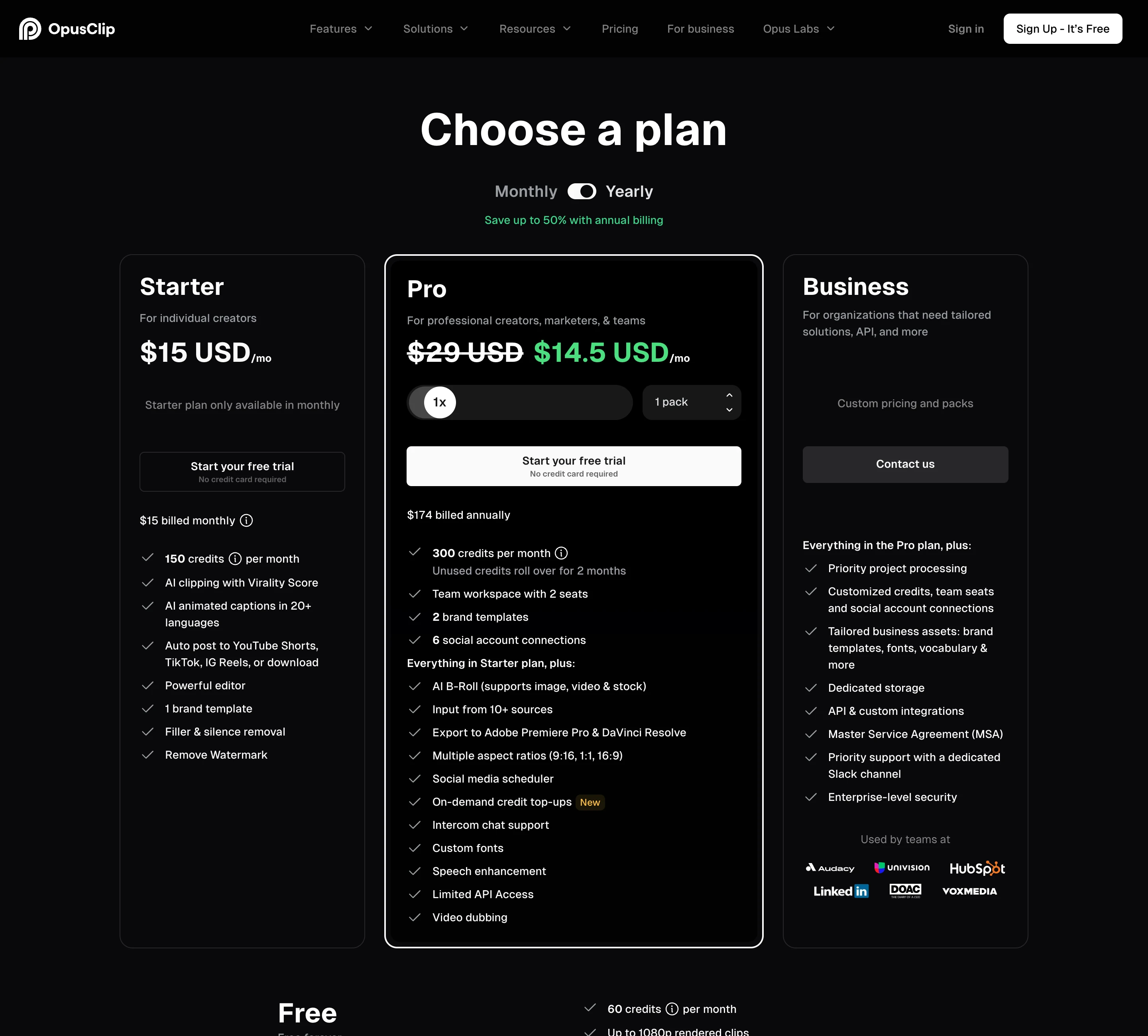
| Plan | Monthly | Yearly | Credits | Notable |
|---|---|---|---|---|
| Free | $0 | $0 | 60 a month | Watermark, no editing, up to 1080p, clips not exportable after 3 days |
| Starter | $15 | Not offered | 150 a month | Virality Score, auto-post to Shorts, TikTok and Reels, 1 brand template |
| Pro | $29 | $14.50 a month ($174 a year) | 300 a month per pack | Scheduler, 6 social accounts, 2 seats, Premiere and DaVinci export, video dubbing |
| Business | Custom | Custom | Custom | API, dedicated storage, SSO |
Source: opus.pro/pricing, read 31 October 2026. The prices match what we read on 28 October, so the screenshot from that day still applies:
Which is cheaper per minute of video?
Divide the price by the minutes of footage each plan accepts.
| Plan | Price a month | Minutes of footage | Per minute |
|---|---|---|---|
| Descript Creator, yearly | $24 | 1,800 | $0.013 |
| Descript Creator, monthly | $35 | 1,800 | $0.019 |
| Descript Hobbyist, yearly | $16 | 600 | $0.027 |
| Descript Hobbyist, monthly | $24 | 600 | $0.040 |
| Opus Clip Pro, yearly | $14.50 | 300 | $0.048 |
| Opus Clip Pro, monthly | $29 | 300 | $0.097 |
| Opus Clip Starter | $15 | 150 | $0.100 |
On footage alone, Descript is cheaper on every plan. Hobbyist yearly gives twice Opus Clip Pro’s minutes for about the same money.
The catch is what that minute buys. On Opus Clip, the credit covers the clipping: upload, transcribe, pick clips, reframe, caption. On Descript, the media minute covers bringing the footage in and transcribing it. Create Clips is listed under AI tools, which draw from the second meter, AI credits. Descript’s help centre says Underlord, its AI co-editor, has “no fixed price per action”, and it does not publish a per-run cost for Create Clips. You see what a run cost in the Usage tab afterwards. Two tools, Studio Sound and Remove Filler Words, are capped at 30 credits per file.
So the Descript per-minute numbers above are a floor, not a total. Opus Clip’s are the total, apart from X posts, which cost 3 credits each.
How do the free plans compare?
Both give 60 minutes of footage a month. What you can do with it differs.
- Opus Clip Free clips up to 60 minutes a month, renders up to 1080p with a watermark, and has no editing. Clips stop being exportable after 3 days.
- Descript Free accepts 60 media minutes a month, gives 100 AI credits once (not monthly), exports 720p with a watermark, and stores up to 5 GB. You get the full text-based editor.
For testing the clipper, Opus Clip Free is the closer trial of the paid product. For testing whether you like editing by transcript, Descript Free is.
What does each tool do better?
Opus Clip is better at:
- Getting video in. It takes YouTube and LinkedIn links and public .mp4 URLs, and Starter can auto-import new videos from a verified YouTube account. Descript has no YouTube import; its API docs say YouTube URLs are not supported.
- Ranking clips. The Virality Score starts on Starter. Descript’s Create Clips picks “the most engaging moments” without a score you can sort by. Our test of how accurate the Opus Clip Virality Score is covers what that number is worth.
- Posting. Starter auto-posts to YouTube Shorts, TikTok and Instagram Reels; Pro adds a scheduler with 6 social accounts. Descript’s YouTube export does not support Shorts (“download your video and upload it manually”), and it has no social scheduler.
- Predictable cost. One meter, one number per video.
Descript is better at:
- Editing. Delete a sentence in the transcript and the footage goes with it. Layers, scenes, layouts, stock media and Studio Sound are all in the same app.
- Handing off to an editor. Creator and Business export timelines to Premiere, Final Cut Pro, Pro Tools, Logic, Audition, and Samplitude and Reaper. Opus Clip’s Pro plan exports XML to Premiere Pro and DaVinci Resolve one short at a time, with captions as overlays you cannot edit there. Our roundup of AI clip makers that export to Premiere Pro and DaVinci compares the rest.
- Languages. Captions translate into 61 languages and audio dubs into 30. Opus Clip lists animated captions in 20+ languages and dubbing on Pro.
- Price per minute of footage, as the table above shows.
Both offer an API and an MCP connector, so neither wins on automation.
Which one fits a weekly podcast?
Take a one-hour weekly show: about 240 to 300 minutes of footage a month.
- Opus Clip: Starter’s 150 credits are not enough. Pro’s 300 fits, at $29 a month or $14.50 a month yearly. Clipping, captions and scheduling are all inside that price.
- Descript: Hobbyist’s 600 media minutes fit with room to spare, at $24 a month or $16 yearly. Every Create Clips run, Studio Sound pass and Underlord request comes out of 400 AI credits a month, at a cost Descript does not publish in advance. You also need a separate tool to schedule Shorts, TikTok and Reels.
If the episode also needs a proper edit before it goes out, Descript does both jobs in one subscription. If the full episode is already edited and the clips are the whole job, Opus Clip is the shorter path. Our Descript review for short-form teams covers the two-meter billing in more depth, and the Opus Clip review covers its clip quality and credits.
Where ScaleReach fits, briefly, since we publish this: it is a per-minute clipper like Opus Clip, at $12 a month for 200 minutes ($0.060 a minute) or $10 a month yearly ($0.05), with scheduling included from Starter and one meter. The full ranking of Opus Clip alternatives by price per minute places every tool, and our Opus Clip vs VEED comparison covers the other editor-first option.
FAQ
Is Descript cheaper than Opus Clip?
Per minute of footage, yes. Descript Creator costs $24 per person a month yearly for 1,800 media minutes, about $0.013 a minute. Opus Clip Pro costs $14.50 a month yearly for 300 credits, about $0.048. But Descript’s media minutes only cover importing and transcribing. Create Clips and other AI tools draw a second meter, AI credits, with no published per-run price. Prices read 31 October 2026.
Can Descript make clips like Opus Clip?
Yes. Descript’s Create Clips tool, in the AI Tools panel under Repurpose, makes 1 to 20 clips per run, each 10 seconds to 5 minutes long, with portrait 9:16 and square 1:1 layouts and an optional topic or goal. Each clip arrives as its own editable composition. Unlike Opus Clip, it gives no virality score to rank the clips.
Can Descript import a YouTube link?
No. Descript imports local files, Zoom cloud recordings, Google Drive files and media recorded in the app, and its API documentation states that YouTube URLs are not supported as import sources. Opus Clip accepts YouTube links, LinkedIn links and public .mp4 URLs directly.
Can Descript post to TikTok or YouTube Shorts?
Not directly. Descript exports full videos to YouTube on every plan, but its help centre says YouTube Shorts are not supported and must be downloaded and uploaded by hand. It has no TikTok or Instagram publishing and no social scheduler. Opus Clip Starter auto-posts to YouTube Shorts, TikTok and Instagram Reels.
Do Opus Clip and Descript credits roll over?
Opus Clip’s monthly credits expire after 60 days, so they carry over one extra month, and yearly credits last 12 months. Descript’s media minutes and AI credits reset at each renewal and do not roll over. Top-ups on Descript are one-time purchases.
Which is better for editing clips in Premiere Pro?
Descript, if you need the full timeline. Creator and Business export timelines to Premiere, Final Cut Pro, Pro Tools, Logic and Audition. Opus Clip Pro exports XML to Premiere Pro and DaVinci Resolve one short at a time, and its animated captions arrive as overlays you cannot edit in Premiere.
The bottom line
Opus Clip is the tool for a clip pipeline. It takes a link, finds and ranks the moments, captions them and posts them, and one credit per source minute tells you the cost before you start. Its weak spots are a $15 Starter with no scheduler and no yearly option, and a per-minute price higher than Descript’s.
Descript is the tool for editing, with clipping included. It is cheaper per minute of footage on every plan, exports timelines to Premiere and Final Cut Pro, and translates captions into 61 languages. But it cannot take a YouTube link or post a Short, and its clipping runs on AI credits with no published price per run. Choose by whether the clips or the edit fill your week.
If a number here looks wrong, email hevin@scalereach.ai and we will correct it and note the change.
Hevin K runs ScaleReach, an AI clip maker that competes with Opus Clip and Descript. There is no affiliate relationship with either. Every fact about them comes from pages they control, linked and dated, and neither tool was run on our own videos for this post.
