
To add Hinglish captions to a Short or a Reel, you need a step most caption tools skip: transliteration. Speech-to-text writes Hindi in Devanagari, and it often writes the English words in Devanagari too. Across the 63 Hindi videos ScaleReach processed between 1 September and 12 October 2026, 90.5% of the 180,413 transcribed words came back in Devanagari. Hinglish captions need the same words, in the same order, at the same timestamps, spelled in Roman letters.
Disclosure: ScaleReach converts Hindi captions to Hinglish automatically, and this post compares us with tools we compete with, so weigh the bias. ScaleReach figures come from a read-only query of our production database and from our source code on 12 October 2026. 24 of the 63 videos were processed in our own test workspace, and every example quoted below comes from that workspace, never from a customer’s clips. Competitor facts come from each vendor’s own pages, read the same day and linked where they appear. We did not test the competitor apps for this post.
The short answer
Hinglish captions are a script change, not a translation. “फेमस इकोनॉमिस्ट” should become “famous economist”, and “नाम के” should become “naam ke”. Same words, same order, same timing.
Expect Devanagari by default. YouTube’s own Hindi captions wrote 95.4% of words in Devanagari in our sample, English words and names included.
Pick a tool that converts. Reap, Kapwing and ScaleReach say they make Hinglish captions. Opus Clip says it doesn’t support Hindi at all.
Bottom line: read every clip’s captions before you post. Hinglish has no standard spelling, and a word the speech-to-text misheard stays misheard.
What are Hinglish captions?
Hinglish captions are Hindi speech written in Roman letters, the way Hindi is typed in WhatsApp chats and Instagram comments. They are not a translation. The words stay Hindi and only the alphabet changes.
- Hindi words are spelled out by sound: “kya”, “hai”, “nahi”, “matlab”.
- English words spoken in the middle of Hindi stay in English: “economy”, “data”, “GDP”.
- Names come back in their usual spelling: “Angus Maddison”, “East India Company”.
- There is no official spelling. “nahi” and “nahin” are both common.
Here’s one phrase from a public YouTube video processed in our own workspace, three ways:
| Version | Text |
|---|---|
| Devanagari (what speech-to-text gave us) | एंगस मेडिसन नाम के एक बहुत फेमस इकोनॉमिस्ट |
| Hinglish (what the captions show) | Angus Maddison naam ke ek bahut famous economist |
| English translation (a different job) | a very famous economist named Angus Maddison |
The third row is what an English subtitle would say. It reorders the words, so it can’t sit on the same word-by-word timings as the speech. That difference decides how a tool has to handle Hindi captions, as the next sections show.
Why do auto captions come out in Devanagari?
Because Devanagari is Hindi’s standard script, and speech-to-text models write each language in its standard script. Often that includes the English words people mix in.
ScaleReach gets a transcript in one of two ways. For a YouTube link, it first reads the video’s own YouTube captions. If there aren’t usable ones, it sends the audio to Deepgram’s nova-3 model. Both came back mostly in Devanagari:
| Where the transcript came from | Videos | Words | In Devanagari | In Roman letters |
|---|---|---|---|---|
| The video’s own YouTube captions | 42 | 121,489 | 95.4% | 0.2% |
| Deepgram nova-3 | 21 | 58,924 | 80.4% | 19.0% |
| All 63 videos | 63 | 180,413 | 90.5% | 6.3% |
Source: ScaleReach production database, read-only query, 12 October 2026. Videos processed from 1 September to 12 October 2026 whose transcript contains Devanagari. The remaining words are numbers and punctuation.
YouTube’s captions are the extreme case: only 0.2% of their words were in Roman letters, so English words came out in Devanagari almost every time. Across our own workspace’s Hindi transcripts, “and” appears as एंड 136 times and “but” as बट 83 times. Deepgram kept more English in Roman letters, which gives you a mixed-script transcript like “human psychology में कोई होता है and that bias is called the peak end rule”.
The language tag on a transcript can’t be trusted either. Of the 77 videos since 1 August whose transcript contained Devanagari, 28 were tagged English in our own database, some of them more than 90% Devanagari. So ScaleReach decides whether to convert by looking at the letters themselves, not the tag.
Is a Hinglish caption the same as an English translation?
No. Translation changes the words. Transliteration changes only the letters. For word-by-word animated captions, that difference decides whether the timing still works.
Animated captions highlight each word as it’s spoken, so every word carries its own start and end time. A transliterated word replaces the original one for one and keeps its timestamps. A translation has different words in a different order, often a different number of them, so the timestamps no longer line up with the speech.
Tools describe this step in different ways. Kapwing treats Hinglish as a translation target: per its Hinglish subtitles page, you run auto-subtitles, choose the original language and set Hinglish as the target language. Reap lists Hinglish among the “romanized scripts” it captions in (reap.video/captions). Neither page says how word timing is handled, so we can’t tell you.
ScaleReach does the transliteration automatically. Here’s what the code does as of 12 October 2026:
- One AI request per batch of clips. When clips are found, the words of every clip that contains Devanagari go to Google’s Gemini Flash in a single request.
- Exactly one output word per input word. The model is told to keep the same count and order, never translate, leave words already in Roman letters unchanged, and use casual spellings like “kya”, “hai” and “nahi” rather than academic transliteration.
- A count check, then a retry. If a clip comes back with a different word count, that clip is retried on its own. If it fails again, it keeps its Devanagari captions instead of getting broken ones.
- Devanagari still renders if it’s kept. The caption renderer switches Devanagari words to the Noto Sans Devanagari font, so a fallback clip shows proper Hindi text, not empty boxes.
The count check shows in the data. The three clips quoted in this post had 287, 187 and 212 source words, and their captions have 287, 187 and 212 words.
How well does automatic Hinglish conversion work?
Since 4 September 2026, 221 of 223 clips with Devanagari words in their transcript got fully Roman-script captions. That’s 99.1%. The other 2 kept their original Devanagari words, and no clip came out half converted.
| Period | Clips | Fully Hinglish | Kept Devanagari |
|---|---|---|---|
| 1 to 3 September 2026 (launch, our own test workspace) | 76 | 30 | 46 |
| 4 September to 12 October 2026 (all workspaces) | 223 | 221 | 2 |
Source: ScaleReach production database, read-only query, 12 October 2026. Counts cover clips still stored on that date.
The launch was rough. The first version, shipped on 1 September, decided by the video’s language tag, so it skipped Hindi videos tagged English. It also lost long answers: in one logged failure, the model’s thinking used 2,591 of its 2,682 output tokens and the answer was cut off before it finished. Both were fixed on 2 and 3 September.
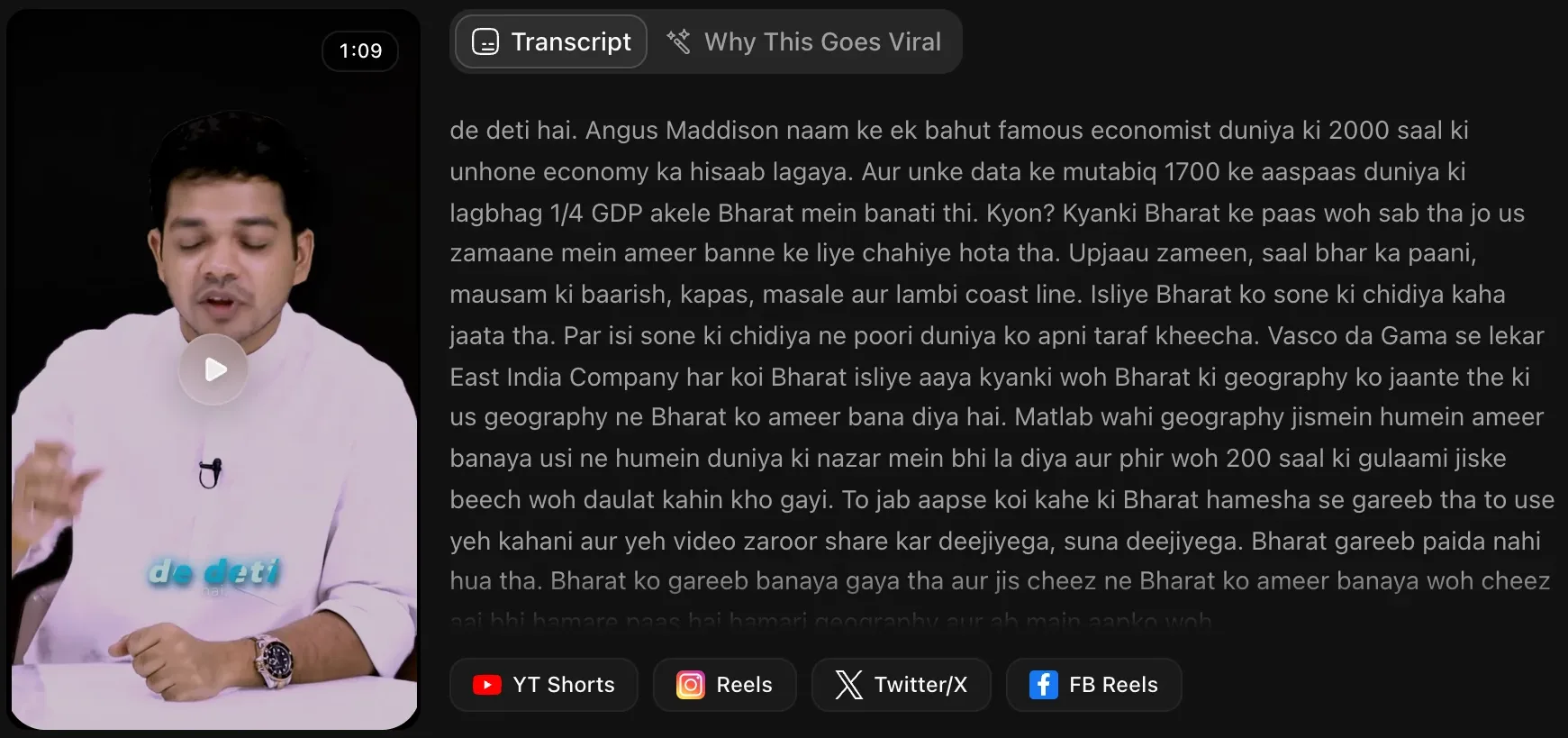
Fully converted isn’t the same as perfect. Here’s what the conversion did with words from the clip in the screenshot below and one other video in our own workspace:
| Speech-to-text gave | Captions show | Verdict |
|---|---|---|
| जीडीपी | GDP | Right, acronym restored |
| ईस्ट इंडिया कंपनी | East India Company | Right, name restored |
| एंगस मेडिसन | Angus Maddison | Right, name restored |
| क्योंकि | kyanki | Wrong, the usual spelling is “kyonki” |
| fama (already in Roman letters) | fama | Wrong before conversion: the speaker meant FEMA, and speech-to-text wrote “fama” |
The last row is the one to remember. The converter leaves Roman-letter words alone by design, so it can’t fix a word the speech-to-text got wrong. Capitals follow the transcript too. The Deepgram transcript in that second video was all lowercase, so its captions read “gift city” where the AI-written clip title says GIFT City.
Which AI clip makers support Hinglish captions?
Three of the seven tools we checked say they make Hinglish captions. One says it doesn’t support Hindi at all.
| Tool | Hindi captions | Hinglish captions | What its own page says |
|---|---|---|---|
| ScaleReach | Yes | Yes, automatic | Every clip caption with Devanagari words is converted. No setting to keep Devanagari |
| Reap | Yes | Yes | ”100+ languages, including romanized scripts like Hinglish and Romanized Urdu” |
| Kapwing | Yes | Yes | Choose Hinglish as the target language after auto-subtitles |
| Vizard | Yes | Not mentioned | Claims “over 97%” accuracy in Hindi, and translates Hindi subtitles into 28 other languages |
| Klap | Yes | Not mentioned | Lists Hindi among its 52 languages |
| Submagic | Yes | Not mentioned | Hindi is one of 123 listed languages |
| Opus Clip | No | No | ”OpusClip does not support Hindi at this time” |
Sources: reap.video/captions, Kapwing’s Hinglish subtitles page, Vizard’s Hindi subtitles page, the FAQ on klap.app, submagic.co/languages-supported, and Opus Clip’s Hindi support article and supported languages list (all verified 2026-10-12). ScaleReach: our source code on the same date.
“Not mentioned” means exactly that: the vendor’s page doesn’t say, and we didn’t test inside the app. Run a short Hindi clip through any of them before you pay.
Reap covers more ground than we do. ScaleReach converts Devanagari only, while Reap also lists Romanized Urdu, Arabizi and Romanized Bengali, and the code sample on its captions page includes a script: "roman" option. One claim on that page doesn’t hold, though: it calls Reap “the only AI video tool that supports romanized scripts”, while Kapwing offers Hinglish subtitles and ScaleReach makes Hinglish captions. Kapwing’s own advantage is control. You pick Hinglish explicitly, and its Translation Rules fix how brand names and terms are written across projects. Our Reap review covers its pricing and limits.
Opus Clip is the clearest case. Its help centre has a one-line article saying “OpusClip does not support Hindi at this time”, and its supported languages page lists 25 languages without Hindi. Hindi does appear in the FAQ for Agent Opus, a separate product, but only in its list of voice-cloning languages.
How do you add Hinglish captions with ScaleReach?
- Paste the YouTube link or upload the file. For a link, ScaleReach uses the language YouTube reports for the video. For an upload, pick Hindi in the Language menu on the configure page so the transcriber doesn’t have to guess.
- Choose a caption style. Hinglish words use the style’s own font. Any Devanagari word that stays switches to Noto Sans Devanagari.
- Let the clips generate. The conversion runs while clips are detected, so there’s no extra button. Clip titles and hook titles come back in Roman script: none of the 216 clip titles from Hindi-tagged videos since 1 September used Devanagari. Hindi videos also produced about as many clips as English ones, 4.8 per 10-to-40-minute video in the last 14 days against 5.1, though that’s only 13 Hindi videos.
- Read each clip’s captions in the editor. Fix acronyms, names and brand terms, and change spellings you don’t like, such as “kyanki” to “kyonki”. You can edit any word before you export.
- Download the clip or schedule it. Shorts and Reels publish from the same workspace.
For timing, size and placement once the words are right, our guide to captions that increase watch time covers the rest.
When should you keep Devanagari captions instead?
When your viewers read Devanagari comfortably and the speech is formal Hindi with little English, Devanagari captions can read more naturally than long Hindi words spelled in Roman letters. That’s a call about your own audience. We have no data on which script performs better, and we haven’t seen anyone publish it.
ScaleReach doesn’t make that choice easy today, so know these limits before you sign up:
- There’s no switch to keep Devanagari. Every clip caption with Devanagari words is converted. Keeping Devanagari means editing the words back by hand.
- The full transcript download stays in Devanagari. Only clip captions are converted. The SRT, VTT, TXT and JSON downloads of the whole video keep the original script.
- It runs on the script, not the language. Marathi and Nepali are also written in Devanagari, so their captions are romanized the same way.
- Other scripts aren’t converted. Urdu, Bengali and other non-Devanagari scripts stay as the transcript wrote them. Reap is the tool to try for those.
FAQ
What are Hinglish captions?
Hinglish captions are Hindi speech written in Roman letters, with the English words left in English: “Angus Maddison naam ke ek bahut famous economist” instead of “एंगस मेडिसन नाम के एक बहुत फेमस इकोनॉमिस्ट”. The words don’t change, only the alphabet, so they aren’t a translation. They match how Hindi is typed in chats and comments, which is why creators use them on Shorts and Reels.
How do I convert Hindi captions to Hinglish?
Use a caption tool that transliterates rather than translates, or edit the words by hand. ScaleReach converts automatically: paste a Hindi YouTube link and every clip’s captions come out in Roman letters, with the timings unchanged. Reap lists Hinglish as a caption script, and Kapwing lets you set Hinglish as the target language after auto-subtitles. Whichever you use, read the captions before posting, because spellings vary.
Is Hinglish the same as translating Hindi to English?
No. Translation changes the words and usually their order: “naam ke ek bahut famous economist” becomes “a very famous economist named”. Transliteration keeps every Hindi word and only changes the script. That matters for word-by-word captions, because each word has its own timestamp. A transliterated word keeps it, while a translated sentence no longer lines up with the speech.
Why do my Hindi captions show English words in Hindi script?
Because the speech-to-text model wrote the whole transcript in Devanagari, English words included. YouTube’s own Hindi captions do this almost every time: across 42 videos in our sample, 95.4% of words were Devanagari, and in our own workspace “and” appeared as एंड 136 times. Converting to Hinglish restores those words. In our data, जीडीपी came back as “GDP” and फेमस इकोनॉमिस्ट as “famous economist”.
Does Opus Clip support Hindi or Hinglish captions?
No. Opus Clip’s help centre has a one-line article that says “OpusClip does not support Hindi at this time”, checked on 12 October 2026. Its supported languages page lists 25 languages, and Hindi isn’t one of them. Hindi appears only as a voice-cloning language for Agent Opus, a separate product. If you want Hinglish captions specifically, Reap, Kapwing and ScaleReach say they make them.
Can I make Hinglish captions for free?
Yes, on free plans with limits. ScaleReach converts captions on every plan, including the free one, where clips carry a watermark. The free allowance is on our pricing page. Reap’s free plan includes 1 hour of captioning with 720p exports, per its captions page. Kapwing’s Hinglish subtitles are free to try with limited minutes, and its free exports are watermarked. All three were checked on 12 October 2026.
The bottom line
Hinglish captions are a transliteration job: same words, same order, same timestamps, Roman letters. Speech-to-text won’t do it for you. It writes Hindi in Devanagari, and YouTube’s own captions do the same to English words and names. So the tool you caption with has to convert, and it has to convert word for word, or the animated captions drift off the speech.
ScaleReach, Reap and Kapwing say they do this, and Opus Clip doesn’t support Hindi at all. Whichever you pick, the last step is yours: read the captions. Conversion fixes the alphabet, not what the speech-to-text heard, and Hinglish has no spelling rulebook.
Every ScaleReach number here comes from our production database and source code, dated where it’s cited. If one looks wrong, tell us at hevin@scalereach.ai and we will correct it in the open.
Changelog
October 2026 update. First published. Script mix, transcript sources, language tags, conversion outcomes, clip titles and clip counts were measured from ScaleReach’s production database on 12 October 2026. Conversion behaviour, retries and fonts come from our production code as of that date. Vendor language support was read from each vendor’s own page on 12 October 2026.
Last reviewed: October 2026 Next planned refresh: January 2027 Update hooks: whether ScaleReach adds a setting to keep Devanagari or romanizes other scripts; whether Opus Clip adds Hindi; whether Vizard, Klap or Submagic start stating Hinglish support; re-measure the conversion rate once more Hindi clips have been processed.
About the author
Hevin K runs ScaleReach, an AI clip maker that turns long videos, including Hindi and Hinglish ones, into captioned vertical clips. The figures in this post come from ScaleReach’s own production database and source code, dated where they are cited.
