
Opus Clip and Submagic sell different things under similar names. Opus Clip charges by the minute of video you feed it: $15 a month buys 150 minutes, which is $0.10 a source minute. Submagic charges by the video: $19 a month buys 45 credits, which covers 15 uploads of up to 2 minutes each. If you cut long podcasts or webinars into shorts, Opus Clip is built for that job. If you already have short vertical videos and want them captioned and polished, Submagic is. Every figure below is the US price, read from each vendor’s own pages on 28 October 2026.
Disclosure: ScaleReach publishes this comparison and competes with both tools. I did not pay for either plan for this post, and I did not run the same video through both, so there is no output-quality verdict here. There are no affiliate links. Every fact comes from a page the vendor controls, linked and dated.
The 60-second verdict
Pick Opus Clip if your source videos are long (podcasts, webinars, streams) and you want clips found for you. Billing is per source minute, sources can run up to 10 hours, and Starter at $15 auto-posts to YouTube Shorts, TikTok and Reels.
Pick Submagic if your videos are already short and caption style is what you care about. Its plans cap each video at 2, 5 or 30 minutes, and long-video clipping (Magic Clips) is a credit-hungry extra on top.
Check first: Submagic’s help centre does not say whether the 2, 5 and 30 minute caps apply to Magic Clips sources. If they do, an hour-long podcast fits no self-serve plan.
Bottom line: Opus Clip is a clipper that also captions. Submagic is a caption editor that also clips. Choose by the length of the video you start with.
Opus Clip vs Submagic at a glance
| Opus Clip | Submagic | |
|---|---|---|
| What you pay for | Minutes of source video (1 credit = 1 minute) | Videos (3 credits per upload, plus AI features) |
| Cheapest paid plan, monthly | Starter $15, 150 credits | Starter $19 per member, 45 credits (15 videos) |
| Cheapest paid plan, yearly | Pro $14.50/month ($174 a year) | Starter $12/month per member ($144 a year) |
| Mid plan | Pro $29/month, 300 credits | Pro $39/month per member, 120 credits (40 videos) |
| Longest video | Up to 10 hours, per the help centre | 2 min (Starter), 5 min (Pro), 30 min (Business) |
| Long-video clipping | The core product, every plan | Magic Clips, 8 credits each |
| Free option | Free plan, 60 credits a month, watermarked | Free trial, 3 short videos, watermarked downloads |
| Caption languages | 20+ (pricing page), “over 25” (help centre) | 48+ (help centre), 50+ (languages page) |
| Highest export | Highest available on Starter and Pro, 4K on Business | 1080p (Starter), 2K (Pro), 4K at 60 FPS (Business) |
| Social posting | Starter: auto-post to Shorts, TikTok, Reels. Pro: scheduler, 6 accounts | Pro and Business: TikTok, YouTube, Instagram, with analytics |
| MCP server | Yes, “MCP connector” from Pro | Yes, api.submagic.co/mcp, uses API credits |
| Refunds | Credits back per project on Pro, within 14 days, before any download | ”We do not offer refunds” |
Sources: opus.pro/pricing, help.opus.pro, submagic.co/pricing and care.submagic.co (all verified 2026-10-28).
What is the difference between Opus Clip and Submagic?
Opus Clip is a long-to-short clipper. You give it a long video, it picks the moments, reframes them to vertical, adds captions and gives each clip a Virality Score. Everything else (editing, B-roll, scheduling) sits around that job.
Submagic started as an AI caption tool for short videos. You upload a short vertical video, it adds animated captions, zooms, B-roll, sound effects and silence cuts. Its long-to-short feature, Magic Clips, came later and is priced separately from the main workflow.
That difference shows up in every row of the table above. Opus Clip meters the input. Submagic meters the number of videos and caps how long each one can be.
How much does Opus Clip cost in 2026?
US prices on opus.pro/pricing, read 28 October 2026:
| Plan | Monthly | Yearly | Credits | Notable |
|---|---|---|---|---|
| Free | $0 | $0 | 60 a month | Watermark, up to 1080p, exports kept 3 days |
| Starter | $15 | Not offered | 150 a month | Auto-post to Shorts, TikTok and Reels, no scheduler |
| Pro | $29 | $14.50 a month ($174 a year) | 300 a month | Scheduler, 2 seats, 6 social accounts, API, MCP connector, dubbing |
| Business | Custom | Custom | Custom | 4K, SSO, full API |
Source: opus.pro/pricing (verified 2026-10-28). The page says Starter is “only available in monthly”.
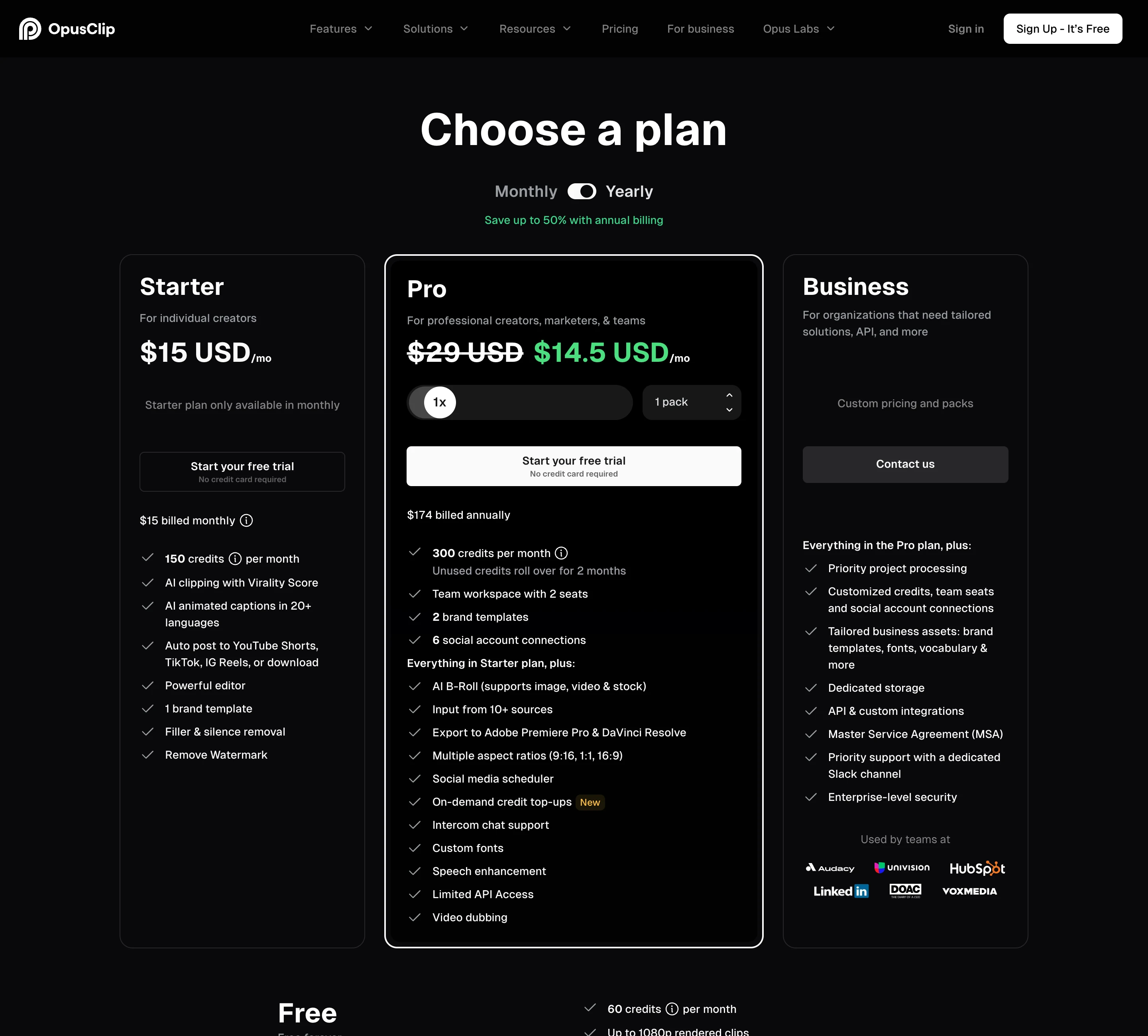
The help centre defines the unit: processing costs “1 credit per minute of the original video imported”. Videos under a minute round up to 1 credit and partial minutes round down, so a 42.5-minute podcast costs 42 credits. Posting to X costs 3 credits per clip per X account.
Unused credits roll over for one extra month on monthly plans. On yearly Pro you get all 3,600 credits up front, valid for 12 months. That 3,600 figure is a year’s total, not a monthly allowance, a mix-up we made ourselves once. What happens to leftover credits when you cancel is covered in do Opus Clip credits expire.
Opus Clip also prices by country. When we read its pricing script on 26 October 2026, the US, UK, Canada, Australia and the euro area paid the figures above, and India, Brazil and Mexico saw lower prices.
How much does Submagic cost in 2026?
US prices on submagic.co/pricing, read 28 October 2026. All plans are priced per member:
| Plan | Monthly | Yearly | Credits a month | Videos | Max length per video |
|---|---|---|---|---|---|
| Starter | $19 | $12 a month ($144 a year) | 45 | 15 | 2 minutes |
| Pro | $39 | $23 a month ($276 a year) | 120 | 40 | 5 minutes |
| Business | $69 | $41 a month ($492 a year) | 300 | 100 | 30 minutes |
Sources: submagic.co/pricing and the help centre’s cost article (updated 25 October 2026), both verified 2026-10-28. Yearly billing saves “up to 41%”.
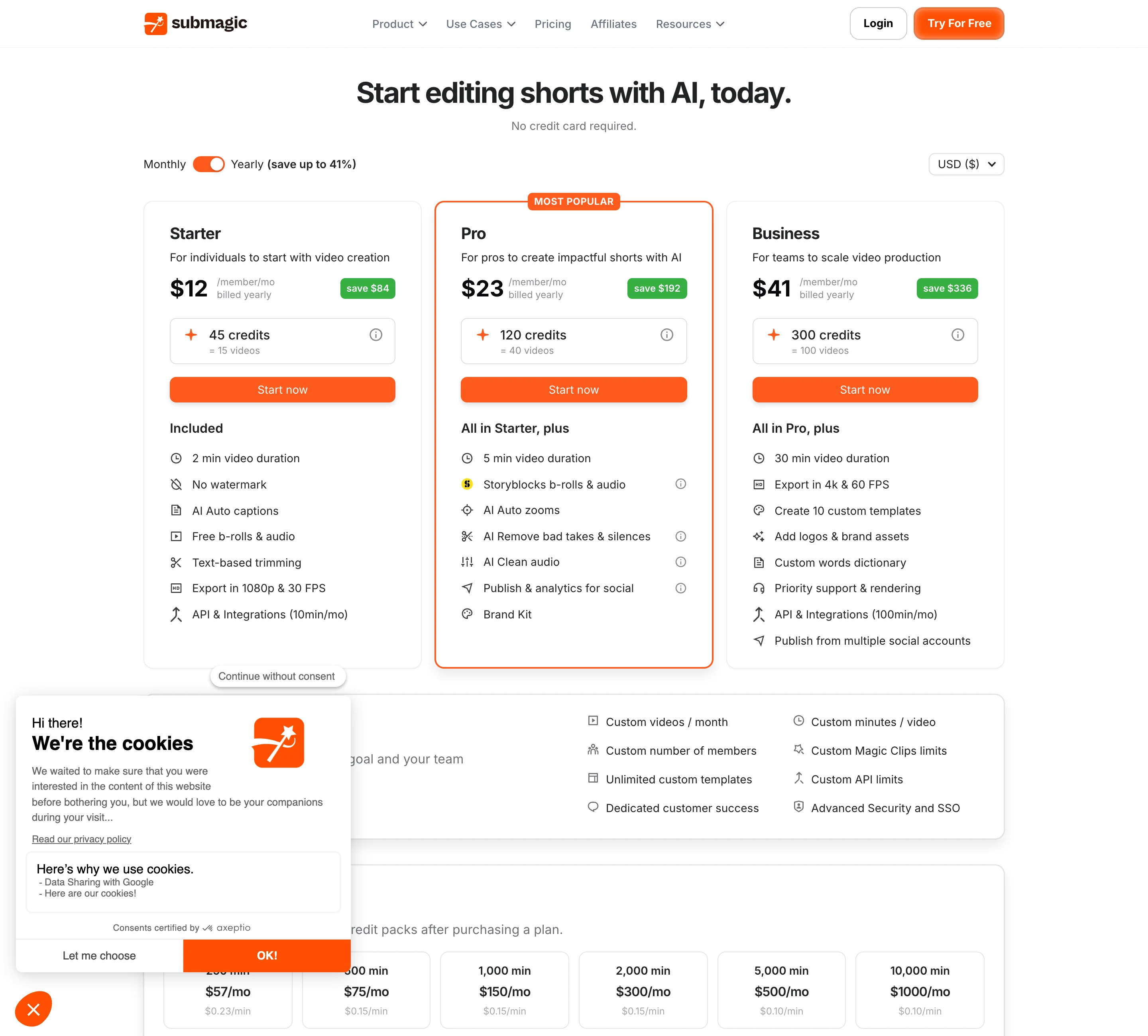
What a credit buys, per the help centre: uploading a video costs 3 credits, AI captions are free, other AI features cost 1 to 3 credits each, and “Magic Clips cost 8 credits each”. The ”= 15 videos” on the Starter card is 45 credits divided by 3, so it assumes you use no other AI feature. Every extra feature lowers the video count.
Plan limits worth knowing:
- No watermark on any paid plan. Starter exports at 1080p and 30 FPS, Pro at up to 2K, Business at up to 4K and 60 FPS.
- Publishing starts on Pro. Pro connects 1 profile per platform on TikTok, YouTube and Instagram. Business connects 3.
- Business is the only plan that fits a normal webinar. Its 30-minute cap is the only one above 5 minutes.
Per-minute or per-video: which is cheaper?
It depends on how long your videos are, because the two tools charge for different things.
Opus Clip, per source minute:
| Plan | Monthly billing | Yearly billing |
|---|---|---|
| Starter | $0.100 | Not offered |
| Pro | $0.097 | $0.048 |
Submagic, per uploaded video (captions only, no other AI features):
| Plan | Monthly billing | Yearly billing | Best case per minute, monthly |
|---|---|---|---|
| Starter | $1.27 | $0.80 | $0.63 (15 videos of 2 minutes) |
| Pro | $0.98 | $0.58 | $0.195 (40 videos of 5 minutes) |
| Business | $0.69 | $0.41 | $0.023 (100 videos of 30 minutes) |
Calculated from the two pricing pages (2026-10-28). The Submagic “best case” column assumes every video uses its full length cap.
These are not the same job. A Submagic upload is one video you caption and polish. An Opus Clip minute is input to a clipper that returns several clips. The fair comparison depends on your workflow:
- You have short videos to caption. Opus Clip will caption them, but it bills you for every minute and its strength is finding clips you do not need found. Submagic’s per-video price is the relevant one.
- You have a long video to clip. On Opus Clip a 60-minute podcast costs 60 credits on any plan. On Submagic it is a Magic Clips job at 8 credits, but see the next section for the length question.
Can Submagic clip long podcasts like Opus Clip?
Yes, with Magic Clips, but read the conditions first. Submagic’s Magic Clips guide describes turning “podcasts, interviews, or webinars” into short clips from a YouTube URL, an upload or a Google Drive link. It says processing takes 10 to 25 minutes, returns “20+ automatically generated clips”, and gives each one a virality score.
Three things are unclear from Submagic’s own pages:
- How it is billed. The cost article (25 October 2026) says “Magic Clips cost 8 credits each”. The step-by-step guide (30 September 2026) calls Magic Clips “an addon subscription”. The pricing page’s checkout links carry an
includeMagicClips=falsesetting and the Custom plan lists “Custom Magic Clips limits”. Treat the 8-credit figure as current and confirm it in the app. - What “each” means. If it means each long video you submit, Starter’s 45 credits cover 5 runs a month, Pro’s 120 cover 15 and Business’s 300 cover 37, with nothing left for other features. The article does not say.
- Whether the length caps apply. The length limit article sets 2, 5 and 30 minutes “per video per upload and export” and a 3,000 MB file size. It does not carve out Magic Clips sources. If the cap applies, an hour-long podcast does not fit any self-serve plan.
Opus Clip has none of these questions. Its help centre supports videos up to 10 hours, uploads of up to 10 GB on Free and Starter and 30 GB on Pro, and clip lengths from under a minute to 15 minutes. Pro adds “Topics search” and “Prompt to clip” to steer what it picks.
I did not run the same podcast through both tools, so I cannot tell you which picks better moments. Our test of the Opus Clip Virality Score covers how far its scores can be trusted.
Which has better captions, Opus Clip or Submagic?
Submagic puts more into captions, by its own feature list. It claims 98.8% accuracy “under optimal conditions” in its help centre, lets you add a custom words dictionary on Business, translates captions, and lists premium caption templates on Pro and Business. Its language count varies by page: 48+ in the help centre, 50+ on the languages page, whose title says 123.
Opus Clip’s pricing page lists “AI animated captions in 20+ languages” on Starter, and its language list names 25. It adds keyword highlights and emoji on every plan, plus custom fonts, curse-word censoring and speech enhancement on Pro.
Both accuracy claims are the vendors’ own. Neither page names a test set. Our longer look at what Submagic’s caption editor does well is the place for style comparisons.
Do Opus Clip and Submagic post to TikTok, Instagram and YouTube?
Both do, from different plans.
- Opus Clip Starter ($15) auto-posts to YouTube Shorts, TikTok and Instagram Reels, with no scheduler.
- Opus Clip Pro ($29) adds a scheduler and 6 social account connections. Its help centre lists posting to X, Facebook, LinkedIn, Pinterest, Threads and Bluesky as well, and scheduling to all nine networks. X posts cost 3 credits each.
- Submagic Starter ($19) has no publishing.
- Submagic Pro ($39) schedules to TikTok, YouTube and Instagram with analytics, 1 profile per platform. Business allows 3 profiles per platform.
So Opus Clip gets you posting at a lower price and to more networks. Submagic adds post analytics in the same place you edit.
Is there a free version of Opus Clip or Submagic?
Opus Clip has a free plan that renews: 60 credits a month, watermarked, rendered up to 1080p, with exports kept for 3 days. Starter and Pro also show a free trial with no credit card required; the page does not state its length.
Submagic has a free trial rather than a plan. Its help centre says you can upload 3 short videos and edit them, and that subscribing lets you download without a watermark.
Can you get a refund from Opus Clip or Submagic?
Submagic says no. Its refund article reads “we do not offer refunds for our SaaS”. You can cancel or pause from the Stripe portal in your profile.
Opus Clip refunds credits, not money, and only in narrow cases. On Pro you can refund a single project within 14 days of upload, as long as you have not downloaded a clip from it. Deleting a project does not return its credits. The full mechanics are in how to cancel Opus Clip.
On a yearly plan, that is $174 (Opus Clip Pro) or $144 to $492 per member (Submagic) paid up front with no refund path on either. Use the free plan or trial first.
Do Opus Clip and Submagic work with Claude and other AI agents?
Both run MCP servers. Opus Clip lists an “MCP connector” on Pro and Business. Submagic’s MCP server sits at https://api.submagic.co/mcp, works with Claude, Claude Code and Cursor, and draws on the same API key and credits as its REST API. Submagic’s pricing cards show 10 API minutes a month on Starter and 100 on Business, with extra packs from $57 a month for 250 minutes.
Opus Clip or Submagic: which should you choose?
| Your situation | Pick | Why |
|---|---|---|
| Weekly podcast or webinar, 30 to 120 minutes | Opus Clip | Billed per source minute, sources up to 10 hours, clipping is the core product |
| Talking-head shorts under 2 minutes, captions matter most | Submagic | Per-video pricing, caption-first editor, no watermark from $12 a month yearly |
| Shorts of 2 to 5 minutes | Submagic Pro | Starter’s 2-minute cap rules it out |
| Posting to TikTok, Reels and Shorts at the lowest price | Opus Clip Starter | Auto-posts from $15; Submagic publishing starts at $39 |
| Team of 3 or more | Compare carefully | Opus Clip Pro includes 2 seats per pack, up to 4; Submagic charges per member |
A worked example. A weekly 60-minute podcast is about 260 source minutes a month. On Opus Clip that fits Pro: $29 a month, or $14.50 on yearly billing. Starter’s 150 credits would run out by the third episode. On Submagic, four or five Magic Clips runs cost 32 to 40 credits, which fits Starter on credits alone, but only if Magic Clips accepts a 60-minute source on your plan. Check that in the app before you pay for a year.
Where ScaleReach fits, briefly, since we publish this: it is a per-minute clipper like Opus Clip, at $12 a month for 200 minutes ($0.060 a minute) or $10 a month yearly, with scheduling included from that plan. It publishes to YouTube Shorts and Instagram Reels; TikTok posts stay private until TikTok finishes auditing our app. The full ranking of Opus Clip alternatives by price per minute puts it seventh, and the Submagic alternatives list covers caption-first tools.
FAQ
Is Opus Clip or Submagic better for podcasts?
Opus Clip is the better fit for podcasts. It bills per minute of source video, accepts videos up to 10 hours and is built around finding clips in long recordings. Submagic can clip long videos with Magic Clips at 8 credits each, but its plans cap each video at 2, 5 or 30 minutes, and its help centre does not say whether those caps apply to Magic Clips.
Is Submagic cheaper than Opus Clip?
For short videos, often yes; for long ones, no. Submagic Starter costs $12 a month yearly for 15 captioned videos of up to 2 minutes. Opus Clip costs $0.10 a source minute on Starter and $0.048 on yearly Pro. If your videos run longer than a few minutes, Opus Clip’s per-minute price is usually cheaper and has no length cap below 10 hours.
How do Submagic credits work?
Each upload costs 3 credits, AI captions are free, other AI features cost 1 to 3 credits, and Magic Clips cost 8 credits each, per Submagic’s help centre on 25 October 2026. Starter includes 45 credits a month, Pro 120 and Business 300. The “videos” figure on each plan assumes you use no AI feature beyond captions.
How do Opus Clip credits work?
One credit is one minute of the original video you import. Videos under a minute round up to one credit and partial minutes round down. Starter includes 150 credits a month and Pro 300. Monthly credits roll over for one extra month, and yearly Pro grants 3,600 credits up front, valid for 12 months.
Does Submagic have a free plan?
No, it has a free trial. Submagic’s help centre says you can upload 3 short videos for free and edit them, and that a subscription removes the watermark on download. Opus Clip has a free plan instead, with 60 credits a month, watermarked exports and clips kept for 3 days.
Do Opus Clip and Submagic offer refunds?
Submagic says it does not offer refunds. Opus Clip refunds credits for a single project on Pro, within 14 days of upload and only if no clip has been downloaded; its help centre does not document a self-serve money-back route for web subscriptions.
The bottom line
Opus Clip and Submagic overlap less than their marketing suggests. Opus Clip meters minutes of long video and is built to find clips in it, with posting from its $15 plan. Submagic meters short videos, caps their length at 2, 5 or 30 minutes, and puts its effort into captions and polish.
Start from the video you have. Long recordings point to Opus Clip, or to a cheaper per-minute clipper. Short videos that need better captions point to Submagic. Neither offers refunds on a plan, so use the free plan or trial before a yearly charge.
Changelog
October 2026. First published. Prices and limits read from both vendors’ pricing pages and help centres from a US view on 28 October 2026.
Last reviewed: October 2026 Next planned refresh: January 2027
If a number here looks wrong, email hevin@scalereach.ai and we will correct it and note the change.
Hevin K runs ScaleReach, an AI clip maker that competes with Opus Clip and Submagic. There is no affiliate relationship with either. Every fact about them comes from pages they control, linked and dated, and neither tool was run on our own videos for this post.
