
Opus Clip and CapCut both turn one long video into a set of vertical shorts, and both start you on 60 free minutes of source video a month. After that they split. Opus Clip is a clipper: Pro costs $29 a month, or $14.50 a month billed yearly, for 300 minutes. CapCut is a full video editor with a clipping tool called Long video to shorts inside it: CapCut Pro lists at USD 19.99 a month on CapCut’s US pricing page, and CapCut’s own pages say Pro adds 240 clipping minutes a month. Every figure below was read from each vendor’s own pages on 7 November 2026.
Disclosure: ScaleReach publishes this comparison and competes with both tools. I did not pay for either plan for this post, and I did not run the same video through both, so there is no output-quality verdict here. There are no affiliate links. Every fact comes from a page the vendor controls, linked and dated.
The 60-second verdict
Pick Opus Clip if clipping is the whole job. It takes a YouTube link, ranks clips with a Virality Score, handles recordings up to 10 hours, and its Pro plan adds a scheduler and Premiere Pro and DaVinci Resolve export.
Pick CapCut if you edit everything else in CapCut anyway. The clipper drops each short into a full editor, and Pro also brings templates, 1 TB of cloud storage and 1,200 AI credits a month for its other AI tools.
Watch out for: CapCut’s prices vary by region and platform, and its pricing page calls the displayed price “for reference only”. The 240 extra Pro minutes come from a CapCut article, not the pricing page. Opus Clip’s $15 Starter has no scheduler and no yearly option.
Bottom line: on paper, CapCut Pro gets you the same 300 clipping minutes as Opus Clip Pro for less on monthly billing, and about the same on yearly. Opus Clip gives you more clipping features for that money. CapCut gives you an editor.
Opus Clip vs CapCut at a glance
| Opus Clip | CapCut (Long video to shorts) | |
|---|---|---|
| What it is | Long-to-short AI clipper | Video editor (web, desktop, mobile) with an AI clipping tool |
| Free clipping | 60 credits a month (1 credit = 1 source minute), watermark, exports for 3 days | 60 minutes a month, per a CapCut article; the tool page calls the clipper free and watermark-free |
| Cheapest paid, monthly | Starter $15, 150 credits | Pro USD 19.99, 60 + 240 clipping minutes (per a CapCut article) |
| Paid, yearly | Pro $14.50 a month ($174 a year), 300 credits | Pro $179.99 a year, per CapCut’s Standard vs Pro guide |
| Longest source | Up to 10 hours | Under 3 hours or 10 GB, per a CapCut article |
| Import | YouTube, Zoom, Google Drive, Dropbox, Riverside and 13 more link types, public .mp4 links, local files | Your device, CapCut cloud, Google Drive, Dropbox |
| Clip ranking | Virality Score on Starter and up | No score mentioned on CapCut’s tool pages |
| Clip length options | 0 to 1 min, 1 to 3, 3 to 5, 5 to 10, 10 to 15 | Auto, under 60 s, 60 to 90 s, 90 s to 3 min, or custom |
| Captions | Animated caption templates, multi-language transcription | Auto captions in 20+ languages |
| Posting | Starter posts to social; Pro adds a scheduler and multiple profiles per platform | Direct sharing to TikTok, YouTube, Facebook and Instagram |
| Editing after clipping | Text and timeline editing on Starter and up | Full CapCut editor via “Edit more” |
| Premiere / DaVinci export | XML on Pro | Not listed on the tool pages |
| API / MCP | Video Editing API, Scheduler API and MCP connector on Pro | Not listed on the tool or pricing pages |
Sources: opus.pro/pricing and Opus Clip’s help centre on credits, video length and video sources; capcut.com/pricing, CapCut’s tool pages for Long video to shorts and AI long video to short video, and the CapCut articles linked in the sections below. All read 2026-11-07.
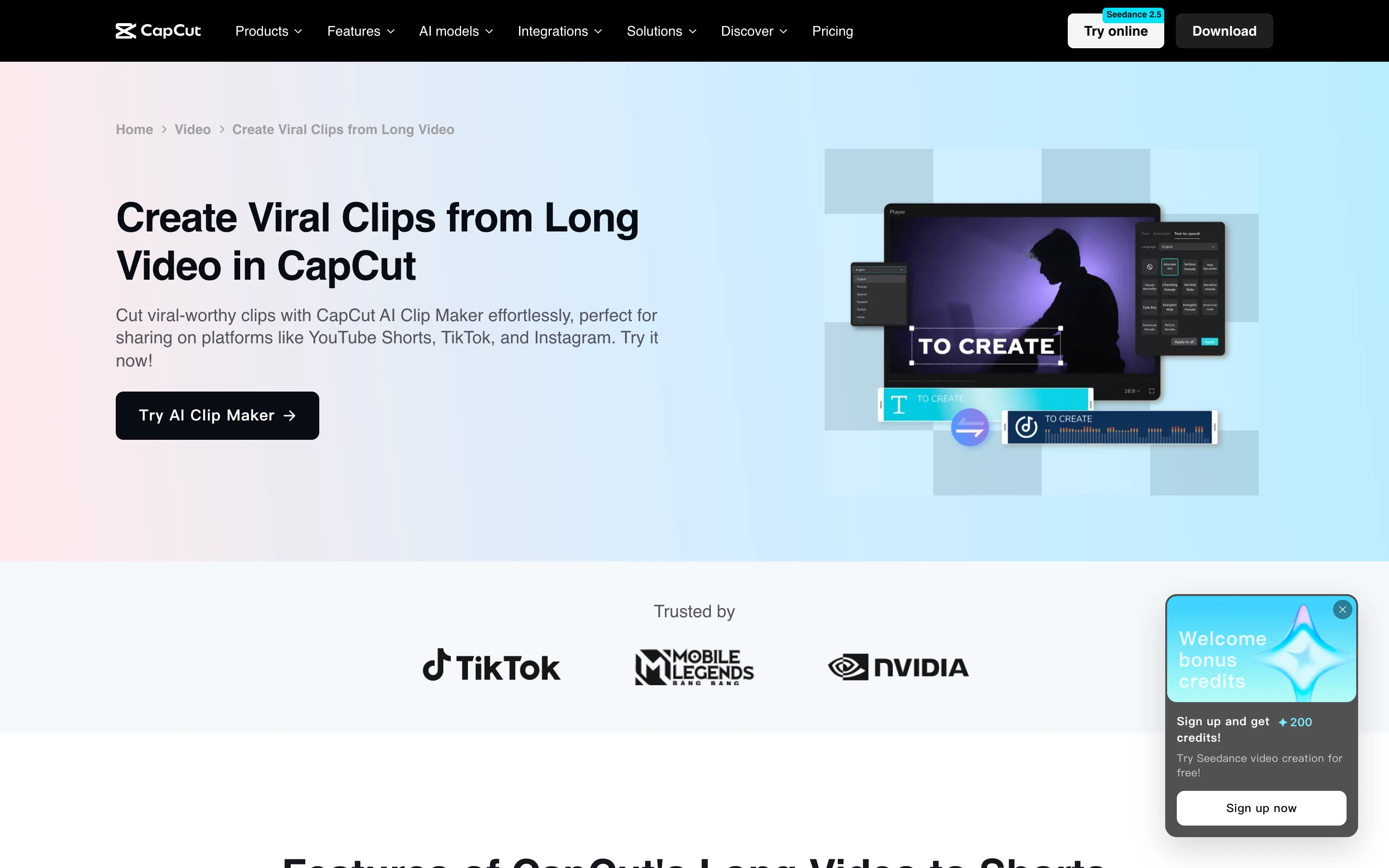
What is CapCut’s long video to shorts tool?
It is CapCut’s automatic clipper, and CapCut calls it by several names. The tool page is titled “Create Viral Clips from Long Video”, the button says “Try AI Clip Maker”, and the feature list says “Long Video to Shorts”. You upload a long video, pick the part to convert and a clip duration, and CapCut cuts it into vertical clips with captions.
What CapCut’s own pages say it does:
- Finds highlights with AI analysis of the video, and an “AI Highlights” option for podcasts that works from speech patterns.
- Reframes 16:9 to 9:16 with subject tracking to keep the speaker in frame.
- Captions every clip automatically, in more than 20 languages.
- Hands each clip to the editor. “Edit more” opens the clip in CapCut’s full editor, where templates, effects and music are available.
CapCut’s tool page is labelled “CapCut PC”, and its articles describe the tool on CapCut’s web editor and desktop app. I did not confirm whether it is in the mobile app.
How much does CapCut Pro cost in 2026?
CapCut’s US pricing page, read through a US connection on 7 November 2026, shows:
| Plan | Price shown | AI credits a month | Cloud storage |
|---|---|---|---|
| Free | USD 0 | Not listed | Not listed |
| Pro | USD 19.99/month | 1,200 | 1 TB |
| Ultra | USD 79/month | 8,645 | 1 TB |
| Teams | USD 12.49/month per seat | 1,200 per seat | 1 TB |
Source: capcut.com/pricing, read 2026-11-07. The page also offers new users a 7-day free trial of Pro with no card required.
Four caveats, all from CapCut itself:
- The price is not fixed. The pricing page says “Displayed pricing is for reference only” and that the final price, taxes and offers appear after sign-in. CapCut’s help article How much does CapCut Pro cost? says pricing varies by region, device and promotion. From an Indian connection, the same pricing page showed no prices at all.
- The yearly price is not on the pricing page. CapCut’s Standard vs Pro guide, dated 23 September 2026, lists Pro at $19.99 a month or $179.99 a year, which works out to $15.00 a month.
- Teams prices disagree. The pricing page shows USD 12.49 per seat a month. The same Standard vs Pro guide says Teams starts “at around $24.99 per month”.
- AI credits are a separate meter. The 1,200 monthly credits are for CapCut’s generative tools, such as the Seedance video models listed on every paid card.
Is CapCut’s long video to shorts tool free?
Partly. The tool page’s FAQ says CapCut turns long content into short videos “without watermarks” through “its free, user-friendly interface”, and the AI long-to-short page says there is “a free online editing entry point” but that you should check availability in the editor.
The only CapCut page I found that states the allowance is an article from 16 May 2025 comparing Exemplary AI alternatives. It says: “You can convert 60 minutes of long videos to shorts for free every month”, and that Pro adds 240 minutes a month. The public tool pages I read on 7 November 2026 do not state it, and I did not sign in to check the figure inside the tool.
One more conflict: CapCut’s Standard vs Pro guide says the auto caption generator is “exclusive to Pro users”, while the clipping tool pages say every clip gets captions. If captions matter to you, check them on a free account before you rely on them.
How much does Opus Clip cost in 2026?
| Plan | Monthly | Yearly | Credits | Notable |
|---|---|---|---|---|
| Free | $0 | $0 | 60 a month | Watermark, exports up to 1080p for 3 days, media expires after 3 days |
| Starter | $15 | Not offered | 150 a month | Virality Score, posting to social, auto-import from a verified YouTube account, no scheduler |
| Pro | $29 | $14.50 a month ($174 a year) | 300 a month per pack | Scheduler, Premiere and DaVinci export, prompt to clip, video dubbing, MCP connector |
| Business | Custom | Custom | Custom | Dedicated queue, SSO, unlimited storage |
Source: opus.pro/pricing, read 7 November 2026. Opus Clip’s prices are unchanged since our Opus Clip vs Submagic comparison on 28 October.
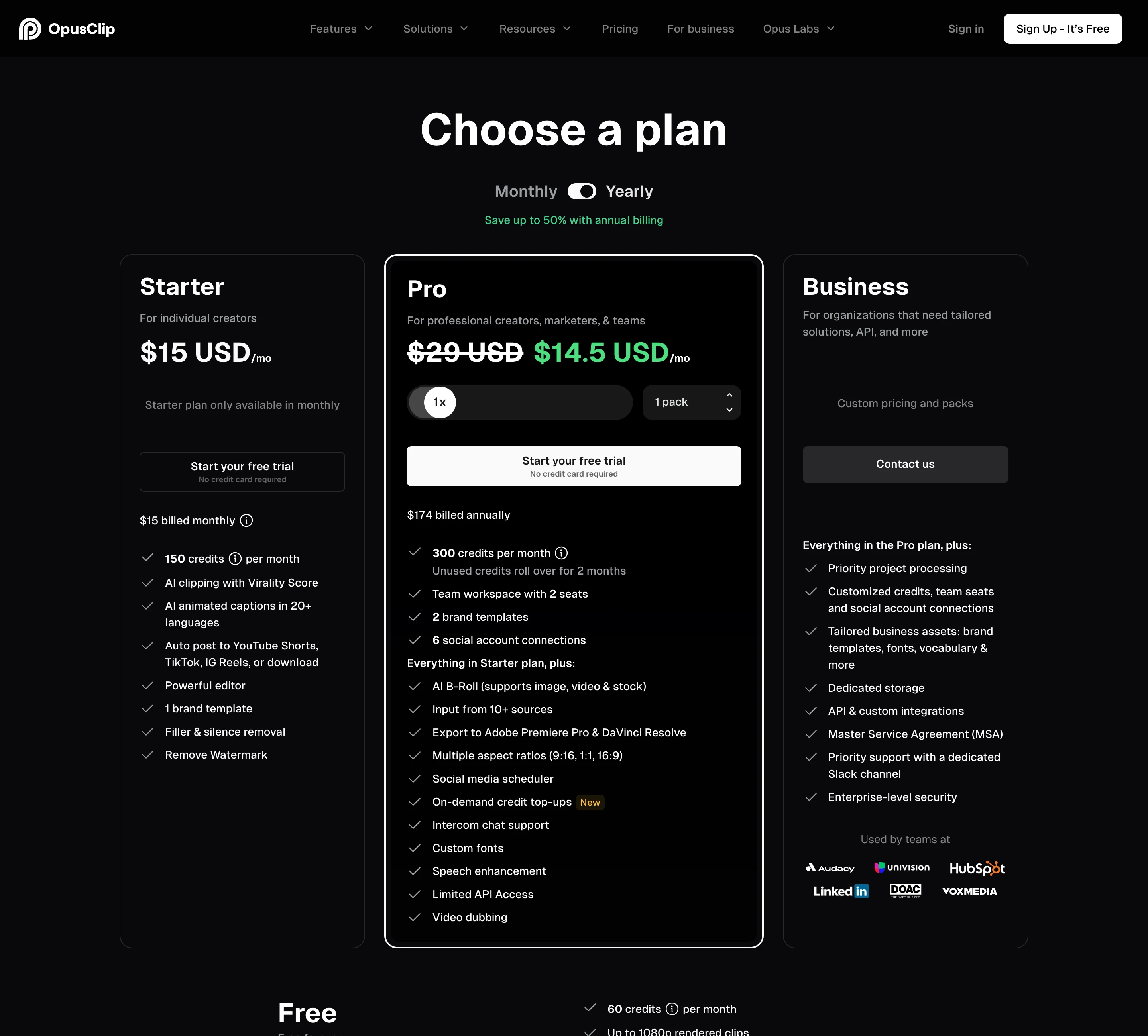
Per Opus Clip’s credits article, one credit is one minute of the original video. Partial minutes round down, videos under a minute round up to 1 credit, and posting to X costs 3 credits per clip per X account. Monthly credits expire after 60 days, and yearly plans get 3,600 credits up front, valid for 12 months. Our guide to whether Opus Clip credits expire covers the edge cases.
Is CapCut cheaper than Opus Clip?
On monthly billing, yes, if CapCut’s 240 extra Pro minutes still apply. Both plans then give 300 clipping minutes a month:
| Plan | Price a month | Clipping minutes | Per minute |
|---|---|---|---|
| Opus Clip Pro, yearly | $14.50 | 300 | $0.048 |
| CapCut Pro, yearly ($179.99) | $15.00 | 300 (60 + 240) | $0.050 |
| CapCut Pro, monthly | $19.99 | 300 (60 + 240) | $0.067 |
| Opus Clip Pro, monthly | $29 | 300 | $0.097 |
| Opus Clip Starter | $15 | 150 | $0.100 |
CapCut figures use the US prices shown on 7 November 2026 and the 60 + 240 minutes from CapCut’s May 2025 article. Your CapCut price may differ.
So on monthly billing CapCut Pro is about $9 a month cheaper for the same minutes. On yearly billing the two are within 50 cents a month. The difference is what else the money buys. Opus Clip’s $29 buys a clip pipeline: Virality Score, prompt to clip, scheduler, Premiere export. CapCut’s $19.99 buys a full editor, templates, 1 TB of storage and 1,200 AI credits, with clipping as one feature.
Which handles longer videos?
Opus Clip. Its help centre says it supports videos up to 10 hours, and you can process part of a longer one with the timeframe slider. Local uploads go up to 10 GB on Free and Starter and 30 GB on Pro.
CapCut’s 2026 roundup of long-video-to-shorts tools says its tool takes videos “up to 3 hours or 10GB”. Both tools let you pick only part of a video to convert.
On either tool, a long recording uses up your monthly minutes fast. A 3-hour livestream would use 180 of the 300 minutes on Opus Clip Pro. CapCut describes its allowance in minutes of long video converted, so the same stream would use 180 of CapCut Pro’s 300.
Can CapCut clip a YouTube video from a link?
The tool pages do not say so. Both CapCut tool pages list uploads from your device, CapCut’s cloud storage, Google Drive and Dropbox, and ask you to keep the page open while the file uploads. Neither mentions pasting a YouTube link.
Opus Clip’s video sources article lists links from YouTube, Zoom, Google Drive, Dropbox, Vimeo, Twitch, Riverside, StreamYard, LinkedIn and more, plus public .mp4 links and local uploads. Starter and Pro can also auto-import new videos from a verified YouTube account. If your long videos already live on YouTube, Opus Clip skips the download-and-upload step. Our guide to turning YouTube videos into Shorts covers that workflow.
What does Opus Clip do better than CapCut?
- Ranking clips. The Virality Score scores each clip from Starter up. CapCut’s tool pages describe AI highlight detection but no score you can sort by. Our test of how accurate the Opus Clip Virality Score is covers what that number is worth.
- Longer sources and link import. 10 hours against 3, and YouTube links against file uploads.
- Directed clipping. Pro adds topic search, prompt to clip and reprompting to refine the results.
- Scheduling and hand-off. Pro has a social scheduler, posting to multiple profiles per platform, and XML export to Premiere Pro and DaVinci Resolve.
- Automation. Pro lists a Video Editing API, a Scheduler API and an MCP connector. CapCut’s tool and pricing pages list neither.
What does CapCut do better than Opus Clip?
- Editing. Every clip opens in CapCut’s full editor. Its Standard vs Pro guide lists keyframe animation, chroma key, color grading and a multi-layer timeline.
- Price on monthly billing. $19.99 against $29 for the same 300 clipping minutes, at US list prices.
- More than clipping in the subscription. Pro includes premium templates, 1 TB of cloud storage and 1,200 AI credits a month for CapCut’s generative tools. Opus Clip Pro has 100 GB of fixed storage.
- Shorter clip presets. CapCut offers under 60 seconds and 60 to 90 seconds. Opus Clip’s shortest range is 0 to 1 minute, and its ranges run up to 15 minutes.
- A card-free Pro trial. The pricing page offers 7 days of Pro with no card. Opus Clip’s Starter and Pro buttons also say no card is required for their free trial.
Which one fits a weekly podcast?
Take a one-hour weekly show: 240 to 300 minutes of footage a month, depending on whether the month has four or five episodes.
- Opus Clip: Starter’s 150 credits are not enough. Pro’s 300 fits, at $29 a month or $14.50 a month billed yearly, with the scheduler included. Opus Clip can pull each episode straight from YouTube.
- CapCut: the free 60 minutes cover one episode. Pro’s 300 minutes fit the month, if the 240-minute figure holds, at $19.99 a month in the US. Each episode has to be uploaded as a file, and episodes over 3 hours will not fit.
If you already edit the full episode in CapCut, Pro does both jobs in one subscription. If the episode is finished and the clips are the job, Opus Clip is the shorter path. Run one episode through each free plan first: both cover a full hour.
Where ScaleReach fits, briefly, since we publish this: it bills per source minute like Opus Clip. Pro is $18 a month for 400 minutes ($0.045 a minute) or $12.50 a month billed yearly ($0.031), with uploads up to 3 hours and scheduling to YouTube Shorts and Instagram Reels. See ScaleReach vs Opus Clip or our pricing page. For editor-first tools like CapCut, our Opus Clip vs Descript comparison covers the closest match, and the full ranking of Opus Clip alternatives by price per minute covers 14 more.
FAQ
Is CapCut’s long video to shorts tool free?
Yes, up to a monthly allowance. CapCut’s tool page calls the clipper free and watermark-free, and a CapCut article from May 2025 says free accounts can convert 60 minutes of long video a month, with Pro adding 240 minutes. The public tool pages read on 7 November 2026 do not state the allowance, so check it in the tool before uploading a long recording.
How much does CapCut Pro cost in 2026?
CapCut’s US pricing page shows Pro at USD 19.99 a month on 7 November 2026, with 1,200 AI credits and 1 TB of storage. CapCut’s Standard vs Pro guide lists $179.99 a year. CapCut says prices vary by region, device and promotion and that the displayed price is for reference only, so the price at your checkout may differ.
Is CapCut cheaper than Opus Clip?
On monthly billing, yes. CapCut Pro is $19.99 a month in the US and, per CapCut’s own article, includes 300 clipping minutes a month. Opus Clip Pro is $29 a month for 300 minutes. On yearly billing they are close: $15.00 a month for CapCut Pro against $14.50 for Opus Clip Pro. Opus Clip’s $29 includes a Virality Score, scheduler and Premiere export.
Can CapCut make clips from a YouTube link?
CapCut’s tool pages do not list it. They describe uploads from your device, CapCut’s cloud, Google Drive and Dropbox. Opus Clip accepts YouTube links directly, along with Zoom, Vimeo, Twitch, Riverside and other links, public .mp4 URLs and local files, and Starter and Pro can auto-import from a verified YouTube account.
Does CapCut have a virality score like Opus Clip?
Not that CapCut’s pages mention. Its tool pages describe AI highlight detection and an AI Highlights option for podcasts, but no score for ranking clips. Opus Clip shows a Virality Score on every clip from the $15 Starter plan up. Neither tool’s output was tested for this post.
Which handles longer videos, Opus Clip or CapCut?
Opus Clip. Its help centre says it supports videos up to 10 hours, with local uploads up to 30 GB on Pro. CapCut’s own roundup says its tool takes videos up to 3 hours or 10 GB. Both count the source length against your monthly minutes, and both let you convert just part of a video.
The bottom line
Opus Clip is the tool for a clip pipeline. It takes a YouTube link, handles 10-hour recordings, ranks clips with a Virality Score, and Pro adds prompt to clip, a scheduler and Premiere Pro and DaVinci Resolve export. Its weak spots are a $15 Starter with no scheduler and a monthly Pro price higher than CapCut’s.
CapCut is the tool for creators who already edit in CapCut. Its Long video to shorts tool starts free, hands every clip to a full editor, and Pro costs less than Opus Clip Pro on monthly billing for the same 300 minutes, if CapCut’s stated allowance holds. Its weak spots are a 3-hour source cap, file uploads only, no clip score, and prices that change by region and platform. Choose by whether clipping or editing fills your week.
If a number here looks wrong, email hevin@scalereach.ai and we will correct it and note the change.
Changelog
November 2026. First published. All Opus Clip and CapCut figures read from their own pages on 7 November 2026.
Last reviewed: November 2026 Next planned refresh: February 2027
Hevin K runs ScaleReach, an AI clip maker that competes with Opus Clip and CapCut’s clipping tool. There is no affiliate relationship with either. Every fact about them comes from pages they control, linked and dated, and neither tool was run on our own videos for this post.

