
Almost every video that goes into an AI clip maker is landscape, and almost everything that has to come out is vertical. In our own pipeline, 1,212 of the last 1,224 source videos were pulled from a YouTube link, which means 16:9, filmed wide, and 96% of the 7,101 clips we produced from them shipped as 9:16 vertical. The hard part is the reframe in the middle: cropping a wide frame down to a tall one without slicing the speaker off the side.
These are ScaleReach’s own numbers, measured on 27 July 2026 from our production database. This post explains how our auto-reframe, which we call smart crop, keeps a person in frame when it converts a landscape video to vertical: the actual algorithm, the layouts it picks for one, two, or more people, and the cases where it genuinely can’t help. ScaleReach is an AI clip maker, so weigh the bias yourself. The mechanics below come from our own source code, not a brochure.
The short answer
Don’t center-crop. A fixed crop down the middle of a 16:9 frame throws away about two-thirds of its width, and the speaker is rarely dead center, so that is exactly how heads get cut off.
Track the face instead. Good auto-reframe detects the face every fraction of a second and moves the crop to follow it, keeping the head near the top of the vertical frame where it belongs.
More than one person needs a different layout, not a wider crop. Two speakers stack into two panels; a screen-share splits screen-on-top, face-on-bottom. One tall crop can’t hold two people who are sitting apart.
Bottom line: converting landscape to vertical is a face-tracking problem, not a resize. Do it by hand for one clip; use a tool that tracks the subject once you are doing it at volume.
Why the clip has to be vertical in the first place
Every major short-form surface is built for a full-screen vertical frame, and anything else gets letterboxed or cropped by the platform anyway.
| Platform | Native format | Notes |
|---|---|---|
| TikTok | 9:16, 1080×1920 | The ratio the For You feed is built around |
| Instagram Reels | 9:16, 1080×1920 | Only 9:16 fills the screen without padding |
| YouTube Shorts | Vertical, up to 3 min | Uploads are vertical, max 1080p |
Source: YouTube’s own Shorts help page (verified 28 September 2026) for the Shorts figures; TikTok and Reels specs are the platforms’ widely published 1080×1920 recommendation.
So a 16:9 recording that looks fine on YouTube is the wrong shape everywhere a short lives. If you post it as-is, the platform shrinks it into a letterboxed strip in the middle of the screen, and a letterboxed clip in a vertical feed reads as “not made for here.” The clip has to become 9:16, which means something has to decide what to keep and what to crop away.
Why the naive crop cuts the speaker off
A 16:9 frame is 1,920 pixels wide. A 9:16 slice of it, at the full height of the frame, is only about 608 pixels wide. So converting to vertical means picking which ~608 of those 1,920 columns to keep and throwing the other two-thirds away, in every single frame.
The lazy way to choose that slice is to take the middle and never move it. That works only if your subject sits in the exact center of the frame and never shifts. Real footage doesn’t cooperate: an interview subject sits camera-left, a presenter drifts to a slide on the right, two podcast guests are on opposite sides of the table. Center-crop all of them and you get a shoulder, half a face, or an empty chair while the speaker talks off-screen. This is the single most common reason a reframed clip looks broken.
The fix is to move that slice so the person stays inside it. That is the whole job of face tracking.
How auto-reframe keeps the speaker in frame
Our smart crop reframes a landscape clip to 9:16 by finding the face and following it. Here is what actually happens under the hood.
- It detects faces with Google’s MediaPipe BlazeFace model, sampling the video every 0.2 seconds (every 0.1 seconds on clips under 30 seconds). A detection has to clear a 50% confidence bar to count, and detection runs on a downscaled 480p copy of the frame, which is plenty for locating a face and much faster than full resolution.
- It centers on the eyes and nose, not the middle of the box. The crop targets a blend weighted toward the nose and eye line rather than the geometric center of the detection rectangle, so the framing sits on the face rather than the chin or chest.
- It leaves head room. The face is placed about 20% down from the top of the vertical frame, the way a human editor frames a talking head, instead of dead center with empty space above the head.
- It holds still, then glides. The tracker locks the crop in place while the face stays inside a release band (roughly 8% of the frame width), so small leans, head-sway, and shoulder shifts produce zero camera movement. Only a real, sustained move unlocks a smooth glide, and a speaker switch or scene cut past a larger threshold triggers an instant hard cut. A final two-pass smoothing step with eased interpolation removes the pixel-level jitter that makes cheap auto-crop look nervous.
- It doesn’t chase gestures. If the face is bouncing back and forth, which is what waving hands and laughing look like to a detector, the tracker recognizes the oscillation and suppresses the pan instead of swinging the frame around.
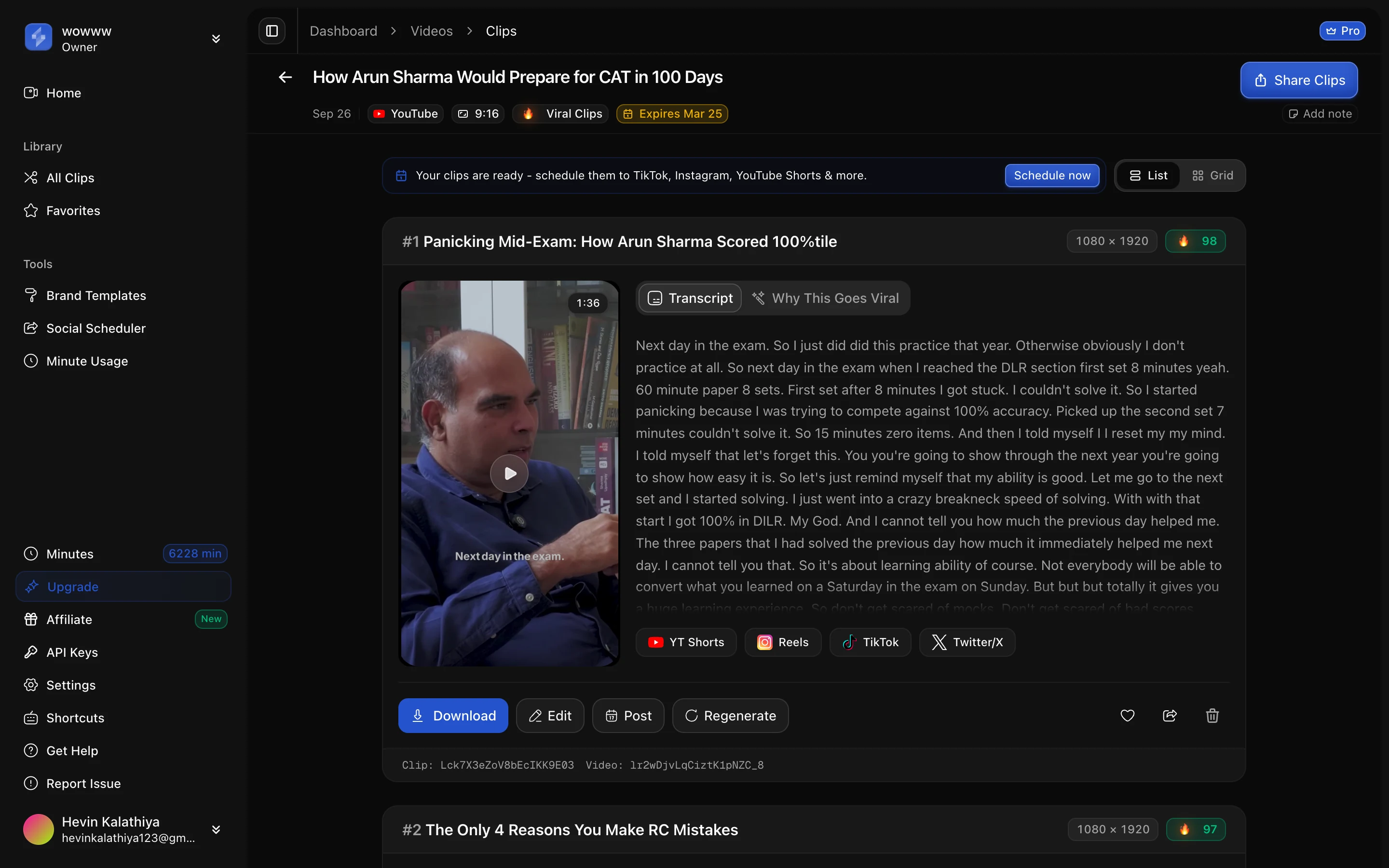
The result is a vertical clip where the speaker stays put and the camera only moves when it should. Below is a single-speaker lecture, filmed wide for YouTube, reframed to a 1080×1920 vertical clip with the speaker held in frame and captioned.
What happens with two speakers, or five?
You cannot keep two people who sit three feet apart inside one tall crop. So the reframe stops trying to crop and switches layout based on how many faces it sees and where they are.
| People on screen | What the reframe does |
|---|---|
| One speaker | Tracks the face and follows it, head near the top |
| Two speakers | Stacks them, each speaker in their own panel, one above the other |
| Three | A larger panel for the main speaker on top, two stacked below |
| Four | A 2×2 grid, one speaker per cell |
| Five or more | Letterboxes the whole frame so nobody is cropped out |
| Screen + webcam | Splits the frame: screen on top, tracked webcam face on the bottom |
| No face at all | Keeps the full frame with a slight zoom instead of guessing a crop |
| Already vertical | Skips reframing entirely |
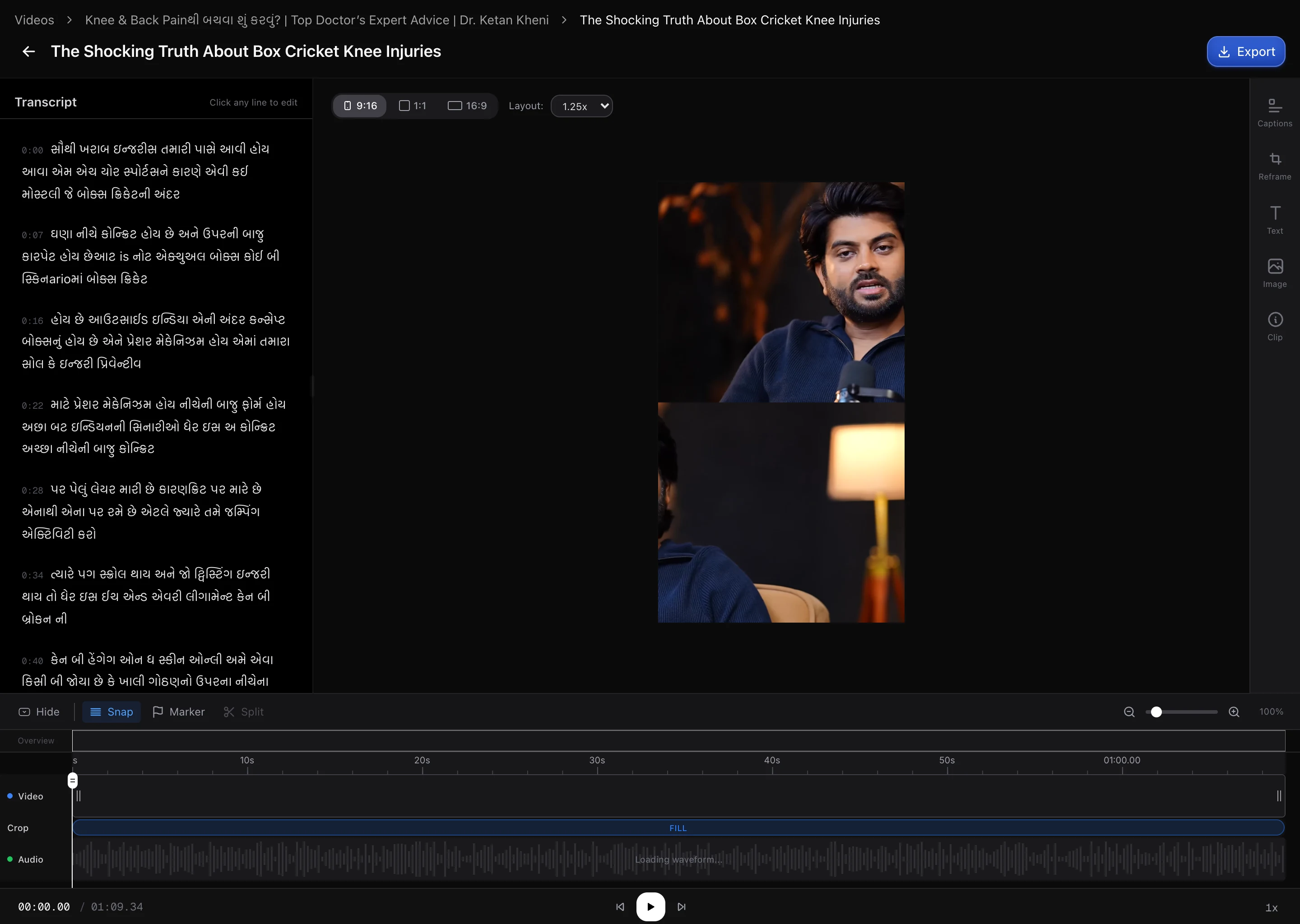
Within a single clip it can switch between these as the shot changes, so a single-camera intro that cuts to a two-shot gets tracked first and stacked second. Here is the two-speaker case: a landscape podcast reframed into a vertical stacked layout, each speaker in their own panel instead of one being cropped out of the shot.
For a multi-speaker recording, there is a second question worth asking of any tool: does it track faces or the active speaker? Ours does both. When more than one person is on screen, it runs pyannote speaker diarization on the audio to work out who is talking, then points the framing at that person. On a single-speaker clip it skips diarization entirely, because there is nobody to disambiguate and it saves roughly two minutes of processing. We compare how the major tools handle this in our feature-by-feature breakdown of face and speaker tracking.
When auto-reframe can’t help, and what it does instead
Being honest about the limits matters more than pretending there are none.
- No face, no tracking. On b-roll, slides, product shots, or a wide landscape with no clear face, there is nothing to follow. Rather than guess a crop and get it wrong, the reframe keeps the whole frame and applies a slight 1.25× zoom. If detection fails outright, it falls back to a plain center crop so the clip still renders.
- Silent gameplay and screen recordings lose the most. Footage where the “subject” is a minimap, a scoreboard, or a block of code has no face and doesn’t survive a vertical crop cleanly. A split screen-plus-webcam layout rescues tutorials with a talking head in the corner, but pure gameplay with no camera is the weakest case for any auto-reframe, ours included.
- Fast crosstalk can mis-assign. In a heated multi-person moment where two people talk over each other, the active-speaker guess is occasionally wrong for a beat. This is why the reframe is editable: you can override the crop rather than re-run the whole job.
- Already-vertical clips are left alone. If the source is already portrait, reframing would only degrade it, so the pipeline detects that and skips the step.
How to convert a landscape video to vertical, step by step
If you are doing one clip by hand in an editor, the manual version is: add your 16:9 footage to a 1080×1920 timeline, then keyframe the horizontal position so the crop follows the speaker across the clip. It works, and it is tedious, roughly the same keyframing for every clip you cut.
The faster path, especially once you are making more than a couple of clips from one recording:
- Start from the landscape source. Upload the 16:9 file or paste the YouTube link. You don’t need to pre-crop anything.
- Pick 9:16. It is the default target, since that is what 96% of clips end up as.
- Let it track the speaker. Auto-reframe finds and follows the face; for a multi-person recording it picks the stacked or grid layout for you.
- Spot-check the busy moments. Scrub to the parts with gestures, cutaways, or two people, which is where any auto-crop is most likely to need a nudge, and adjust the crop there if you want.
- Caption and export at 1080×1920. Burned-in captions plus the vertical frame are what the platforms reward.
You can do all of this in the AI video reframe tool. Once the clip is vertical, the rest of the workflow, how many clips one recording yields and how long each one should run per platform, is a separate decision, and both are covered elsewhere.
FAQ
How do I turn a landscape video into a vertical video without cutting off the speaker?
Track the face instead of cropping the center. A fixed center crop keeps the middle 1080 pixels of a 1920-wide frame and discards the rest, so any speaker who is not dead center gets clipped. Auto-reframe detects the face several times a second and moves the crop to follow it, keeping the head near the top of the vertical frame. For two or more people it switches to a stacked or split layout so nobody is cropped out.
What is auto-reframe, or smart crop?
Auto-reframe converts a wide 16:9 video into a tall 9:16 one by choosing which part of each frame to keep. Instead of a fixed crop, it detects the subject, usually a face, and repositions the crop over time so the subject stays in frame. Our version uses face detection every 0.2 seconds, places the head about 20% from the top, and smooths the movement so the framing holds still and only glides on real motion.
Does converting 16:9 to 9:16 lose video quality?
You lose frame area, and how sharp the result looks depends on your source resolution. A 9:16 crop keeps only about a third of a 16:9 frame’s width. From a 4K source there are more than enough pixels left to fill a crisp 1080×1920 clip; from a 1080p source that slice has to be scaled up, so it softens slightly. Either way, what you trade is field of view, which is exactly why keeping the crop on the speaker matters so much.
What happens to a two-person podcast when you reframe it vertically?
The two speakers stack into two panels, one above the other, so both stay visible instead of one being cropped away. The reframe detects that there are two faces sitting apart and, when audio is available, uses speaker diarization to keep the framing sensible. Recordings with three or four people get a grid layout, and five or more are letterboxed so the whole scene is preserved.
What aspect ratio should a short-form clip be?
9:16 vertical, exported at 1080×1920. That is the native format for TikTok, Instagram Reels, and YouTube Shorts, and the only ratio that fills the screen without padding. In our data 96% of all clips are 9:16, with about 1% square (1:1) and 1% left in 16:9 for the rare landscape use case. Unless you have a specific reason, reframe to 9:16.
Can auto-reframe handle gameplay or screen recordings?
Partly. A tutorial or demo with a webcam face in the corner reframes well: the layout splits into the screen on top and the tracked face on the bottom. Pure gameplay or a screen recording with no face is the hardest case, because there is no subject to follow, so the reframe keeps the full frame with a light zoom rather than cropping blindly. Screen-heavy footage is where a vertical crop loses the most.
The bottom line
Converting landscape to vertical is not a resize, it is a decision about what to keep in every frame. Center-cropping makes that decision badly and cuts people off. Tracking the face makes it the way an editor would, and switching layouts for two or more speakers solves the case a single crop physically can’t.
For one clip, keyframe it by hand. For a week’s worth of clips from one recording, that is an hour of tedium a tool does in one pass, which is the whole reason auto-reframe exists. Get the vertical frame right first, and everything downstream, captions, scheduling, the platform’s own crop, has something clean to work with.
Every number here comes from our own pipeline and is dated in the text. If one looks wrong, tell us at sales@scalereach.ai and we will correct it in the open.
Changelog
September 2026 update. First published. Aspect-ratio distribution (96% 9:16 across 7,101 clips) and the landscape-source share (1,212 of 1,224 videos from YouTube) are from ScaleReach pipeline data measured 27 July 2026. The reframe mechanics (face detection cadence, head placement, layout modes, speaker diarization) are described from our production smart-crop source as of this date. Platform specs verified against the vendors’ pages on 28 September 2026.
Last reviewed: September 2026 Next planned refresh: December 2026 Update hooks: whether the 9:16 share moves off 96% on the next pipeline re-measurement; whether the layout set (single, dual, triple, quad, group, screen-plus-facecam) changes; whether any platform changes its recommended resolution or aspect ratio.
About the author
Hevin K runs ScaleReach, an AI clip maker that turns long landscape videos and podcasts into scored, captioned vertical clips. The figures in this post come from ScaleReach’s own production database and source code, dated where they are cited, so you can judge them directly.
