
To turn coaching videos into short clips, start with the recordings where you teach (webinars, workshops, trainings, solo videos), not the sessions where a client talks. Record them so your camera stays on screen, then let a clip tool pull lessons that make sense on their own. The recording setup decides more than people expect: in our own library, a 38-minute course recorded as slides with no camera gave 7 clips scoring 91 to 97, and 6 of the 7 came out as a whole slide shrunk into a vertical frame.
Disclosure: ScaleReach makes a clip generator for coaches, so weigh the bias. Every ScaleReach figure below comes from a read-only query of our production database on 4 October 2026, or from our own source code on the same day. Zoom and ICF facts are quoted from their own pages, read the same day and linked where they appear.
The short answer
Clip what you teach. Webinars, masterclasses, group trainings and talks are yours to publish.
Don’t clip client sessions without written consent. The ICF defines confidentiality as protecting anything from the coaching relationship unless the client gives written consent to release it. That covers a 1:1 call you upload to an AI tool, not just one you post.
Record active speaker view. One face fills the frame and the vertical crop can follow it. Gallery view and slides-only recordings crop worst.
Bottom line: the best coaching clip is one self-contained idea, a framework, a reframe or an answer to a question clients always ask, in under 90 seconds.
Which coaching videos can you turn into clips?
Most coaches have two kinds of footage, and only one of them is safe to publish by default.
| Recording | Clip it? | Why |
|---|---|---|
| Webinar or masterclass | Yes | You’re teaching to an audience. It was made to be seen |
| Recorded workshop or training | Yes, your parts | Attendee faces and questions need their permission |
| Solo video, live stream, keynote | Yes | Already public or meant to be |
| Podcast guest appearance | Usually | Check the host’s terms before reposting their footage |
| Group coaching call | Only your teaching segments | Members’ stories are confidential |
| 1:1 client session or sales call | No, unless the client gives written consent | Confidential by default |
The ICF’s Code of Ethics is direct about this. Standard 2.1 commits coaches to “the strictest level of confidentiality with all parties involved”. Its appendix defines confidentiality as “the protection of any information obtained in or around the coaching relationship unless there is a legal reason or requirement, a threat of harm, or written consent to release is given by the client.”
Two other standards matter before you upload anything, even privately. Standard 2.4 covers how you “maintain, store, and dispose of any records, including electronic files”. Standard 2.5 extends your obligations to “any technology systems I may utilize”, and names artificial intelligence. An AI clip tool is one of those systems. Here is what happens to an uploaded file on ScaleReach, so you can judge it against your own client agreements:
- The audio is transcribed by Deepgram, a speech-to-text provider.
- The transcript is read by a Google Gemini model, through Google’s Vertex AI, to pick the moments.
- The source and clips are deleted after 15 days on the free plan and 6 months on paid plans.
If a client session is the only place a great answer lives, the simplest fix is to re-record the answer yourself as a short solo video. You keep the idea and the client keeps their privacy.
How should you record a coaching session so it crops to vertical?
Every clip tool has to turn a 16:9 recording into a 9:16 clip, and it can only follow faces it can see. ScaleReach’s reframe picks a layout from the faces it finds in sampled frames. Here’s how the common Zoom recording layouts map to what you get:
| Zoom recording layout | What the reframe sees | Vertical result |
|---|---|---|
| Active speaker | One face, large | The crop tracks your face. The cleanest result |
| Shared screen with your thumbnail in a corner | One small face (3 to 12% of frame width) in a corner in 35%+ of frames | Screen on top, your face below, 50/50 |
| Gallery view, 2 people side by side | Two faces on opposite sides | Both stacked, one above the other |
| Gallery view, 3 people | Three faces | One large panel on top, two below |
| Gallery view, 2 × 2 grid | Four tile-sized faces | A 2 × 2 grid |
| Gallery view, 5 or more people | A group | The whole frame letterboxed into 9:16. Faces get small |
| Shared screen only, no camera | No face | The whole frame with a 1.25× zoom. Slide text gets small |
Zoom lets you pick which of these you record. Its cloud recording settings include “Record active speaker with shared screen”, “Record gallery view with shared screen” and “Record active speaker, gallery view and shared screen separately”, which saves each layout as its own video. There’s also “Record thumbnails when sharing”, which includes “a thumbnail of the presenter when screen sharing”. Zoom lists cloud recording as needing a Pro, Business or Enterprise account (verified 2026-10-04).
The practical setup for a coaching webinar:
- Turn on “Record active speaker, gallery view and shared screen separately” and tick at least Active speaker.
- Turn on “Record thumbnails when sharing”, so your face stays in the shared-screen file too.
- Clip the active speaker file. Keep gallery view for the replay page, not for shorts.
Here’s what happens when you skip that. This full course from our own test workspace was recorded as slides and a voice, with no camera. The clips scored well, because the score reads what’s said. But in 6 of the 7 clips there was no face to follow, so the whole slide got shrunk into the middle of a vertical frame.
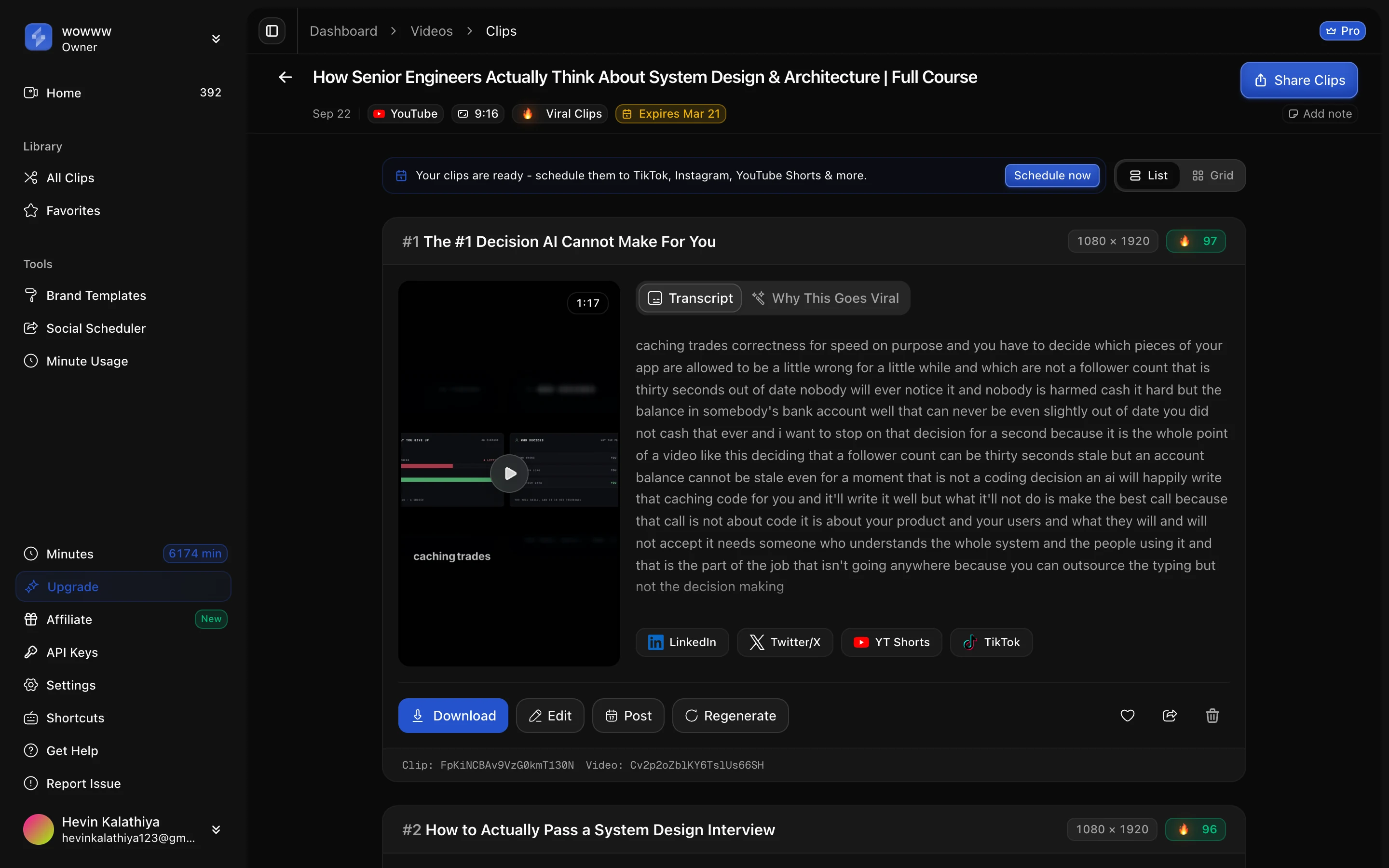
For more on how face tracking works, see how to convert landscape video to vertical. Every reframe can be changed by hand in the editor before you export.
What makes a good coaching clip?
One idea that works without the rest of the session. ScaleReach finds moments by reading the transcript, so it’s looking for spoken setups and payoffs, not visuals. In coaching footage, the clips that stand alone tend to be:
- A named framework. “There are two voices holding you back” works on its own. “As I said in part one” doesn’t.
- A reframe of a common belief. Saying out loud the thing most of your audience gets wrong.
- The answer to a question you hear every week. If three clients asked it, strangers are searching for it.
- A short story with a turn. A client result told without identifying the client, or with their written consent.
These are real clip titles our system picked from public YouTube videos processed in our own test workspace:
| Source | Length | Clips | Example clips (viral score) |
|---|---|---|---|
| Interview with a counselling psychologist and life coach | 66 min | 9 | ”The Two Voices Holding You Back” (92), “Why ‘Awareness’ Is Not Enough To Change” (90), “The Difference Between Pain and Suffering” (85) |
| Video on the consulting industry | 10 min | 8 | ”The MECE Framework: How Consultants Solve Impossible Problems” (95) |
| System design full course, slides only | 38 min | 7 | ”The #1 Decision AI Cannot Make For You” (97), “How to Actually Pass a System Design Interview” (96) |
Source: ScaleReach production database, read-only query, 4 October 2026.
Notice how often “framework” shows up. Every clip also gets labels for the hook technique the model thinks it uses. In coaching footage those labels read like teaching moves: “Actionable mental model”, “Promises a framework”, “Counter-intuitive statement”. To be straight about what that means: across all 4,835 live clips, the 226 (4.7%) with a framework-style label averaged a viral score of 88, against 87 for every clip. The score doesn’t reward frameworks. Pick them because they show prospects how you think, not because they score higher. On how to open each clip, see how to write a hook for short videos.
Should you change the clip type for coaching videos?
You can, though almost nobody does. Of 1,991 clip jobs set up on ScaleReach, 1,956 (98.2%) used the default Viral Clips template, and 75 (3.8%) added a custom prompt. The templates closest to coaching material:
| Template | What the model is told to look for |
|---|---|
| Topic Clips | ”Each clip should be a self-contained explanation of a specific topic” |
| Speaker’s Insights | ”Insightful, thought-provoking, or relatable opinions… expert knowledge, and moments of wisdom” |
| Instructions | ”Step-by-step instructions, tips, tricks, and practical demonstrations” |
| Testimonial | ”Success stories” and “authentic praise”. Only use this with the client’s consent |
The Custom tab takes plain language, for example “Find moments where I explain a framework or answer a client question, under 90 seconds.” We don’t have enough non-default jobs to say any template beats Viral Clips on coaching footage, so treat this as a way to steer, not a proven upgrade.
How long should a coaching clip be?
Most land between 30 and 60 seconds, and teaching runs a bit longer. The 73 live clips from videos with coaching or course words in the title had a median length of 43 seconds, and 69.9% ran 60 seconds or less. The 4,729 clips from everything else had a median of 45 seconds, with 73.3% at 60 seconds or less. That’s a small sample, because coaching content is rare in our library: 10 of the 814 completed videos have words like coach, course or class in the title.
Explanations need room. The slides-only course above produced clips from 25 to 104 seconds. YouTube Shorts takes up to 3 minutes, so a 90-second lesson fits. If you post the same clip everywhere, our breakdown of clip length on TikTok, Reels and Shorts covers where each length works.
How do you upload a Zoom recording?
Download it first. ScaleReach takes links from YouTube, Twitch and Kick, not Zoom share links, so a Zoom recording goes in as a file. Files can be MP4, MOV or WebM, up to 2 GB on the free plan and 4 GB on paid plans.
Length and minutes depend on the plan:
| Plan | Longest video accepted | Minutes per month | Price |
|---|---|---|---|
| Free | 30 minutes | 100 (one-time) | $0 |
| Starter | 2 hours | 200 | $12/month, or $10/month billed annually |
| Pro | 3 hours | 400 | $18/month, or $12.50/month billed annually |
| Agency | 3 hours | 5,000 | $99/month, or $49/month billed annually |
A 60-minute webinar costs 60 minutes, so Starter covers about three a month and Pro about six. The free plan’s 30-minute cap per video means a full webinar needs a paid plan, or a trimmed file. Current figures are on the pricing page.
If the webinar was also a sales or B2B event, our webinar to LinkedIn clips playbook covers clip roles and posting order.
FAQ
How do I turn coaching videos into short clips?
Pick a recording where you’re teaching, such as a webinar, workshop or training, and download the active speaker version. Upload it to an AI clip tool, which reads the transcript, picks self-contained moments, crops them to 9:16 and adds captions. Review the clips, keep the ones that make sense without the rest of the session, and post them to Reels, Shorts or LinkedIn.
Can I post clips from client coaching sessions?
Not without the client’s written consent. The ICF Code of Ethics defines confidentiality as protecting any information from the coaching relationship unless there’s a legal reason, a threat of harm, or written consent to release. Uploading a session to an AI tool counts as using a technology system, which the code also covers. Re-recording the idea as a solo video is the safer route.
What’s the best Zoom setting for recording clips?
Active speaker. In Zoom’s cloud recording settings, turn on “Record active speaker, gallery view and shared screen separately” and tick Active speaker, then clip that file. One large face gives the vertical crop something to follow. Turn on “Record thumbnails when sharing” too, so your face stays visible during slides. Zoom lists cloud recording as needing a Pro, Business or Enterprise account.
Why do my slide-heavy clips look empty on mobile?
Because there’s no face to follow. When a recording is only slides and voice, ScaleReach keeps the whole frame with a 1.25× zoom rather than guessing a crop, so the slide sits small in the middle of a 9:16 frame. Keep your camera on while presenting, or record with your thumbnail in a corner, and the clip becomes screen on top and your face below.
How long should a coaching clip be?
Usually 30 to 60 seconds, with room to go to 90 for an explanation. In our library, clips from coaching and course videos had a median of 43 seconds, and 69.9% ran 60 seconds or less. That sample is small, 73 clips. YouTube Shorts accepts up to 3 minutes, so a complete lesson of 60 to 90 seconds fits.
How many clips does a one-hour coaching webinar give?
Usually high single digits, more if the talking is dense. In our library, the 21 videos of 30 to 90 minutes processed in the last 60 days averaged 7.4 clips, median 7. A 66-minute coaching interview gave 9. A 10-minute talk on consulting gave 8, because almost every minute held a point. Yield follows how much self-contained teaching is in the recording, not its length alone.
The bottom line
Coaching footage clips well because it’s built from spoken ideas, and that’s what AI clip tools read. The work is in choosing the right recordings: teach on camera, record active speaker view, and leave client sessions out unless the client has agreed in writing.
Then pick clips the way you’d pick examples for a talk. One framework, one reframe or one answer per clip, short enough to watch twice, clear enough that a stranger gets the point without the session around it.
Every ScaleReach number here comes from our production database and source code, dated where it’s cited. If one looks wrong, tell us at hevin@scalereach.ai and we will correct it in the open.
Changelog
October 2026 update. First published. Clip counts, lengths, template use, custom-prompt use and hook-label shares were measured from ScaleReach’s production database on 4 October 2026. Reframe layouts, plan limits, upload formats, retention windows and the transcription and detection providers come from our production code as of that date. Zoom recording settings were read from support.zoom.com and the ICF Code of Ethics from coachingfederation.org on 4 October 2026.
Last reviewed: October 2026 Next planned refresh: January 2027 Update hooks: re-measure clip length once more coaching videos have been processed; whether Zoom links become a supported source; whether Zoom changes its recording layout options.
About the author
Hevin K runs ScaleReach, an AI clip maker that turns long videos, including webinars and coaching recordings, into captioned vertical clips. The figures in this post come from ScaleReach’s own production database and source code, dated where they are cited.
