
A Subway Surfers split-screen video is a vertical 9:16 short with your clip in the top half and gameplay running in the bottom half. At the standard 50/50 split, each half is 1080 × 960 pixels. Our own data shows how settled that layout is: of the 90 videos ScaleReach users have processed in split-screen mode, 88 used an even 50/50 split.
Disclosure: ScaleReach makes a Subway Surfers split-screen generator, so weigh the bias. Every ScaleReach figure below comes from a read-only query of our production database on 30 September 2026. The mechanics come from our own rendering code, not a brochure. The one external claim, YouTube’s monetization rules, is quoted from YouTube’s own help page.
The short answer
Stack two videos in a 1080 × 1920 frame. Your clip goes on top, gameplay goes underneath, and each half is cropped to fill its space. Only your clip’s audio plays.
Keep the split at 50/50 unless you have a reason not to. Give the top half more room only when the speaker’s face or on-screen text needs it.
Keep the clip shorter than the gameplay loop. Our loops run 74 to 90 seconds. A longer clip replays the same run, and viewers notice.
Bottom line: the layout is easy. The real decision is whether the top half is your content. YouTube’s monetization rules reward original content, and gameplay stacked under someone else’s clip is the textbook case of what they don’t reward.
What is a Subway Surfers split-screen video?
It’s a short-form format with two layers stacked vertically. The top half carries the message: a podcast moment, a Reddit story read aloud, a movie scene, a study fact. The bottom half plays continuous, cut-free gameplay, usually Subway Surfers, Minecraft parkour or GTA driving, or “satisfying” footage like soap cutting. People also call it “brainrot” editing.
The reasoning behind it is simple. The audio carries all the meaning, so the bottom half only has to supply constant motion that doesn’t compete with the words. Gameplay with no story of its own does exactly that.
What nobody publishes, us included, is controlled data showing that the gameplay layer raises retention. You’ll see that claim on almost every page selling the format. We don’t have a measurement that proves it, so this post doesn’t make the claim.
How to put Subway Surfers under a video (manual method)
Any editor with layers can do this. Here is the process in editor-agnostic terms:
- Start a 1080 × 1920 project. That’s 9:16 vertical, the frame TikTok, Reels and Shorts are built around.
- Put your clip on the top layer and scale it to fill the top 1080 × 960. Scale until it covers the whole area, then crop the overflow. Don’t letterbox it. If your source is landscape, keep the speaker in the kept area; the face-tracking problem is the same here as in a full-frame reframe.
- Put the gameplay on the layer below, filling the bottom 1080 × 960. Same rule: scale to cover, then crop.
- Mute the gameplay. Only your clip’s audio should play.
- Trim everything to your clip’s length. If the gameplay is shorter than your clip, you’ll have to loop it, and that’s where the repeat becomes visible.
- Add captions near the seam between the two halves. That’s where they sit in the render shown further down, so neither half covers them.
- Export as MP4 at 1080 × 1920.
It works, but you repeat all seven steps for every clip. That’s fine for one or two shorts a week. It becomes the job itself if you’re cutting a whole episode.
What split ratio should a split-screen video use?
Use 50/50. It’s the default in our renderer and the choice almost everyone makes. 88 of the 90 split-screen videos in our data used it. The other two used 45/55.
| Split (top/bottom) | Top half | Bottom half | When to use it |
|---|---|---|---|
| 50/50 | 1080 × 960 | 1080 × 960 | The default. Works for most talking and story content |
| 60/40 | 1080 × 1152 | 1080 × 768 | The speaker’s face or on-screen text needs more room |
| 40/60 | 1080 × 768 | 1080 × 1152 | Narration-only content where the top is mostly captions |
Our renderer accepts anything from 30/70 to 70/30. Past about 60/40 in either direction, one half gets cramped enough to defeat the point of the layout.
How long should a split-screen clip be?
Keep it under the length of your gameplay loop, which in practice means under about 80 to 90 seconds. Our background library has 27 loops, and here is how long they actually run:
| Background | Loops | Length |
|---|---|---|
| GTA 5 | 12 | 74–90 seconds (average 88) |
| Minecraft parkour | 7 | 90 seconds each |
| ASMR / satisfying | 5 | 90 seconds each |
| Subway Surfers | 3 | 80–90 seconds (average 87) |
Source: ScaleReach background library, measured 30 September 2026.
A clip that runs past its loop shows the same gameplay run twice. In our data, split-screen clips run a median of 44 seconds, 84.4% are 60 seconds or shorter, and 93.7% are 90 seconds or shorter. That leaves about 6% long enough to outrun even our longest loop. Split-screen clips also skew shorter than everything else we render: 84.4% are one minute or less, against 71.9% for ordinary clips. For platform-by-platform length targets, see how long a clip should run on TikTok, Reels and Shorts.
How do you make a split-screen video automatically?
With a clip tool that does the stacking for you. Here is what ScaleReach’s renderer does, straight from the code:
- It places your clip on top and the gameplay underneath, scaling each to cover its own half and cropping the overflow. Neither half is stretched.
- It plays your clip’s audio only. The gameplay is always silent.
- It varies the gameplay between clips. If a loop is at least twice as long as your clip, it starts from a random point. If the loop is shorter than your clip, it loops. So two clips from the same episode don’t open on the same frame of gameplay.
- It picks the background for you, either from loops you select or at random from the 27-loop library.
- It caps split-screen output at 1080p, even on plans that export 4K otherwise. 1080 × 1920 is the resolution the platforms play anyway.
The workflow is: paste a YouTube link or upload a file, turn on split screen, pick a ratio and background, and every clip the AI finds comes out already stacked, captioned and scored. Split-screen backgrounds are on paid plans from Starter ($12/month, or $10/month billed annually); the free plan doesn’t include them. Current figures are on the pricing page.
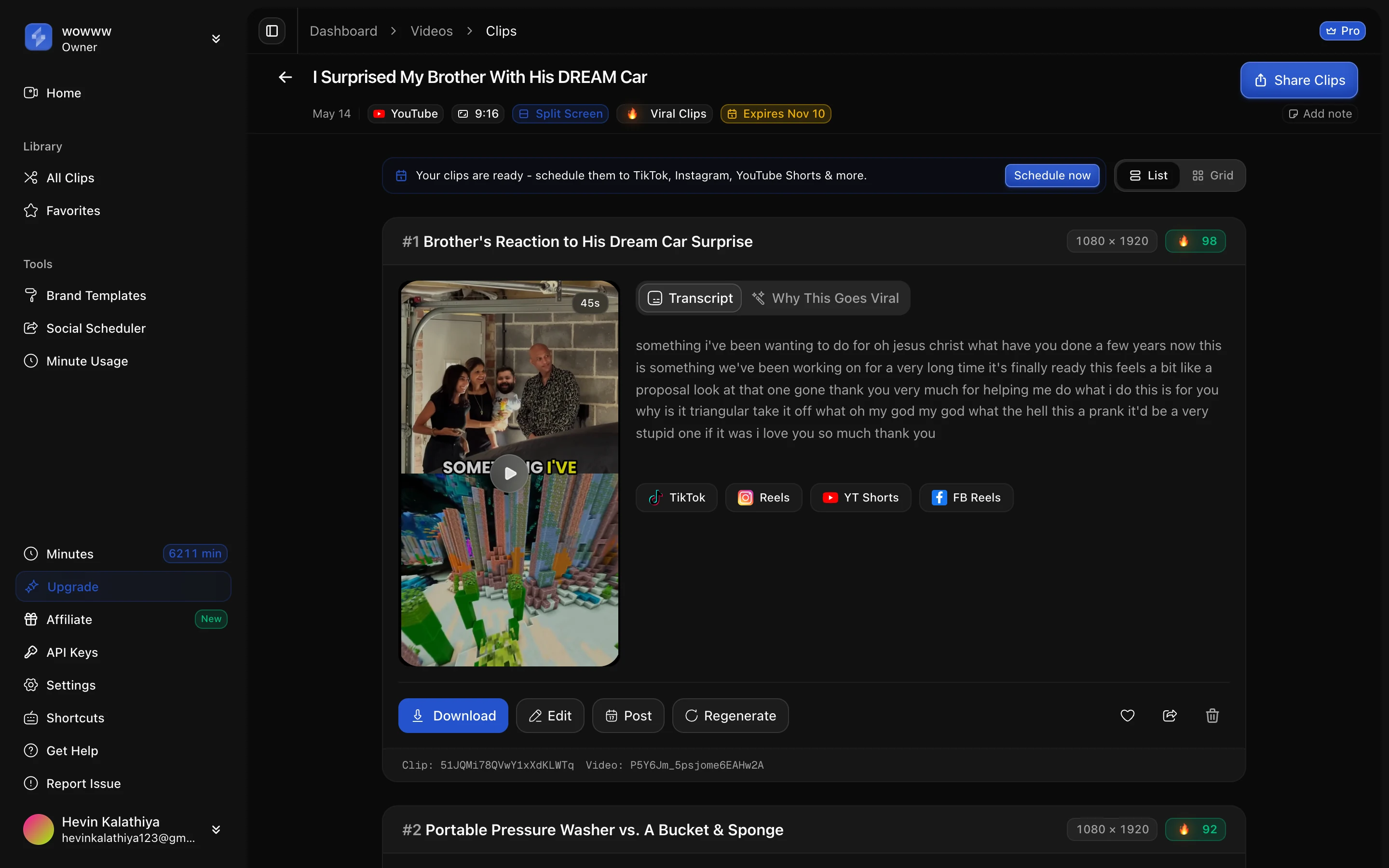
The same layout works with any loop, which is why we also run Minecraft parkour and ASMR versions of this tool. Subway Surfers is the best known of the four, not the only option.
Can you monetize Subway Surfers split-screen videos on YouTube?
Only if the top half is genuinely yours, or transformed enough that it counts as yours. YouTube’s channel monetization policies describe reused content as content repurposed “without adding significant original commentary, substantive modifications, or educational or entertainment value”. Among the examples of what isn’t allowed to monetize, the page lists “short videos you compiled from other social media websites.”
Two more lines from the same page matter for this format:
- Templates count against you. Since 15 July 2025 YouTube calls this “inauthentic content”. The page says generic content “includes content that looks like it’s made with a template.” A channel of identical gameplay-under-clip shorts looks like a template by design.
- The review covers the whole channel, not one video. Reused content “applies to your channel as a whole”, so one weak format can cost monetization on everything.
The same page also says what is fine. It lists “edited footage from other creators where you add a storyline and commentary”, and “a Short that puts your own personalized spin on a trend.” So the safe version of this format is your own recording on top: your podcast, your commentary, your story. Gameplay is a presentation layer on top of that. It isn’t a substitute for it. Monetization rules are separate from copyright, and YouTube says so explicitly. TikTok and Instagram apply their own originality rules to reposts, which we covered in how to repost a video without getting flagged.
Who should use the split-screen format?
It suits faceless accounts, storytime and Reddit narration, study facts, and podcast clips aimed at a younger TikTok audience. It suits a personal brand, a B2B account or anything on LinkedIn badly. The format reads as low-effort to exactly the audience those accounts are trying to impress.
Our own users treat it as a niche, not a default. Only 90 of 1,931 videos (4.7%) were processed with split screen on, by three users, almost all of it between February and mid-May 2026. The other 95% of our clips are ordinary full-frame vertical clips. If you’re unsure, clip an episode both ways and post both. The format that fits your audience will show up in your own analytics faster than in anyone’s blog post, this one included.
FAQ
How do I put Subway Surfers under a video?
Make a 1080 × 1920 vertical project and put your clip on the top layer, scaled to fill the top 1080 × 960. Put Subway Surfers gameplay on the layer below, filling the bottom 1080 × 960. Mute the gameplay, trim both to your clip’s length, add captions near the seam and export as MP4. A split-screen generator does the same stacking automatically for every clip it finds in a long video.
What is the best split ratio for a split-screen video?
50/50, giving each half 1080 × 960 pixels. It’s the default in our renderer, and 88 of the 90 split-screen videos processed on ScaleReach used it. Give the top half more room, around 60/40, when the speaker’s face or on-screen text needs it. Past about 60/40 in either direction, one half becomes too cramped to work.
How long should a Subway Surfers split-screen video be?
Shorter than the gameplay loop, which in practice means under about 80 to 90 seconds. Our Subway Surfers loops run 80 to 90 seconds and the whole 27-loop library tops out at 90, so a longer clip shows the same gameplay twice. Split-screen clips on ScaleReach run a median of 44 seconds, and 84.4% are a minute or less.
Can I monetize split-screen brainrot videos on YouTube?
Only if the content is substantially yours. YouTube’s monetization policies exclude reused content without “significant original commentary, substantive modifications, or educational or entertainment value”, and they flag content that looks template-made. Gameplay stacked under someone else’s clip is the risky case. Your own podcast or commentary with gameplay underneath is the safer one, because the top half is original.
Is there a free Subway Surfers video generator?
ScaleReach’s free plan gives you 100 minutes of AI clipping, but split-screen backgrounds start on the Starter plan, at $12/month or $10/month billed annually. The manual method in any layered video editor costs nothing but time. Expect to repeat seven steps for every clip.
Does it have to be Subway Surfers gameplay?
No. The format works with any continuous, cut-free footage that doesn’t compete with your audio. Our library has 27 loops: 12 GTA 5 driving, 7 Minecraft parkour, 5 ASMR or satisfying clips and 3 Subway Surfers. Subway Surfers is the best known, but the bottom half only needs steady motion with no story of its own.
The bottom line
The layout takes seconds to describe: your clip on top, gameplay below, 50/50, 1080 × 1920, the clip’s audio only, and shorter than the loop. The manual method works in any editor. A generator does it for every clip in one pass.
The decision that matters is what goes in the top half. Put your own recording there and the gameplay is a harmless attention layer. Put someone else’s clip there and you’re building exactly the channel YouTube’s reused-content and template rules are written to demonetize.
Every ScaleReach number here comes from our production database and rendering code, dated where it’s cited. If one looks wrong, tell us at sales@scalereach.ai and we will correct it in the open.
Changelog
September 2026 update. First published. Split-screen usage (90 of 1,931 videos, 88 at 50/50), clip lengths (median 44 seconds, 84.4% at 60 seconds or less) and the 27-loop background library were measured from ScaleReach’s production database on 30 September 2026. The rendering behaviour (stacking, audio, loop and offset handling, the 1080p cap) comes from our production compositor code as of that date. YouTube policy quotes were read from support.google.com/youtube/answer/1311392 on 30 September 2026.
Last reviewed: September 2026 Next planned refresh: December 2026 Update hooks: whether YouTube changes its reused- or inauthentic-content wording; whether the background library grows past 27 loops or past 90-second loop lengths; whether split-screen usage moves off 4.7% of videos.
About the author
Hevin K runs ScaleReach, an AI clip maker that turns long videos into captioned vertical clips, including split-screen shorts with gameplay underneath. The figures in this post come from ScaleReach’s own production database and rendering code, dated where they are cited.
