
Upload a one-hour podcast episode to an AI clip maker and you will usually get back somewhere between 8 and 20 short clips, not the dozens the category likes to imply. That range is not a guess. It comes from our own pipeline, where we measured 7,101 clips generated from 1,224 source videos, then read the live numbers again on 27 September 2026 to check them against real one-hour episodes.
These are ScaleReach’s own numbers, from our production database and source code rather than a marketing page, so you can weigh the bias for yourself. The point of this post is not to sell you a plan. It is to set a realistic expectation before you upload, because “how many clips will I actually get” is the question every podcaster asks and almost nobody answers with data.
The short answer
A typical one-hour episode returns high single digits to the low twenties. In our data the average for a straightforward hour sits near 8 to 10 clips, and a fast, topic-dense interview pushes it into the high teens or low twenties.
The “dozens of clips” figure is really a multi-hour number. Our own average for everything over 60 minutes is 18 clips, but that bucket is dominated by two and three-hour podcasts. A tight 60 minutes sits at the bottom of it.
Density matters more than length once you are near an hour. How much distinct, quotable material the hour contains moves the count more than a few extra minutes of runtime.
Bottom line: plan for roughly a dozen clips from a one-hour episode. That is about two weeks of daily posting, or a month if you post every other day, from a single recording.
What counts as a “clip” here?
A clip in this post is one AI-detected moment that the pipeline cut, reframed to vertical, captioned, and returned ready to post. It is not a rough candidate or a timestamp suggestion. Every clip counted below is a finished, downloadable short with a virality score attached.
That definition matters because it is where tools quietly disagree. Some count detected moments before you cut them, some count only what you export, and some cap the number at your plan tier. When we say a 65-minute interview produced 21 clips, we mean 21 finished vertical clips sitting in the library, each one you could download and post as-is.
How we measured this
Two sources, both first-party, both dated.
- The corpus. 1,224 source videos and the 7,101 clips they produced, measured on 27 July 2026. This is the same dataset our clip generator tool page and cost breakdown cite, so the numbers here agree with the rest of the site.
- A live re-read. On 27 September 2026 we queried the production database again for real episodes near the one-hour mark and their exact clip counts, to confirm the July averages still hold and to pull the concrete examples you see below.
One honest caveat about the live numbers. Clips are deleted on a schedule once they age out, so the raw average clip count for older videos in the database understates what those videos originally produced. Every figure below is drawn from either the 27 July measurement, taken when the clips were fresh, or from recent episodes whose clips are still intact. We did not publish a deflated live average as if it were the true yield.
So how many clips from one hour, really?
Clip yield scales with source length. Here is the full ladder from the July measurement, so you can see where an hour falls.
| Source length | Average clips per video |
|---|---|
| Under 5 min | 2.9 |
| 5 to 15 min | 4.3 |
| 15 to 30 min | 5.4 |
| 30 to 60 min | 7.5 |
| Over 60 min | 18.0 |
Source: ScaleReach pipeline data, 1,224 videos and 7,101 clips, measured 27 July 2026.
Notice the jump from 7.5 to 18 as you cross the hour mark. That looks like an hour of runtime suddenly doubles your output, and it does not. The “over 60 min” bucket is mostly two and three-hour podcasts, and those long shows pull the average up hard. A source sitting right at 60 minutes behaves much more like the top of the 30-to-60 band than like the 18-clip average.
Real episodes make this concrete. These are four actual videos from a ScaleReach workspace, with their clip counts read on 27 September 2026.
| Episode | Length | Clips produced |
|---|---|---|
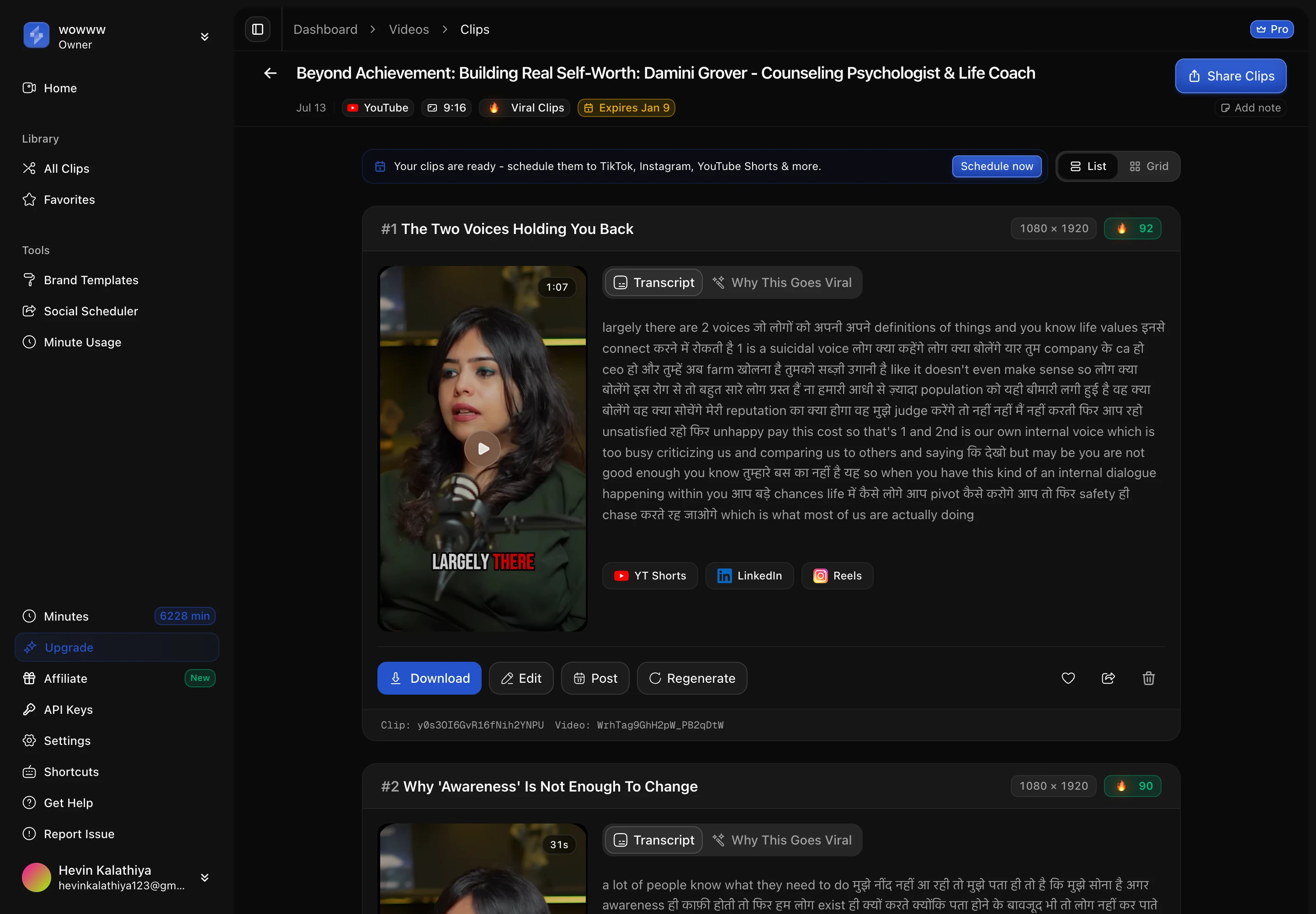
| A self-worth interview (Damini Grover) | 66 min | 9 |
| NVIDIA CEO Jensen Huang interview | 63 min | 16 |
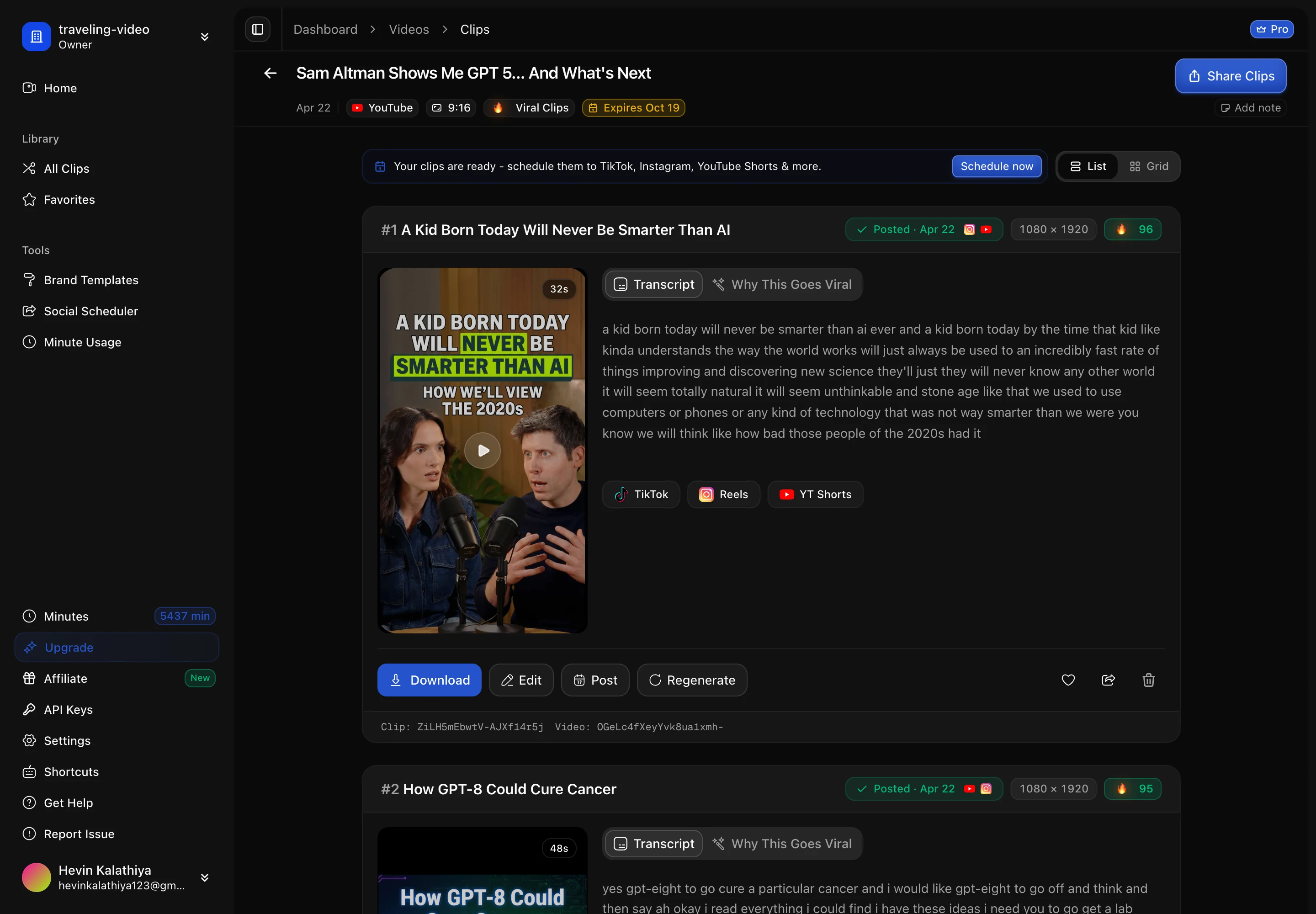
| Sam Altman on GPT-5 | 65 min | 21 |
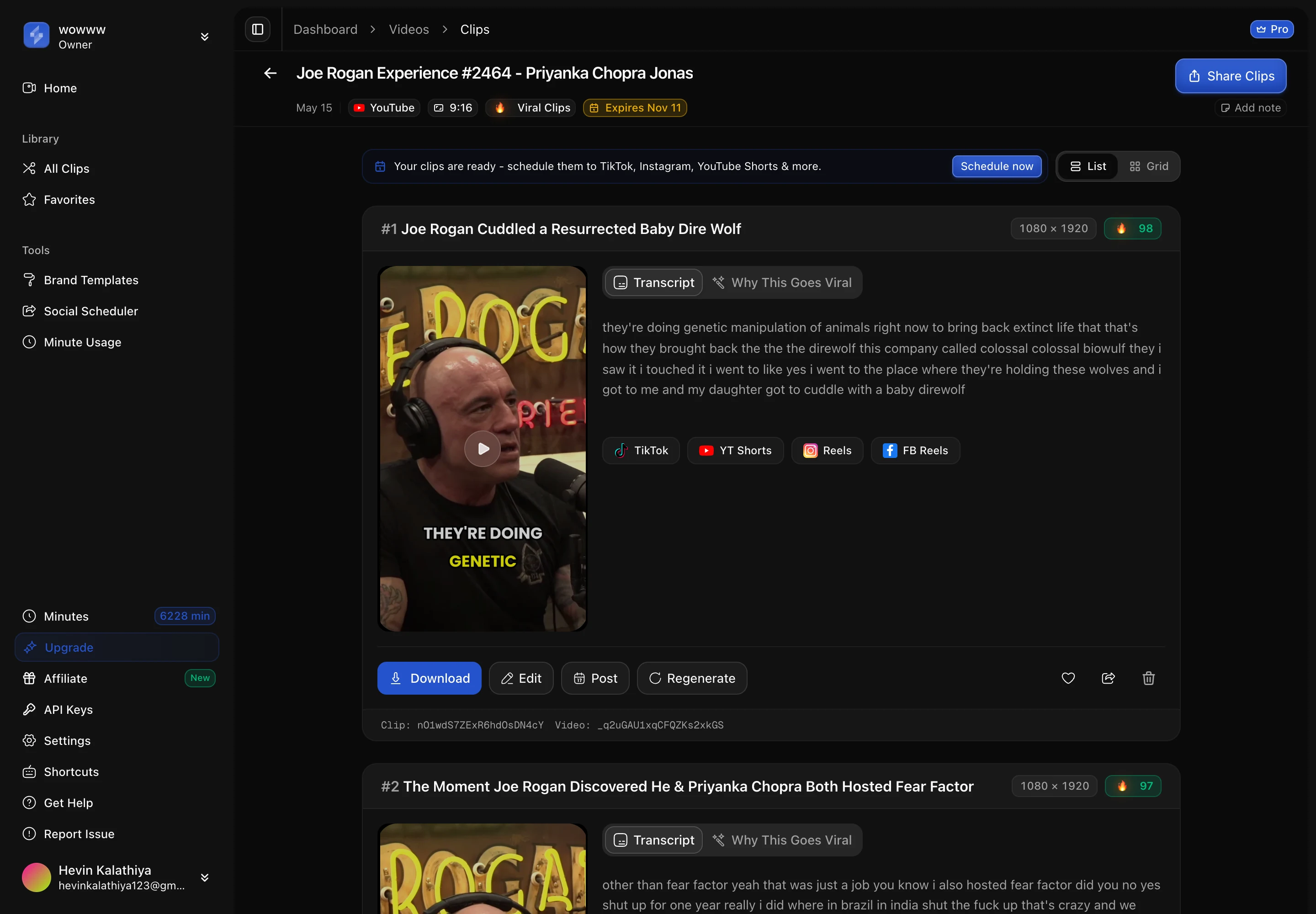
| Joe Rogan Experience #2464 | 2 hr 25 min | 61 |
Three of those are within five minutes of each other in length and range from 9 to 21 clips. That spread, from the same one-hour runtime, is the real answer: expect a dozen or so, and know that the exact number depends on the episode, not the clock.
Why do some one-hour episodes produce three times as many?
Because the pipeline cuts on distinct, self-contained moments, and some hours simply hold more of them. Two recordings of identical length can yield 9 and 21 clips for reasons that have nothing to do with the runtime.
- Topic density. An interview that moves through fifteen sharp questions gives the detector fifteen natural clip boundaries. A slow, single-thread conversation gives it far fewer.
- Quotability. Strong hooks, clean one-liners, and stories with a beginning and an end score higher and survive as clips. Rambling stretches get skipped.
- Structure. Panels, rapid Q&A, and reaction segments cut into more clips than a monologue, where the good material is buried in longer passages.
- Dead air. Intros, sponsor reads, and tangents are not clip material, and a chatty hour with ten minutes of setup effectively has fifty minutes of clippable content.
The 65-minute Sam Altman interview below returned 21 clips because it is fast and packed with distinct, quotable claims. The 66-minute episode above returned 9 because it is a slower, more reflective conversation. Same length, very different clip counts.
Does a longer episode just mean more clips?
Roughly, yes, and this is where the “dozens” figure comes from. A two-hour show gives the detector twice the material of a one-hour show, so it lands near twice the clips. Our biggest single upload, a 2-hour-25-minute Joe Rogan episode, produced 61 clips, the most from any one source in our library.
So if a roundup tells you an AI clip tool makes “30-plus clips,” read it as a claim about a long recording. It is true for a two or three-hour podcast and misleading for a one-hour one. When you are comparing tools, the honest unit is clips per source hour, not the biggest number a vendor can point to. We break the tools down that way in our feature-by-feature comparison.
How far does a dozen clips actually go?
Further than it sounds, because short-form is a cadence game, not a volume game. Our clips run a median of 42 seconds, so a dozen 40-second clips is roughly eight to nine minutes of finished vertical video from one hour of source.
At a realistic posting rhythm, that one recording covers:
| Clips from the episode | Posting 3x per week | Posting daily |
|---|---|---|
| 9 clips | 3 weeks | 9 days |
| 12 clips | 4 weeks | 12 days |
| 20 clips | ~7 weeks | 3 weeks |
One weekly one-hour episode, clipped, is enough to post most days without ever running dry. What you do with those clips is a separate skill, and we cover placement in how to grow a podcast with short clips and length-per-platform in podcast clip length on TikTok, Reels and Shorts.
The clips also come back fast. In our data, sources over 30 minutes finished processing in a median of about five and a half minutes, so a one-hour episode is clipped and captioned before your coffee is cold.
FAQ
How many clips can you get from a one-hour podcast?
Usually 8 to 20 finished clips. In our first-party data a straightforward one-hour episode averages high single digits, and a fast, topic-dense interview reaches the high teens or low twenties. Real one-hour episodes in our library produced 9, 16, and 21 clips. The exact number depends on how much distinct, quotable material the hour contains, not on the runtime alone.
Why do people say AI makes 30 or more clips from a podcast?
Because that figure describes a long recording, not a one-hour one. Clip yield scales with length, so a two or three-hour podcast lands near 30 to 60 clips. Our own average for everything over 60 minutes is 18 clips, but that number is pulled up by multi-hour shows. A tight 60-minute episode sits at the bottom of that bucket, closer to a dozen.
What makes one episode produce more clips than another?
Density and structure. An interview with many sharp, self-contained questions gives the detector more natural clip boundaries than a slow, single-topic conversation. Strong hooks and clean stories survive as clips; rambling stretches, intros, and sponsor reads do not. Two recordings of identical length can produce 9 and 21 clips for this reason alone.
How long are the clips from a one-hour podcast?
They run a median of 42 seconds and an average of 46.7 seconds across 7,101 clips, with a floor of 5 seconds and a ceiling of about 3 minutes. That length fits YouTube Shorts, Reels, and TikTok without trimming, so a dozen clips is roughly eight to nine minutes of ready-to-post vertical video from one hour of source.
Can I clip a full one-hour podcast on the free plan?
Not in one upload. The ScaleReach free tier includes 100 minutes a month but caps a single upload at 30 minutes, so a full hour needs a paid plan or has to be split in two. On a paid plan a 60-minute episode costs 60 source minutes, which fits comfortably inside Starter’s 200 monthly minutes. See our pricing for the current tiers.
How long does it take to clip a one-hour episode?
About five to six minutes of processing. In our data, sources over 30 minutes finished in a median of roughly five and a half minutes from job start to clips ready. The clips come back reframed to vertical, captioned, and scored, so the wait is for finished shorts rather than raw candidates you still have to edit.
The bottom line
Plan for about a dozen clips from a one-hour podcast. High single digits if it is a slow, reflective conversation, the high teens or low twenties if it is a fast, topic-dense interview. The dozens-of-clips numbers you see quoted are real, but they belong to two and three-hour recordings, and reading them as a one-hour figure will leave you disappointed.
The more useful way to think about it: one weekly hour-long episode, clipped, gives you enough 40-second shorts to post most days of the week without repeating yourself. The bottleneck was never how many clips you can make from an hour. It is what you do with them after.
Every number here comes from our own pipeline and is dated in the text. If one looks wrong, tell us at sales@scalereach.ai and we will correct it in the open.
Changelog
September 2026 update. First published. Clip-yield ladder and clip-length figures from ScaleReach pipeline data measured 27 July 2026 (1,224 videos, 7,101 clips); real one-hour episode examples and clip counts read from the production database on 27 September 2026.
Last reviewed: September 2026 Next planned refresh: December 2026 Update hooks: whether the clip-yield-by-length ladder shifts on the next pipeline re-measurement; whether the median clip length moves off 42 seconds; whether the free-tier per-upload cap (currently 30 minutes) changes.
About the author
Hevin K runs ScaleReach, an AI clip maker that turns long videos and podcasts into scored, captioned vertical clips. The figures in this post come from ScaleReach’s own production database and source code, dated where they are cited, so you can judge them directly.
