
Vugola is an AI clip maker built for AI agents as much as for people. It cuts long videos into captioned shorts, schedules them to five social networks, and puts a REST API and an MCP server on every paid plan, so Claude, ChatGPT or Cursor can clip and post for you. Plans cost $19.99, $49.99 and $99.99 a month, and one credit buys one minute of source video. That makes it one of the most expensive tools per source minute we have priced. It has no free plan, all sales are final, and it does not publish to YouTube.
Disclosure: I run ScaleReach, which publishes this review and competes with Vugola. I did not pay for a Vugola plan, and I did not run my own videos through it for this post. There is no affiliate relationship. Everything below comes from Vugola’s own home, pricing, docs and terms pages, read on 27 October 2026. Where Vugola beats us, I say so.
The 60-second verdict
Choose Vugola if you want an AI agent to do the clipping and posting, you want a YouTube channel watched and clipped automatically, or you want to tell an editor what to change in plain English.
Look elsewhere if you clip several hours of video a month on a budget, need to post to YouTube Shorts, want a free plan to test with, or want a refund path.
Check first: clipping costs 1 credit per started source minute. Starter’s 50 credits cover one 50-minute video a month, and AI prompts and edits come out of the same balance.
Bottom line: the most agent-ready product in this category, priced like a premium editor. Work out your monthly source minutes before you pay.
What is Vugola?
Vugola is a web app at vugolaai.com run by Vugola LLC, a South Dakota limited liability company, per its terms. It also has an iPhone app. Per its home page and docs, it:
- Runs a Clipping Agent that picks moments from a long video, frames the speaker’s face and burns in branded captions.
- Lets you describe the edit you want to an AI editing agent, then fine-tune cuts, captions, framing, text and images on a timeline in its Studio editor.
- Captions speech in 99 languages. The FAQ says it keeps the original language “rather than translating or dubbing it”.
- Schedules and publishes clips from one calendar to X, Instagram, TikTok, Facebook and LinkedIn.
- Runs Automations that watch a YouTube channel, clip new uploads and schedule the clips to your accounts.
- Exposes all of this through a REST API and an MCP server on every paid plan.
The home page says it is “Loved by 95,000+ creators”. The page does not say how that was counted.
How much does Vugola cost in 2026?
The pricing page shows monthly prices by default, with an “Annual Discount, Save 20%” switch. Read on 27 October 2026, in US dollars:
| Plan | Monthly | Yearly (per month) | Charged per year | AI credits | Social platforms | Automations |
|---|---|---|---|---|---|---|
| Starter | $19.99 | $15.00 | $179.99 | 50 a month | 2 (1 account each) | None |
| Creator | $49.99 | $39.17 | $469.99 | 300 a month | 4 (1 account each) | 1 |
| Pro | $99.99 | $79.17 | $949.99 | 800 a month | All 5 (1 account each) | Up to 5 |
Source: vugolaai.com/pricing (verified 2026-10-27). Monthly prices also appear in the page’s structured data. Yearly prices come from the same page’s annual toggle. Every plan lists the Studio editor with AI edit, 1080p export, AI clipping and API access. Creator adds priority processing, and Pro adds priority support.
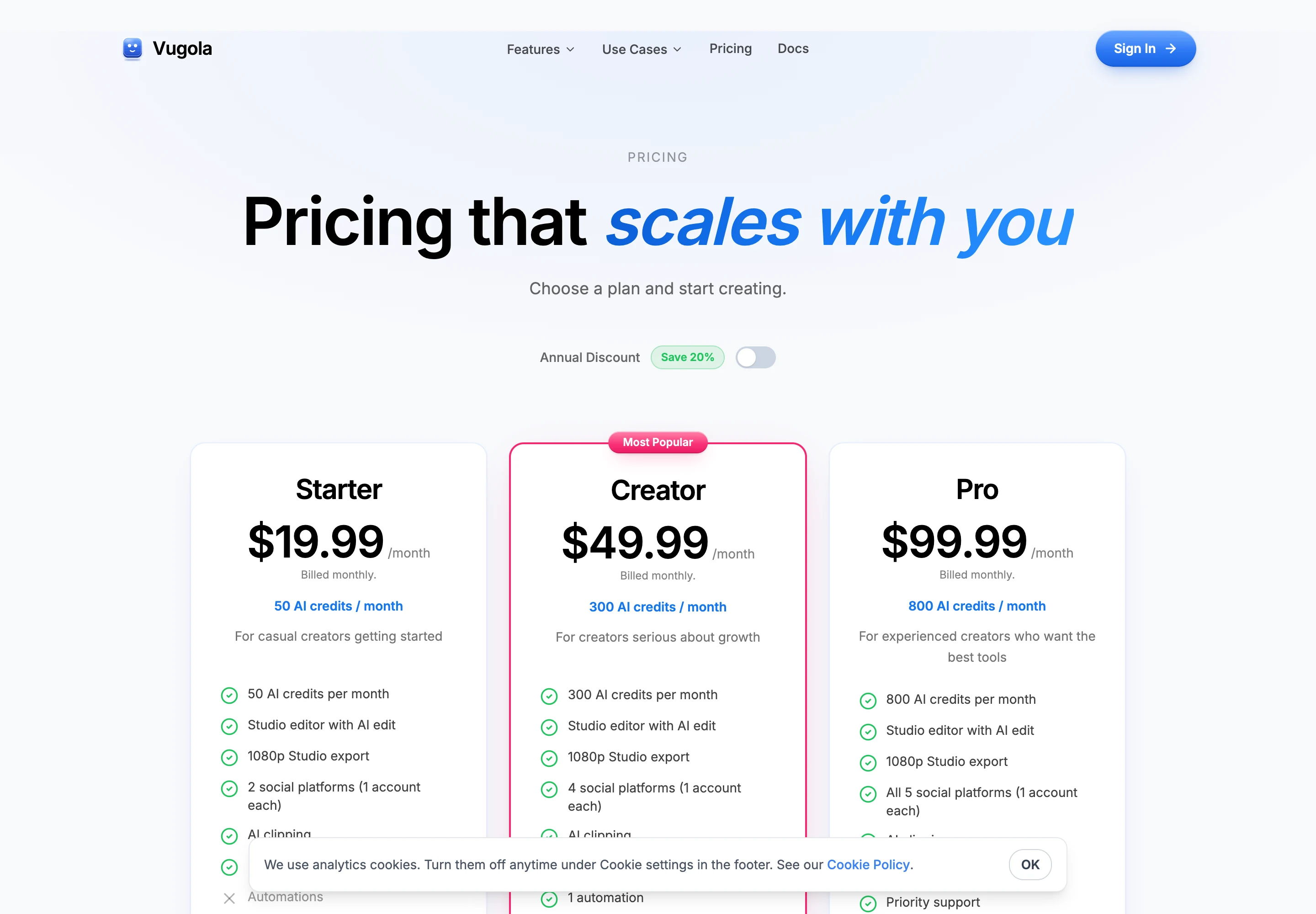
A few things the cards do not make obvious:
- “Save 20%” undersells Starter. Twelve months of Starter at $19.99 is $239.88, and the yearly price is $179.99, which is 25% off. Creator and Pro save about 22% and 21%.
- One account per platform. Even Pro connects one account on each of the five networks. If you run several brands or client channels, that caps you at one of each.
- There is no free plan. The pricing FAQ says “Access starts after payment”, and the API docs say accounts without an active paid plan get a
subscription_requirederror. - No watermark on any plan. The FAQ says every plan includes its full monthly credits and no watermark.
Is Vugola free?
No. There is no free tier on the pricing page. The terms describe a free trial for plans started from the iPhone app and paid on the website, where the checkout page shows how long the trial lasts and the date of the first charge. I could not find the trial’s length on any public page. If you want one, check the checkout screen before you enter a card.
How do Vugola credits work?
The pricing page says “1 credit = 1 AI prompt, AI edit, or clipping minute”. The docs are more exact: clipping and caption jobs cost “1 AI credit per started source minute”, and Vugola shows the quote before the job starts. A 42-minute podcast costs 42 credits, however many clips come out. A 42 minute 10 second recording costs 43.
The same balance pays for every AI prompt and AI edit you make in the Studio editor. Uploads, transcription in the editor and exports are free. Credits reset at the start of each billing period, and the docs say credits are refunded automatically if a job fails because the video has no speech.
At one credit per source minute, the cost per minute is:
| Plan | Monthly price | Credits a month | Cost per source minute, monthly | Cost per source minute, yearly |
|---|---|---|---|---|
| Vugola Starter | $19.99 | 50 | $0.40 | $0.30 |
| Vugola Creator | $49.99 | 300 | $0.167 | $0.131 |
| Vugola Pro | $99.99 | 800 | $0.125 | $0.099 |
| ScaleReach Starter | $12 | 200 minutes | $0.060 | $0.050 |
| ScaleReach Pro | $18 | 400 minutes | $0.045 | $0.031 |
| ScaleReach Agency | $99 | 5,000 minutes | $0.020 | $0.0098 |
Calculated from Vugola’s pricing page and docs (2026-10-27) and our pricing. The yearly column assumes a yearly plan gets the same monthly credits; the FAQ says every plan “includes its full monthly AI credits”, but the pages do not say how a yearly plan grants them. Vugola’s figures are a best case, since any AI prompt or edit also uses credits.
At the same $99.99 a month, Vugola Pro gives you 800 source minutes. ScaleReach Agency at $99 gives 5,000. If you clip a weekly two-hour podcast, that is roughly 520 minutes a month, which fits Vugola Pro but not Creator.
What videos can Vugola clip?
The API docs say clipping sources must be 5 minutes to 3 hours long, from a public YouTube or Vimeo URL or a direct MP4 link, and the app’s upload screen gives the same error for files outside that range. Anything under five minutes is rejected for clipping. A separate caption job accepts videos up to 20 minutes with no minimum. Outputs are 9:16, 1:1 or 16:9, exported at 1080p.
The API allows 3 clipping jobs at once per account and up to 5 new clip requests a minute. The docs say most jobs finish in 10 to 30 minutes.
Does Vugola post to TikTok, Instagram and YouTube?
TikTok and Instagram, yes. YouTube, no. The docs list exactly five scheduling targets: X, Instagram, TikTok, Facebook and LinkedIn. Instagram needs a Business or Creator account, and the docs add that Threads and Bluesky are “no longer supported”. YouTube appears only as a source: Automations watch a YouTube channel and clip its new uploads.
That is an odd gap for a shorts tool. If YouTube Shorts is one of your main channels, you will have to download the clips and upload them yourself.
Publishing to TikTok carries a catch for every tool: TikTok restricts posts from apps it has not audited. We explain what that does to scheduled posts in which clip tools auto-post to TikTok, Reels and Shorts. I did not connect an account to Vugola to test it.
Does Vugola work with Claude and other AI agents?
Yes, and this is where it stands out. Vugola runs a remote MCP server at https://www.vugolaai.com/api/mcp that you sign into with your Vugola account, no API key needed. Its docs list Claude Desktop, Claude Code, Cursor, Cline and Windsurf, and the home page adds ChatGPT. Through it, an agent can clip videos, download clips, schedule posts and manage Automations. There is also an older npm package, vugola-mcp, with the original eight tools.
The REST API covers the same ground: start a clipping job, add captions, check credits, create Automations and schedule up to 25 posts per request. Every paid plan includes it.
ScaleReach also has an MCP server, which we walk through in clipping YouTube videos from Claude with our MCP server. Vugola’s agent tooling is broader today: channel Automations through MCP is something we do not offer.
Does Vugola offer refunds?
No. The terms have a section headed “Refund Policy” that opens “All sales are final”. Except where a refund is required by law, Vugola “does not offer refunds for any subscription, credit purchase, or other transaction once a payment has been completed”, including for dissatisfaction or accidental purchases. It does not prorate partial periods.
You can cancel from Settings at any time and keep access until the end of the billing period. The terms say to cancel at least 24 hours before your renewal date to avoid the next charge. If you pay through Apple in the iPhone app, cancel through Apple instead. Deleting your account ends access immediately, even with paid time left.
On a yearly plan, that means up to $949.99 paid upfront with no refund path. With no free plan either, a monthly Starter is the cheapest way to test it: $19.99 for 50 source minutes.
What do real users say about Vugola?
There is very little independent evidence. Trustpilot blocked my request, so I could not check for a page or score. The iPhone app, published by Vugola LLC, shows 5.0 stars from 2 ratings on the US App Store, updated on 24 October 2026. The home page carries a wall of posts from X, which are the vendor’s selection, and the 95,000 creators figure has no source.
What does Vugola do better than ScaleReach?
Four things, and they are real:
- Agent tooling. A hosted MCP server with OAuth sign-in, plus an API on every paid plan, including channel Automations.
- YouTube channel Automations. Point it at a channel and it clips new uploads and schedules them without you opening the app, on Creator and Pro.
- Prompt-based editing. You can describe a change to the AI editor instead of making it by hand.
- More caption languages. 99, against our 55.
Vugola vs ScaleReach: which should you pick?
| Vugola | ScaleReach | |
|---|---|---|
| Cheapest paid plan | $19.99/month, or $15/month yearly, 50 credits | $12/month, or $10/month yearly, 200 minutes |
| Usage unit | 1 credit per started source minute, plus credits for AI prompts and edits | 1 credit per source minute |
| Best cost per source minute | $0.099 (Pro, yearly) | $0.0098 (Agency, yearly) |
| Free plan | None | 100 free minutes, watermarked |
| Source length | 5 minutes to 3 hours | Up to 2 hours (Starter), 3 hours (Pro and Agency) |
| Caption languages | 99 | 55, plus Hinglish captions |
| Translation or dubbing | No, per its FAQ | Yes |
| Direct publishing | X, Instagram, TikTok, Facebook, LinkedIn | TikTok, Instagram, Facebook, YouTube Shorts, LinkedIn, Threads. X coming soon |
| Accounts per platform | 1 on every plan | 1 to unlimited social accounts, by plan |
| MCP server | Yes, hosted with OAuth, all paid plans | Yes |
| Refunds | No, all sales final | Not compared here |
Vugola figures from its own pages, ScaleReach figures from our pricing page and product, verified 2026-10-27. “Not compared here” means I did not verify the other side of that row.
Pick Vugola if your workflow runs through an AI agent, you want a YouTube channel clipped on autopilot, and your monthly source minutes fit its credits. Pick ScaleReach if you clip hours of video a month, post to YouTube Shorts, want to translate or dub your clips, or want a free allowance to test with first.
FAQ
Is Vugola free?
No. Vugola has no free plan, and its pricing FAQ says access starts after payment. Its terms mention a free trial for plans started from its iPhone app, but no public page states the trial’s length.
How much does Vugola cost?
Starter is $19.99 a month, Creator $49.99 and Pro $99.99. Billed yearly they are $179.99, $469.99 and $949.99. Prices come from Vugola’s pricing page, read on 27 October 2026.
How do Vugola credits work?
Clipping and caption jobs cost 1 AI credit per started source minute, quoted before the job starts. AI prompts and AI edits in the editor also use credits. Exports, uploads and editor transcription are free, and credits reset each billing period.
Does Vugola post to YouTube Shorts?
No. Its docs list five scheduling targets: X, Instagram, TikTok, Facebook and LinkedIn. YouTube is supported only as a source for clipping and Automations.
What is the maximum video length on Vugola?
Clipping sources must be between 5 minutes and 3 hours long. Caption-only jobs accept videos up to 20 minutes.
Does Vugola offer refunds?
No. Its terms say all sales are final, except where a refund is required by law, and it does not prorate partial billing periods.
Hevin K runs ScaleReach, an AI clip maker. Vugola is a competitor and there is no affiliate relationship. Every Vugola fact here comes from pages it controls, linked and dated, and I did not run my own videos through it.
