
VDClip is a Brazilian AI clip maker that turns long videos into vertical, captioned clips, scores each one for viral potential and publishes them to six social networks. For a US visitor its plans run from $6.56 a month for 150 minutes of video to $246.48 a year for 200 hours. On annual billing that is about 2 cents per minute of source video, which puts it among the cheapest clippers we track. The catch is that the prices you see today carry a 20% or 50% discount that the page does not date.
Disclosure: I run ScaleReach, which publishes this review and competes with VDClip. I did not pay for a VDClip plan, and I did not run my own videos through it for this post. There is no affiliate relationship. Everything below comes from VDClip’s own home, pricing, MCP and terms pages, read on 17 October 2026, plus its app store listings. Where VDClip beats us, I say so.
The 60-second verdict
Choose VDClip if you want a low cost per source minute on annual billing, a free plan that renews every month, publishing to six networks from one tool, or AI replies to comments and DMs on Instagram, Threads and YouTube.
Look elsewhere if you need a free plan without a watermark, transcription in more than about 30 languages, or independent reviews to check the vendor’s claims against. I could find almost none.
Check first: the current prices carry a 20% discount on monthly billing and 50% on annual. Without it, the per-minute cost roughly doubles on annual plans.
Bottom line: a full-featured clipper priced aggressively for now, with a thin public track record outside Brazil. Use the 30 free minutes to judge the clips, and lock in a price you would still pay without the promotion.
What is VDClip?
VDClip is a web app at vdclip.com, with iOS and Android apps, run by VDClip Tecnologia da Informação Ltda, a Brazilian company, per its site footer. Its home page calls it “Brazil’s #1 choice for AI video clipping” and claims 120K+ creators and 2M+ clips generated. Per its home page and pricing page, it:
- Takes a link or a file. The pricing table lists local video, YouTube, Google Drive, Twitch, Vimeo, Dailymotion, Kwai and TikTok as import sources. The home page says videos can be up to 10 hours long.
- Scores every clip from 0 to 100 for viral potential, based on tone of voice, expression and pacing.
- Reframes to follow whoever is speaking, with split-screen when two people are on camera.
- Captions in “30+ languages” with 32 animated styles.
- Removes silences and filler words in one click, on Premium and up.
- Publishes and schedules to TikTok, Instagram, YouTube, Facebook, LinkedIn and Threads, with AI-written titles, descriptions and hashtags.
- Includes a browser video editor with a multi-track timeline, chroma key and B-roll.
- Exposes an MCP server, so Claude, ChatGPT, Claude Code or Cursor can clip and schedule videos by text command.
How much does VDClip cost in 2026?
VDClip localises its prices by visitor location. Its pricing page asks the payment processor, Paddle, for a price based on your IP address, so a visitor in Brazil sees reais, a visitor in India sees rupees and a US visitor sees dollars. The US prices below are the ones the page renders when Paddle is given a US address.
| Plan | Monthly billing | Annual billing | Credits (1 credit = 1 minute of video) | Watermark | Social profiles per platform |
|---|---|---|---|---|---|
| Free | $0 | $0 | 30 minutes a month | Yes | 1 |
| Lite | $6.56/month (list $8.20) | No annual plan | 150 a month (2.5 hours) | No | 2 |
| Premium | $15.46/month (list $19.32) | $115.85 a year, shown as $9.65/month (list $231.70) | 420 a month, or 5,040 a year | No | 6 |
| Ultimate, 1 pack | $32.86/month (list $41.08) | $246.48 a year, shown as $20.54/month (list $492.96) | 1,000 a month, or 12,000 a year | No | 10 |
Source: vdclip.com/pricing (verified 2026-10-17), US prices as returned by the page’s Paddle price preview. The page says all displayed prices include applicable taxes.
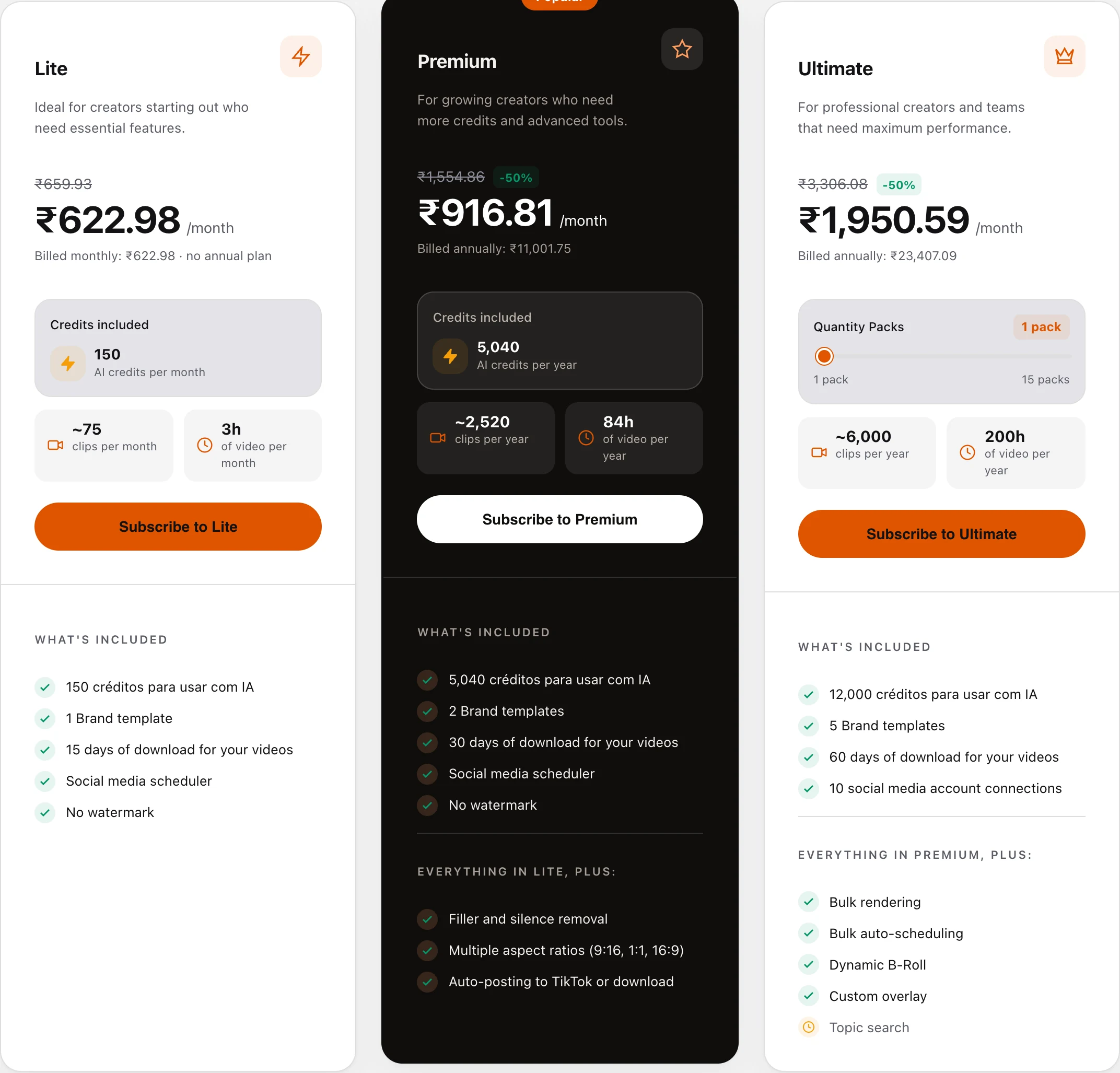
A few things the cards do not make obvious:
- The prices are discounted. Every paid plan shows a struck-through list price. Monthly billing is 20% off and annual billing is 50% off. The Paddle price preview the page loads marks both discounts as recurring, so they appear to apply to renewals too, but the page does not say when the offer ends.
- Ultimate scales in packs. A slider buys more packs: up to 15 on annual and up to 5 on monthly, each adding 1,000 credits a month. I only priced one pack.
- Credits are charged by input length. The FAQ says a 60-minute video uses 60 credits however many clips it returns. On monthly plans, credits stay valid for 60 days.
- Lite’s yearly view is the monthly price. Lite has no annual plan, and the card says so.
- Lite’s hours are rounded up. The card says 150 credits equals “3h of video per month”. At 1 credit per minute, 150 credits is 2.5 hours.
Is VDClip free?
Yes. The pricing FAQ calls it “a permanent Free plan with 30 minutes of video per month”, not a trial, and no card is required. The plan comparison table puts a watermark on Free clips, keeps projects for 5 days and caps the browser editor at 250 MB files. It does include publishing to all six networks, with up to 4 posts a day and 60 a month. One inconsistency: the home page’s Free card lists a virality score, while the comparison table marks “AI curation and virality score” as not included on Free.
How does VDClip compare on cost per source minute?
VDClip prices by minutes of input video, the same unit we use, so the comparison is direct:
| Plan | Price | Minutes / month | Cost per source minute |
|---|---|---|---|
| VDClip Lite, monthly | $6.56/month | 150 | $0.044 |
| VDClip Premium, monthly | $15.46/month | 420 | $0.037 |
| VDClip Premium, annual | $115.85/year | 420 | $0.023 |
| VDClip Ultimate, monthly | $32.86/month | 1,000 | $0.033 |
| VDClip Ultimate, annual | $246.48/year | 1,000 | $0.021 |
| VDClip Premium, annual, at list price | $231.70/year | 420 | $0.046 |
| ScaleReach Starter, annual | $10/month | 200 | $0.050 |
| ScaleReach Pro, annual | $12.50/month | 400 | $0.031 |
| ScaleReach Agency, annual | $49/month | 5,000 | $0.0098 |
VDClip figures from its pricing page, ScaleReach figures from our pricing page, both verified 2026-10-17. Per-minute figures are my arithmetic.
At today’s prices VDClip undercuts us below the agency tier. Premium on annual billing costs about 2.3 cents a minute against 3.1 cents on our Pro plan, and Lite is cheaper than our Starter for a small monthly volume. Our Agency plan is cheaper per minute once you need thousands of minutes a month. Without the 50% promotion, VDClip’s annual plans would cost about 4.6 cents a minute, close to Opus Clip territory. For the wider field, see our clip tools ranked by cost per source minute.
Can VDClip post to TikTok and Instagram?
Its plan comparison table says yes, on every plan including Free: publishing and scheduling to TikTok, YouTube, Instagram, Facebook, LinkedIn and Threads. The limits are posting volume and accounts. Free allows 4 posts a day and 60 a month on 1 profile per platform, and Ultimate allows 150 a day and 1,600 a month on 10. I did not connect an account to test it.
One wording difference to check before you pay: the Premium card lists “Auto-posting to TikTok or download” as a Premium extra, while the table lists TikTok publishing from Free. My reading is that the card refers to automatic posting rather than manual publishing, but VDClip does not explain the difference.
Premium and Ultimate also add something most clippers do not offer: AI replies to comments on posts published through VDClip, and automatic DMs to people who comment, on Threads, Instagram and YouTube. Ultimate extends replies to posts not published through VDClip. Our scheduler covers TikTok, Instagram, Facebook, YouTube Shorts, LinkedIn and Threads, with X coming soon, and has no comment automation. We compared which clip tools auto-post to TikTok, Reels and Shorts in more detail.
Does VDClip work with Claude and ChatGPT?
Yes. VDClip runs a remote MCP server at mcp.vdclip.com/mcp that connects to Claude, ChatGPT, Claude Code and Cursor with an OAuth sign-in rather than an API key. Its MCP page says an agent can send a video, read the transcript, list scored clips, render them and publish or schedule them. The pricing table marks MCP as available on every plan, including Free. A conventional API is listed on Ultimate only. ScaleReach offers the same kind of setup, which we walk through in clipping YouTube videos from Claude with our MCP server.
Which languages does VDClip support?
VDClip says “30+ languages” for captions. It does not publish the list on the pages I read, so check yours before paying. Its caption accuracy figure is also inconsistent: the site menu says 97.8% and the home page body says 98.9%, with no method given for either. ScaleReach transcribes 55 languages and converts Hindi clips to Hinglish captions.
Does VDClip offer refunds?
Only on your first subscription. VDClip’s terms give a 14-day window from the first subscription date for a full refund, and say refunds are not granted for automatic renewals or when the service “has been extensively used in a manner that suggests bad faith”. Cancelling from the profile page stops future charges, and the plan stays active until the end of the paid period. Payments are processed by Paddle.
What do real users say about VDClip?
There is very little independent evidence. VDClip’s home page shows “4.9/5” next to its creator count without saying where the rating comes from. I found no Trustpilot page (trustpilot.com/review/vdclip.com returned a 404) and no G2 listing. Its iOS app “hasn’t received enough ratings or reviews to display an overview”, and its Android app showed 1K+ downloads with no rating when I checked. The testimonials on the home page are from Brazilian creators named by VDClip. That does not mean the product is weak, only that you are relying on VDClip’s own claims.
What does VDClip do better than ScaleReach?
Five things, and they are real:
- Lower cost per minute below agency volume, at today’s promotional prices. Premium annual is about $0.023 a minute against $0.031 on our Pro.
- A free plan that renews. 30 minutes every month, against our 100 minutes once.
- Comment and DM automation on Instagram, Threads and YouTube from Premium.
- Longer sources and clips. Videos up to 10 hours, and clip lengths up to 15 to 30 minutes on Premium and Ultimate. Our plans take files up to 2 or 3 hours.
- More import sources, including Google Drive, Vimeo, Dailymotion and Kwai.
VDClip vs ScaleReach: which should you pick?
| VDClip | ScaleReach | |
|---|---|---|
| Cheapest paid plan | $6.56/month, 150 minutes (20% off list) | $10/month annual ($12 monthly), 200 minutes |
| Best cost per source minute | $0.021 (Ultimate, annual, promotional) | $0.0098 (Agency, annual) |
| Free plan | 30 minutes a month, renews, watermarked | 100 free minutes, watermarked, 30 minutes max per upload |
| Longest source | 10 hours | 2 hours (Starter), 3 hours (Pro and Agency) |
| Languages | 30+ | 55, plus Hinglish captions |
| Direct publishing | TikTok, Instagram, YouTube, Facebook, LinkedIn, Threads | TikTok, Instagram, Facebook, YouTube Shorts, LinkedIn, Threads. X coming soon |
| Comment and DM automation | Premium and up | No |
| Virality score | Yes, 0 to 100 (Lite and up per the table) | Yes, 0 to 100 |
| Gameplay split-screen backgrounds | Not listed | Yes, Subway Surfers, Minecraft and others |
| MCP server | Yes, all plans | Yes |
VDClip figures from its own pages, ScaleReach figures from our pricing page and product, verified 2026-10-17.
Pick VDClip if you clip a few hours a month, the current promotional price is the one you care about, and comment automation or 10-hour sources matter to you. Pick ScaleReach if you need more than 30 languages, gameplay split-screen shorts, or agency volume, where our Agency plan costs less than half as much per minute.
FAQ
Is VDClip free?
Yes, VDClip has a permanent free plan with 30 minutes of video a month, renewed monthly, and no credit card is required. Its plan comparison table says free clips carry a watermark and projects are kept for 5 days. Free still includes captions and publishing to TikTok, Instagram, YouTube, Facebook, LinkedIn and Threads, capped at 4 posts a day.
How much does VDClip cost?
For a US visitor, Lite is $6.56 a month for 150 minutes, Premium is $15.46 a month or $115.85 a year for 420 minutes a month, and Ultimate starts at $32.86 a month or $246.48 a year for 1,000 minutes a month. Those prices include a 20% discount on monthly billing and 50% on annual. Prices are localised, so other countries see different amounts.
Is VDClip cheaper than Opus Clip?
At current prices, yes. VDClip Premium on annual billing works out to about $0.023 per source minute and Lite to about $0.044, against about $0.10 on Opus Clip’s Starter plan, as listed in our Opus Clip alternatives comparison. Without VDClip’s 50% annual discount, its annual plans would cost about $0.046 a minute, which is still cheaper but by a smaller margin.
Does VDClip have a watermark?
Only on the free plan. VDClip’s comparison table marks “No watermark” as not included on Free and included on Lite, Premium and Ultimate, and each paid plan card lists “No watermark”. All plans export 1080p MP4. I did not export a clip to confirm this.
Does VDClip offer refunds?
Yes, within 14 days of your first subscription, per VDClip’s terms. Renewals are not refunded, and VDClip can refuse a refund if the plan was heavily used before the request. Cancelling from your profile page stops future charges, and the plan stays active until the end of the period you paid for.
Is VDClip legit?
VDClip is a registered Brazilian company, VDClip Tecnologia da Informação Ltda, and takes payments through Paddle. What it lacks is independent reviews: I found no Trustpilot page, no G2 listing and no iOS rating, so its “4.9/5” and “120K+ creators” claims cannot be checked from outside. Try the free 30 minutes before paying, and use the 14-day refund window if the clips disappoint.
The bottom line
VDClip packs a lot into a low price: a recurring free plan, a virality score, speaker-tracking reframes, publishing to six networks, comment and DM automation, a browser editor and an MCP server on every plan. At today’s promotional prices it costs about 2 cents per source minute on annual billing, less than our Pro plan.
The two things to weigh are the promotion and the evidence. The 20% and 50% discounts are not dated, and without them the annual per-minute cost roughly doubles. There is almost no independent review of VDClip outside its own site. Test the free minutes on your own footage, check that your language is covered, and compare against the alternatives ranked by cost per source minute or our head-to-head ScaleReach vs Opus Clip page. If a number here looks wrong, tell us at hevin@scalereach.ai.
Changelog
October 2026 update. First published. VDClip pricing, plan comparison table and FAQ read from vdclip.com/pricing on 2026-10-17. US prices taken from the page’s Paddle price preview with a US address; the screenshot shows the page as rendered from India. Features from its home and MCP pages, refund terms from its terms page, app details from the App Store and Google Play, all on the same date. No Trustpilot page or G2 listing found. ScaleReach figures from our pricing page and product on the same date. This review is sourced, not hands-on.
Last reviewed: October 2026 Next planned refresh: January 2027 Update hooks: whether the 20% and 50% discounts are still applied; the language list behind “30+ languages”; which caption accuracy figure is current; whether Free includes the virality score; Trustpilot, G2 and app store ratings.
About the author
Hevin K runs ScaleReach, an AI clip maker. VDClip is a competitor and there is no affiliate relationship. Every VDClip fact here comes from pages it controls or public app stores, linked and dated, and I did not run my own videos through it.
