
Ssemble is an AI clip maker that cuts long videos into Shorts-ready clips and posts them to TikTok, YouTube and Instagram. For a US visitor its plans run from $6 a month to $40 a month, billed yearly, and it counts usage in an unusual way: one credit processes one video of up to 20 minutes, however many clips come out. That makes it very cheap for short sources and much less obviously cheap for long ones. It also has no refunds, and I found no free plan on its pricing page.
Disclosure: I run ScaleReach, which publishes this review and competes with Ssemble. I did not pay for a Ssemble plan, and I did not run my own videos through it for this post. There is no affiliate relationship. Everything below comes from Ssemble’s own home, pricing and terms pages, read on 19 October 2026. Where Ssemble beats us, I say so. We also have a shorter ScaleReach vs Ssemble comparison.
The 60-second verdict
Choose Ssemble if your sources are short (20 minutes or under), you want the lowest price per video we have seen, or you want an API and autoposting from the cheapest plan.
Look elsewhere if you clip hours-long podcasts or webinars, want a free plan to test with, or want a refund if it is not for you.
Check first: each input video counts for at most a 20-minute segment per credit. A 60-minute recording means three segments, and the pricing page does not say how that is metered.
Bottom line: cheap per credit, with rules that reward short videos. Work out what a typical month of your own sources costs in credits before you pay for a year.
What is Ssemble?
Ssemble is a web platform at ssemble.com run by Ssemble Inc., per its footer. Per its home page, it:
- Finds viral moments and cuts Shorts-ready clips with AI, and adds automatic captions.
- Offers Face Tracking, which keeps faces centred in vertical formats, and a Sports Mode that follows the action instead.
- Adds gameplay footage under a clip with a Game Video option.
- Translates captions into other languages while keeping the original audio.
- Schedules and autoposts clips to TikTok, YouTube and Instagram, spreading them over several days.
- Lists an API and an MCP page in its navigation.
Its home page claims “Trusted by 2.4M+ shorts clippers”, “Rated 4.6 out of 5 on Google” and that “last month our users posted 404,136 clips and pulled 448 million views”. These are marketing figures, and the page does not say how they were counted.
How much does Ssemble cost in 2026?
The pricing page shows yearly prices by default, with a monthly and yearly switch. Fetched from a US address on 19 October 2026, the page listed four plans in US dollars:
| Plan | Price shown | Charged per year | List price (struck through) | Video credits per year | Social connections |
|---|---|---|---|---|---|
| Pro | $6/month | $72 | $15 | 360 | 1 |
| Expert | $12/month | $144 | $30 | 840 (720 plus 120 bonus) | 3 |
| Business | $24/month | $288 | $60 | 1,800 (1,440 plus 360 bonus) | Unlimited |
| Custom | $40/month | $480 | $100 | 2,600 (2,000 plus 600 bonus) | Unlimited |
Source: ssemble.com/pricing (verified 2026-10-19). The page says “Save up to 60% with yearly billing”. Pro lists AI Clipping, API access and Schedule and Post. Expert, Business and Custom each list everything in Pro.
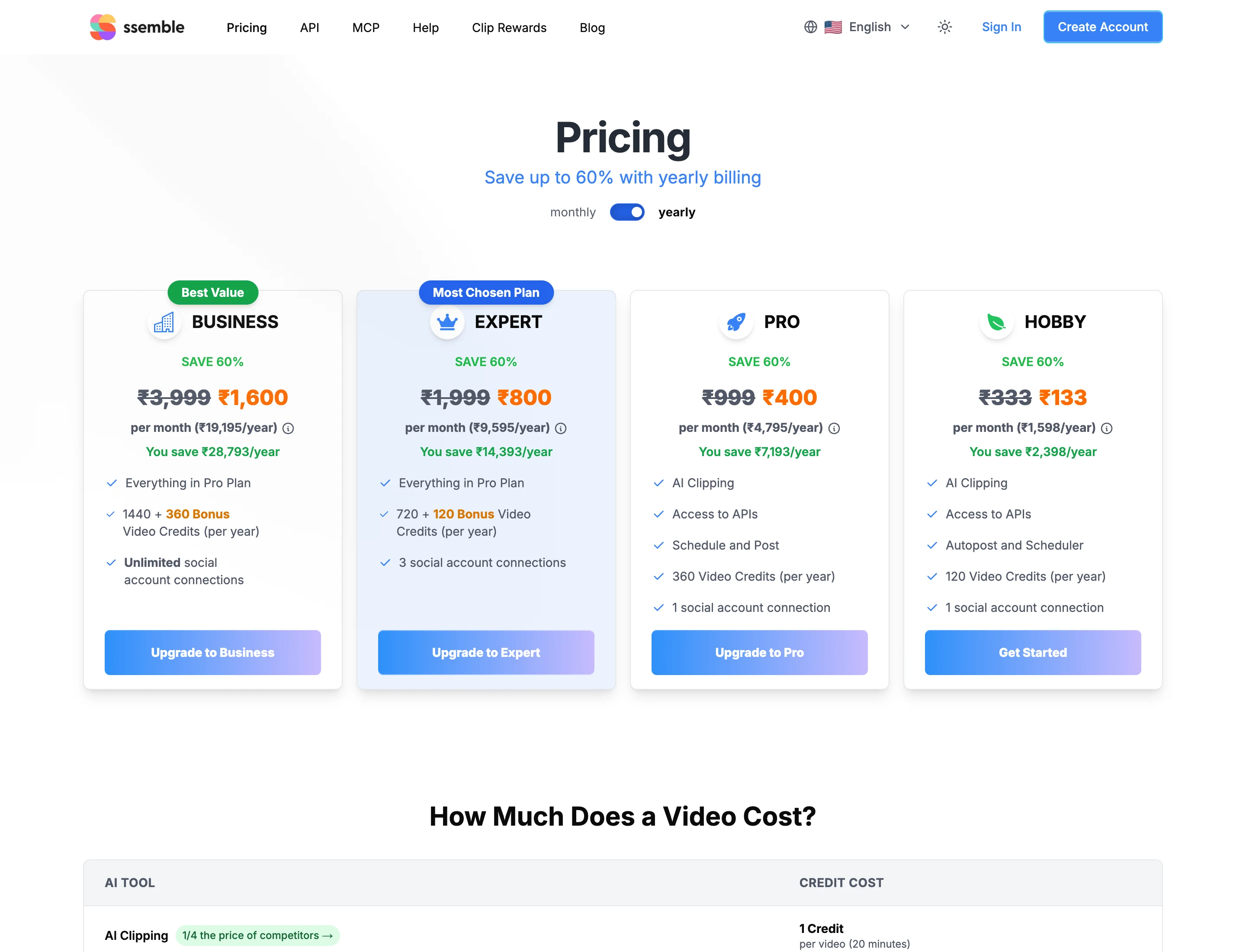
A few things the cards do not make obvious:
- The plan lineup varies by region. The rupee view I captured shows a fourth, cheaper Hobby plan with 120 credits a year and no Custom plan. The US dollar view listed Custom and no Hobby. Check which plans you are offered.
- The struck-through prices are 60% higher than what you pay. Pro shows $15 crossed out and $6 charged. The page does not label the crossed-out figure or say the offer ends, so I treat the discounted price as the real price for now.
- I could not read monthly prices. The page has a monthly toggle, but the version I read showed only yearly prices. If you want to pay monthly, check the toggle yourself.
- Credits are listed per year, but the FAQ says they reset “each billing cycle”. It does not say whether a yearly plan hands you all 360 credits at once or a share each month.
- Bonus credits. Expert, Business and Custom add 120, 360 and 600 bonus credits to the base amount. They are included in the totals above.
Is Ssemble free?
I did not find a free plan. The pricing page lists only paid plans, and the home page says “Plans from $6/mo · Cancel anytime”. I saw “Start Free Trial” as a button label in the site’s page data, but I could not find terms for a trial: no minutes, no duration, no watermark rule. If a trial matters to you, sign up and read what it gives you before entering a card.
How do Ssemble credits work?
This is the part that decides whether Ssemble is cheap for you. The pricing page’s cost table lists one tool, AI Clipping, at “1 credit per video (20 minutes)”. The FAQ explains the input limit: “for each input video, you can select up to a 20-minute segment” to create clips from. Its example is a 60-minute original, from which you can take a maximum 20-minute segment. The home page repeats it as “1 credit = 20 min of video processed”.
I read that as one credit per segment of up to 20 minutes. What the pages do not say is whether a 60-minute video costs three credits in one run or whether you have to pick segments yourself, three times. They also do not say whether a 5-minute video costs a full credit. Assuming a 20-minute segment per credit, the cost per source minute is:
| Plan | Price per year | Credits per year | Cost per credit | Cost per source minute at 20 minutes a credit |
|---|---|---|---|---|
| Pro | $72 | 360 | $0.20 | $0.010 |
| Expert | $144 | 840 | $0.171 | $0.0086 |
| Business | $288 | 1,800 | $0.16 | $0.0080 |
| Custom | $480 | 2,600 | $0.185 | $0.0092 |
| ScaleReach Starter, yearly | $120 | 2,400 minutes | n/a | $0.050 |
| ScaleReach Pro, yearly | $150 | 4,800 minutes | n/a | $0.031 |
| ScaleReach Agency, yearly | $588 | 60,000 minutes | n/a | $0.0098 |
Calculated from Ssemble’s pricing page (2026-10-19) and our pricing. Ssemble’s per-minute column is a best case: it only holds when every credit processes a full 20 minutes. A 7-minute video that costs one credit works out to about $0.029 a minute on Pro.
If your sources are 15 to 20 minutes long, Ssemble is the cheapest tool I have priced. If you clip a two-hour podcast, the credit count is about six per episode, and the real cost depends on rules the page does not state.
Does Ssemble post to TikTok, Instagram and YouTube?
Its pricing page lists Schedule and Post from the Pro plan, with 1 social connection on Pro, 3 on Expert and unlimited on Business and Custom. The FAQ says you can schedule multiple clips over several days across TikTok, YouTube and Instagram. I did not connect an account to test it.
Publishing to TikTok has a catch that applies to every tool: TikTok restricts posts from apps it has not audited. We explain what that does to scheduled posts in which clip tools auto-post to TikTok, Reels and Shorts. Ssemble’s pages do not mention it.
Does Ssemble work with Claude?
Ssemble lists “API” and “MCP” in its navigation, and its Pro plan lists “Access to APIs”. I did not read the MCP page in enough detail to say which clients or plans it covers. ScaleReach offers an MCP server too, which we walk through in clipping YouTube videos from Claude with our MCP server.
Which languages does Ssemble support?
The FAQ says “over 30 languages including English, Spanish, Portuguese, Russian, German, French, Italian, Dutch, Polish, and many more”. It does not publish the full list on the pages I read, so check yours before paying. ScaleReach transcribes 55 languages and converts Hindi clips to Hinglish captions.
Does Ssemble offer refunds?
No. Ssemble’s terms have a section headed “No Refunds”, and say unused credits “expire at the end of each billing cycle and cannot be refunded or carried forward”. Subscriptions renew automatically, and the terms say you will not get a prorated refund for the rest of a period you have paid for. The pricing FAQ says you can cancel at any time without penalties and keep access until the billing period ends, and that videos you have already created stay yours.
The terms add that Ssemble may grant a refund in individual cases where consumer law requires it. On a yearly plan that means you pay for 12 months upfront with no refund path, so test on a lower-commitment option first if you can.
What do real users say about Ssemble?
The independent evidence is thin in what I could reach. Trustpilot blocked my request, so I could not check for a page or a score. The home page cites a 4.6 out of 5 rating “on Google” with no link to the listing, and a 2.4M user figure with no source. I also found creator success stories on Ssemble’s own blog and Instagram posts. They are marketing, not independent reviews.
What does Ssemble do better than ScaleReach?
Four things, and they are real:
- The lowest price per video we have seen when sources are about 20 minutes long: $0.16 to $0.20 per credit.
- API access and autoposting on the cheapest plan. Pro lists both at $6 a month yearly.
- Face Tracking and a Sports Mode for footage where the action matters more than the speaker.
- Unlimited social connections from the Business plan, at $24 a month yearly.
Ssemble vs ScaleReach: which should you pick?
| Ssemble | ScaleReach | |
|---|---|---|
| Cheapest paid plan | $6/month yearly, 360 credits a year | $12/month, or $10/month yearly, 200 minutes |
| Usage unit | 1 credit per video of up to 20 minutes | 1 credit per source minute |
| Best cost per source minute | $0.0080 (Business, yearly, at full 20-minute segments) | $0.0098 (Agency, yearly) |
| Free plan | None found on the pricing page | 100 free minutes, watermarked, 30 minutes max per upload |
| Longest source | 20-minute segment per credit | 2 hours (Starter), 3 hours (Pro and Agency) |
| Languages | 30+ | 55, plus Hinglish captions |
| Direct publishing | TikTok, Instagram, YouTube | TikTok, Instagram, Facebook, YouTube Shorts, LinkedIn, Threads. X coming soon |
| Refunds | No | Not compared here |
| Gameplay split-screen backgrounds | Game Video option | Yes, Subway Surfers, Minecraft and others |
| API | Yes, from Pro | Not compared here |
Ssemble figures from its own pages, ScaleReach figures from our pricing page and product, verified 2026-10-19. “Not compared here” means I did not verify the other side of that row.
Pick Ssemble if you clip short videos in volume and the 20-minute segment rule matches how you work. Pick ScaleReach if you clip podcasts or webinars of an hour or more, want a free allowance to test with, or need more than 30 languages.
FAQ
Is Ssemble free?
I did not find a free plan on Ssemble’s pricing page, which lists only paid plans from $6 a month on yearly billing. Its site shows a “Start Free Trial” button, but I could not find the trial’s terms.
How much does Ssemble cost?
For a US visitor on yearly billing: Pro is $6 a month ($72 a year), Expert $12 ($144), Business $24 ($288) and Custom $40 ($480). Prices come from the pricing page, read on 19 October 2026, and the plan lineup can differ by region.
How do Ssemble credits work?
One credit processes one video of up to 20 minutes, per the pricing page and FAQ. Credits reset each billing cycle and do not roll over.
Does Ssemble offer refunds?
No. The terms have a “No Refunds” section, and unused credits expire at the end of each billing cycle and cannot be refunded.
What is the maximum video length on Ssemble?
The FAQ says you can select up to a 20-minute segment from each input video. A longer recording can still be used, but only 20 minutes of it per credit.
Does Ssemble support other languages?
Yes. It says “over 30 languages” for clipping and can translate captions while keeping the original audio. The full list is not on the pages I read.
Hevin K runs ScaleReach, an AI clip maker. Ssemble is a competitor and there is no affiliate relationship. Every Ssemble fact here comes from pages it controls, linked and dated, and I did not run my own videos through it.
