
LumiClip is an AI clip maker that finds the best moments in long videos, reframes them to vertical 9:16, adds captions and can publish the result. Its paid plans start at $9.99 a month for 6 hours of video, or $59.94 a year for 72 hours. On yearly billing that works out to about 1.4 cents per minute of source video on Starter and 1 cent on Pro, which is cheaper per minute than our own plans. The catches are a free plan that is a single hour rather than a monthly allowance, no refunds on unused time, and very little independent evidence about the product.
Disclosure: I run ScaleReach, which publishes this review and competes with LumiClip. I did not pay for a LumiClip plan, and I did not run my own videos through it for this post. There is no affiliate relationship. Everything below comes from LumiClip’s own home, pricing and terms pages, read on 19 October 2026. Where LumiClip beats us, I say so.
The 60-second verdict
Choose LumiClip if you want a low cost per source minute, 4-hour uploads, an agent that watches a YouTube or Twitch channel and clips it for you, or a one-off $7.99 pack instead of a subscription.
Look elsewhere if you want a free plan that renews each month, a refund if you stop using it, or independent reviews to check the vendor’s claims against. I could not find any.
Check first: the home page and the pricing page disagree about the free plan. The home page describes 60 minutes a month, the pricing page says 60 credits once.
Bottom line: a cheap, fairly complete clipper with a thin public track record. Use the free hour to judge the clips before paying, and prefer monthly billing until you have.
What is LumiClip?
LumiClip is a web app at lumiclip.ai. Its footer reads ”© 2026 LumiClip” and neither the home page nor the terms name a legal entity or country. Per its home page, it:
- Finds the strongest moments in a long recording and cuts them into short clips.
- Reframes 16:9 video to 9:16 and keeps the active speaker centred.
- Adds captions in “30+ languages” with automatic language detection.
- Offers B-roll, silence and filler-word removal, brand templates and a transcript-based editor.
- Lists TikTok, Instagram Reels, YouTube Shorts and LinkedIn for publishing, with Facebook mentioned in the agent section and FAQ.
- Runs an “automation agent” that watches a YouTube or Twitch channel, clips it and publishes automatically.
- Exposes an MCP server at
mcp.lumiclip.ai/mcp, listed for Claude, Claude Desktop and Cursor, plus an API.
The home page claims “Trusted by 5,000+ creators” and “+100K Clips Generated”. It does not say where either figure comes from.
How much does LumiClip cost in 2026?
LumiClip bills in credits, and one credit is one minute of video processing. Prices below are in US dollars as the pricing page showed them on 19 October 2026.
| Plan | Monthly billing | Yearly billing | Credits | Social accounts | Brand templates |
|---|---|---|---|---|---|
| Free | $0 | $0 | 60 once (1 hour) | None, no posting | None |
| Try-Out | $7.99 one-time | n/a | 180 once (3 hours) | 1, 10 posts a month | None |
| Starter | $9.99/month | $59.94 a year, shown as $5/month | 360 a month, or 4,320 a year (72 hours) | 6, 100 posts a month | 2 |
| Pro | $24.99/month per pack | $149.94 a year, shown as $12.49/month | 1,200 a month, or 14,400 a year (240 hours) | 20, unlimited posts | 10 |
Source: lumiclip.ai/pricing (verified 2026-10-19). The page’s yearly toggle is badged “50% OFF”.
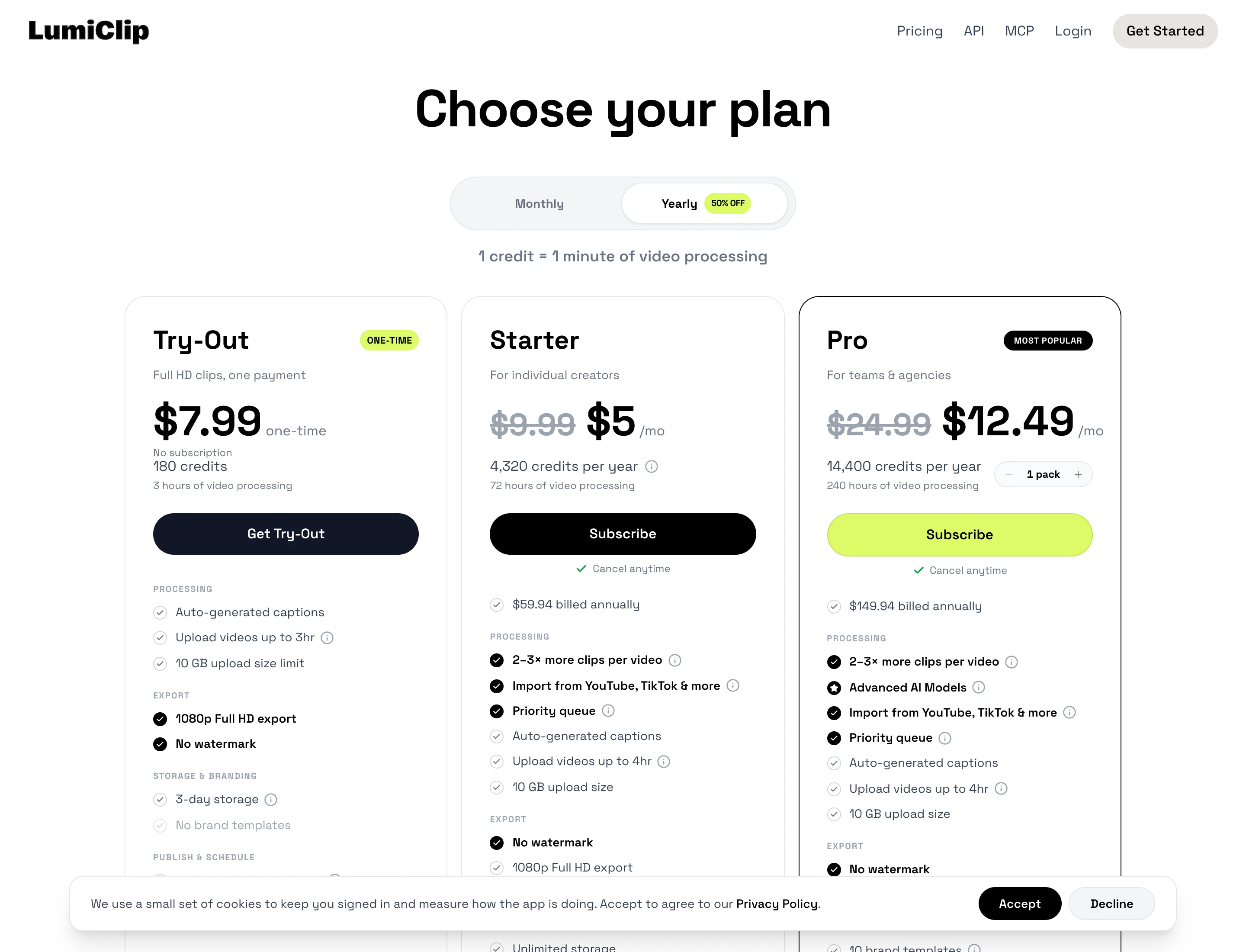
A few things the cards do not make obvious:
- The yearly price is a discount against LumiClip’s own monthly rate, not a countdown promotion. The yearly view strikes through $9.99 and $24.99 and shows $5 and $12.49. The monthly view shows no discount. The page does not say the yearly price is temporary, but it does not promise it will stay either.
- Pro scales in packs. The Pro card has a “1 pack” selector. I only priced one pack.
- Yearly credits look like one annual pool. The card says “4,320 credits per year”, and the FAQ says credits “reset at the start of each billing cycle (monthly or annually)”. I read that as one pool for the year, but the page does not say whether you can burn a year of credits in the first month.
- Credits cover more than clipping. The FAQ says one credit covers “AI clipping, transcription, and applying brand templates”, and that exporting clips costs nothing extra. It does not say whether re-running a video costs credits again.
- Plan features stack. Starter and Pro both list “2-3x more clips per video” and a priority queue. Only Pro lists “Advanced AI Models” and the automation agent.
Is LumiClip free?
Partly. The pricing page lists a Free plan at $0 with “60 credits (one-time)”, 1 hour of video processing, uploads up to 1 hour and 1 GB, 720p export with a watermark, 3-day storage and no social posting. That is a trial, not a renewing allowance.
The home page tells a different story. The summary I read says the free plan is limited to 60 minutes of processed video a month. I treat the pricing page as authoritative because it is the page you pay on, but the two pages should say the same thing, and if you are counting on a monthly free allowance, ask LumiClip before you rely on it.
How does LumiClip compare on cost per source minute?
Because one credit is one minute, the arithmetic is direct:
| Plan | Price | Minutes | Cost per source minute |
|---|---|---|---|
| Try-Out | $7.99 one-time | 180 | $0.044 |
| Starter, monthly | $9.99 a month | 360 a month | $0.028 |
| Starter, yearly | $59.94 a year | 4,320 a year | $0.014 |
| Pro, monthly | $24.99 a month | 1,200 a month | $0.021 |
| Pro, yearly | $149.94 a year | 14,400 a year | $0.010 |
| ScaleReach Starter, yearly | $10 a month | 200 a month | $0.050 |
| ScaleReach Pro, yearly | $12.50 a month | 400 a month | $0.031 |
| ScaleReach Agency, yearly | $49 a month | 5,000 a month | $0.0098 |
Calculated from LumiClip’s pricing page (2026-10-19) and our pricing. ScaleReach monthly billing is $12 for 200 minutes on Starter and $18 for 400 on Pro.
At the same billing cycle, LumiClip is cheaper than ScaleReach per source minute on every plan except our Agency plan, which lands at about the same figure as LumiClip Pro on yearly billing ($0.0098 against $0.0104). A cheaper minute only helps if the clips are good, and the credit rules above decide how many of those minutes you actually spend.
Does LumiClip post to TikTok, Instagram and YouTube?
The pricing page lists social posting from Try-Out upward: one connected account and 10 posts a month on Try-Out, 6 accounts and 100 posts a month on Starter with an auto-scheduler, and 20 accounts with unlimited posts on Pro. The Free plan lists “No social media posting”. I did not connect an account to test it.
Publishing to TikTok has a catch that applies to every tool, not just this one: TikTok restricts posts from apps it has not audited. We explain what that does to scheduled posts in which clip tools auto-post to TikTok, Reels and Shorts. LumiClip’s pages do not say how it handles that.
Does LumiClip work with Claude?
LumiClip says it does. Its home page gives a hosted MCP endpoint at mcp.lumiclip.ai/mcp and an npm package, @lumiclip/mcp-server, and lists Claude, Claude Desktop and Cursor as clients. The pricing page does not say which plans include MCP or the API. ScaleReach offers the same kind of setup, which we walk through in clipping YouTube videos from Claude with our MCP server.
Which languages does LumiClip support?
LumiClip says “30+ languages” for captions and detects the spoken language automatically. It does not publish the list on the pages I read, so check yours before paying. ScaleReach transcribes 55 languages and converts Hindi clips to Hinglish captions.
Does LumiClip offer refunds?
Not for unused time. LumiClip’s terms say it “does not refund partial periods unless required by law”. You can cancel from your dashboard at any time, cancelling stops the next renewal, and you keep your plan features and credits until the billing period ends. The FAQ adds that your first payment is taken immediately, and that on an annual plan you are charged the discounted total for the full year. Credits “do not roll over unless the plan says otherwise”.
That combination matters on yearly billing: you pay for 12 months upfront with no refund path. Monthly billing costs about twice as much per minute, but it is the safer way to test.
What do real users say about LumiClip?
I could not find independent evidence. Trustpilot blocked my request, so I could not check whether it has a page or a score, and I did not find a G2 listing or app-store rating. The home page shows labels such as “Score 96” on a hero graphic without explaining them, and the “5,000+ creators” figure is unsourced. That does not mean the product is weak, only that you are relying on LumiClip’s own claims.
What does LumiClip do better than ScaleReach?
Four things, and they are real:
- A lower cost per minute on Starter and Pro at both billing cycles. Pro yearly is about a third of what our Pro costs per source minute.
- Longer uploads. Videos up to 4 hours on paid plans, against 2 hours on our Starter and 3 on Pro.
- A channel-watching agent that clips a YouTube or Twitch channel and publishes without you pasting links.
- A one-time pack. $7.99 buys 3 hours with no watermark and no subscription.
LumiClip vs ScaleReach: which should you pick?
| LumiClip | ScaleReach | |
|---|---|---|
| Cheapest paid plan | $9.99/month for 360 minutes ($5/month yearly) | $12/month for 200 minutes ($10/month yearly) |
| Best cost per source minute | $0.010 (Pro, yearly) | $0.0098 (Agency, yearly) |
| Free plan | 60 minutes once, 720p, watermarked, no posting | 100 free minutes, watermarked, 30 minutes max per upload |
| Longest source | 4 hours | 2 hours (Starter), 3 hours (Pro and Agency) |
| Languages | 30+ | 55, plus Hinglish captions |
| Direct publishing | TikTok, Instagram, YouTube, LinkedIn (Facebook mentioned) | TikTok, Instagram, Facebook, YouTube Shorts, LinkedIn, Threads. X coming soon |
| Gameplay split-screen backgrounds | Not listed | Yes, Subway Surfers, Minecraft and others |
| MCP server | Yes | Yes |
LumiClip figures from its own pages, ScaleReach figures from our pricing page and product, verified 2026-10-19.
Pick LumiClip if cost per minute is your main concern and you will check the clips with the free hour first. Pick ScaleReach if you need more than 30 languages, gameplay split-screen shorts or agency volume, where our Agency plan matches LumiClip’s best per-minute price with 5,000 minutes a month.
FAQ
Is LumiClip free?
LumiClip has a Free plan of 60 credits, one hour of video, given once. Exports are 720p with a watermark, uploads are capped at 1 hour and 1 GB, and there is no social posting. Its home page describes a monthly limit, so confirm which applies before you rely on it.
How much does LumiClip cost?
Starter is $9.99 a month for 360 minutes, or $59.94 a year for 4,320. Pro is $24.99 a month for 1,200 minutes, or $149.94 a year for 14,400. A one-time Try-Out pack is $7.99 for 180 minutes. Prices are in US dollars from the pricing page, read on 19 October 2026.
What does a LumiClip credit cover?
One credit is one minute of video processing. Per the FAQ it covers AI clipping, transcription and applying brand templates, and exporting clips costs no extra credits.
Does LumiClip offer refunds?
Not for unused time. The terms say it “does not refund partial periods unless required by law”. You can cancel any time and keep access until the period ends.
Does LumiClip add a watermark?
Only on the Free plan, which exports 720p clips with a watermark. Try-Out, Starter and Pro list no watermark and 1080p export.
How many hours of video does LumiClip process?
Starter includes 6 hours a month, or 72 a year. Pro includes 20 hours a month, or 240 a year, per pack. Try-Out includes 3 hours once.
Hevin K runs ScaleReach, an AI clip maker. LumiClip is a competitor and there is no affiliate relationship. Every LumiClip fact here comes from pages it controls, linked and dated, and I did not run my own videos through it.
