
Choppity is an AI video editor that turns long videos and podcasts into short clips, with a transcript editor, profanity censoring and a social scheduler built in. Its paid plans are $24, $32 and $48 a month, or $16.80, $22.40 and $33.60 a month billed yearly, for 3 to 5 hours of AI video analysis. That works out to between $0.075 and $0.16 per minute of source video, depending on plan and billing, which is more than most clippers that price by the minute.
Disclosure: I run ScaleReach, which publishes this review and competes with Choppity. I did not pay for a Choppity plan, and I did not run my own videos through it for this post. There is no affiliate relationship. Everything below comes from Choppity’s own pricing, feature, API and help pages, read on 16 October 2026, plus its public Trustpilot page. Where Choppity beats us, I say so.
The 60-second verdict
Choose Choppity if you want to edit clips by editing the transcript, need swear words beeped automatically, work in a language most clippers skip (it lists 97), or want a REST API with webhooks at $22.40 a month.
Look elsewhere if you need low cost per source minute, a free plan you can actually download from, or publishing to TikTok and Instagram today. Choppity’s own scheduler FAQ says it currently publishes directly to YouTube only.
Check first: the Team card and the Team FAQ describe two different plans, and Creator and Team both have a usage slider whose add-on price is not shown until you move it.
Bottom line: a well-built clipping editor with more editing tools than most, priced per hour of analysis at the top of the category. Try the free hour to judge the clips, then decide whether the editor is worth the premium.
What is Choppity?
Choppity is a web app at choppity.com, run by Mizko Media Pty Ltd according to its site footer. It finds the strongest moments in a long video and turns them into vertical, square or horizontal clips with captions. Per its home page, it:
- Takes a pasted YouTube link or an uploaded file (MP4, MOV, AVI “and more”).
- Says it generates 20 to 50+ clips from one long video, and processes a video in 5 to 15 minutes depending on length.
- Edits through the transcript: delete a word and Choppity cuts it from the video. You can drop an image or a B-roll clip onto any part of the transcript.
- Detects swear words and beeps or mutes them with one toggle.
- Generates captions it describes as “97%+ accurate”, with animated styles modelled on creators like Alex Hormozi.
- Reframes landscape video to 9:16, 1:1 and 16:9.
- Posts or schedules clips from a content calendar, with an ideas board for planning.
- Claims “500,000+ users worldwide”.
How much does Choppity cost in 2026?
| Plan | Monthly billing | Yearly billing | AI video analysis / month | Exports | Social accounts | Seats |
|---|---|---|---|---|---|---|
| Free | $0 | $0 | 1 hour | None | None | 1 |
| Starter | $24/month | $16.80/month ($201.60 a year) | 3 hours | 1080p and 4K | 1 | 1 |
| Creator | $32/month | $22.40/month | 5 hours (slider) | 1080p and 4K | 3 | 1 |
| Team | $48/month | $33.60/month | 5 hours (slider) | 1080p and 4K | 6 | Unlimited |
| Enterprise | Custom | Custom | Custom | 1080p and 4K | Unlimited | Custom |
Source: choppity.com/pricing (verified 2026-10-16). The page opens on yearly billing, which it labels “30% off”. It prints a yearly total only for Starter. At $22.40 and $33.60 a month, Creator and Team would come to $268.80 and $403.20 a year. Those totals are my arithmetic, not figures from the page.
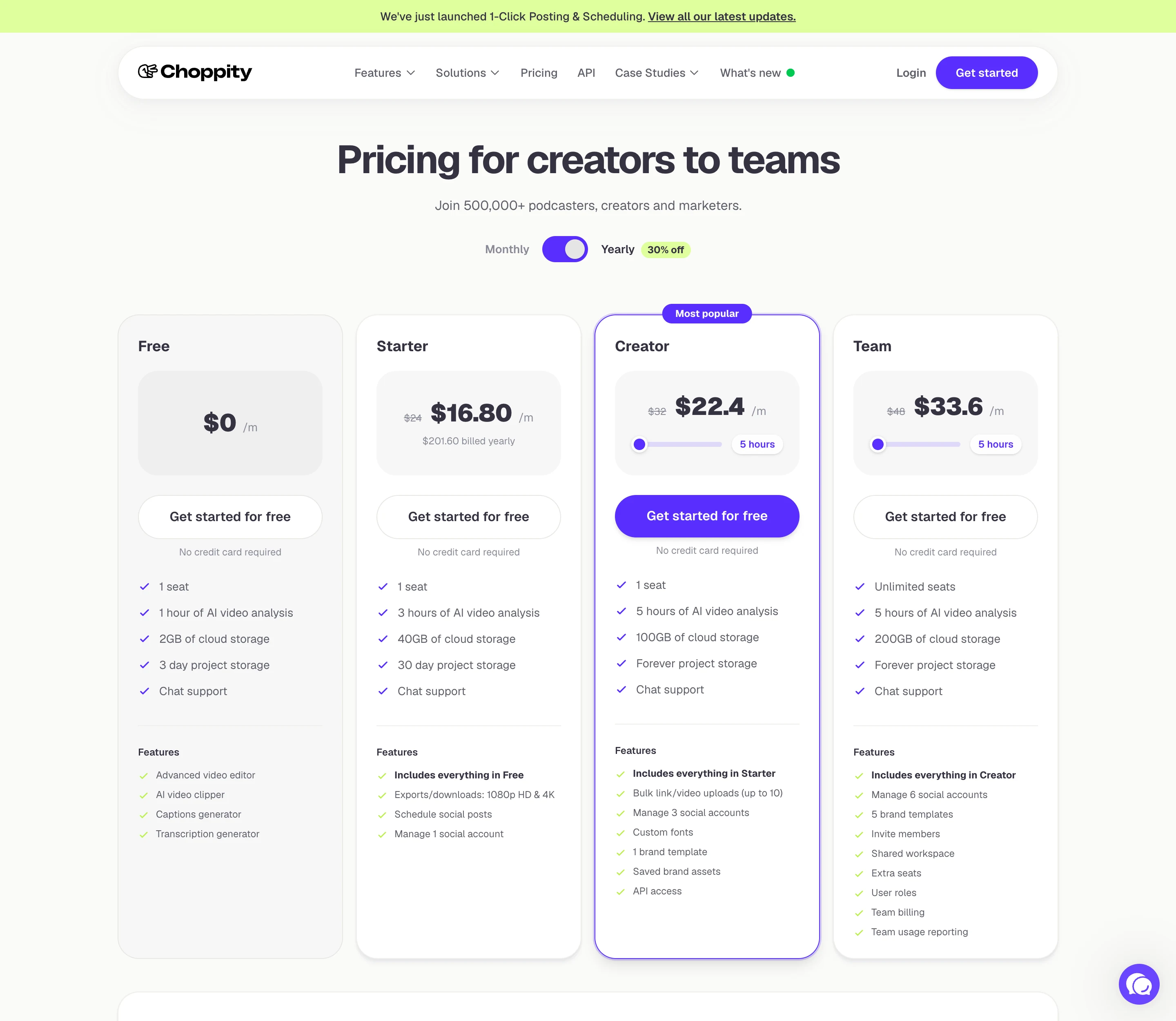
What else each plan adds, from the same page:
- Storage. Free keeps projects for 3 days with 2 GB of cloud storage. Starter keeps them 30 days with 40 GB. Creator (100 GB) and Team (200 GB) keep them forever.
- Creator adds bulk uploads of up to 10 links or videos, custom fonts, one brand template, saved brand assets and API access.
- Team adds five brand templates, a shared workspace, user roles, team billing and usage reporting.
- Usage resets to zero on the first day of every calendar month. The page does not say unused hours roll over.
- Refunds are available if you ask within 14 days of a payment. After that, partial months are not refunded, and cancelling ends access at the end of the billing period.
Three things on the page do not line up:
- The Team plan is described twice. The card says unlimited seats, 5 hours and 200 GB. The FAQ says Team plans start at 3 seats, with each seat bringing 3 hours of video upload a month, 60 GB and 3 custom templates. I could not tell which is current.
- The slider has no visible price. The FAQ says a “Creator pack” adds 0.5 hours of video upload a month and 10 GB of storage, and that you buy more packs with the slider. The page does not show what a pack costs at the default position.
- “Hours” means two things. The cards say hours of AI video analysis. The FAQ says hours of video upload. I read both as hours of source video, but Choppity does not define it.
Is Choppity free?
Yes, but the free plan is a preview. It includes 1 hour of AI video analysis a month, the editor, the clipper, captions and transcription, with 3-day project storage. The plan comparison table lists exports and downloads as not included on Free, and scheduling as not included either. So you can see what Choppity picks from your video, but you need a paid plan to download a clip. No credit card is needed to sign up.
How does Choppity compare on cost per source minute?
Choppity prices by hours of AI video analysis, which I read as hours of source video. Dividing the plan price by the minutes it includes gives a per-minute figure you can compare with other per-minute tools:
| Plan | Price | Minutes / month | Cost per source minute |
|---|---|---|---|
| Choppity Starter, yearly | $16.80/month | 180 | $0.093 |
| Choppity Starter, monthly | $24/month | 180 | $0.133 |
| Choppity Creator, yearly | $22.40/month | 300 | $0.075 |
| Choppity Creator, monthly | $32/month | 300 | $0.107 |
| Choppity Team, yearly | $33.60/month | 300 | $0.112 |
| ScaleReach Starter, annual | $10/month | 200 | $0.050 |
| ScaleReach Pro, annual | $12.50/month | 400 | $0.031 |
| ScaleReach Pro, monthly | $18/month | 400 | $0.045 |
Choppity figures from its pricing page, ScaleReach figures from our pricing page, both verified 2026-10-16. Creator and Team assume the slider stays at its default 5 hours.
Creator on yearly billing is Choppity’s best rate, at about 7.5 cents a minute. That is more than double what our Pro plan costs on annual billing, and more than 2short.ai, Vizard or Descript charge at their entry plans in our clip tools ranked by cost per source minute. It does undercut Opus Clip Starter’s $0.10. Team costs more per minute than Creator for the same 5 hours, so you are paying for the seats and the shared workspace, not more clipping.
How many clips does Choppity make from one video?
Choppity says 20 to 50+ short clips from one long video, depending on its length, and its headline says “30+ clips”. I did not test that. For scale, across 1,224 source videos in our own pipeline, the mean clip count was 5.4 for a 15-to-30-minute source and 18 for a source over an hour, as published in our ranking of AI video clipping tools. A tool returning 30 or more clips is either cutting shorter or keeping more marginal moments. Which of those Choppity does, only a test on your own footage will show.
Which languages does Choppity support?
Choppity’s help centre says it supports 97 languages for transcription and clip generation, including English, Spanish and Hindi. The same article says caption translation inside the editor “is limited today” and suggests exporting a TXT file to translate it elsewhere. If you need clips in another language, plan on doing the translation outside Choppity. ScaleReach transcribes 55 languages, so Choppity covers more.
Can Choppity publish to TikTok and Instagram?
Not directly, by its own account. The social media scheduler page markets posting to YouTube, TikTok, Instagram, Facebook, X and LinkedIn, and a banner across the site announces “1-Click Posting & Scheduling”. But the FAQ on that same page answers “Which social media platforms can I publish to?” with: “Choppity currently supports direct publishing to YouTube, with additional platform integrations rolling out progressively.”
So read the 1, 3 and 6 social accounts on Starter, Creator and Team as limits on how many accounts you can connect, not proof that every network works. If publishing to TikTok or Instagram decides your choice, connect a test account before paying, or use the 14-day refund window. Our scheduler lists TikTok, Instagram, Facebook, YouTube Shorts, LinkedIn and Threads, with X marked coming soon. We compared which clip tools auto-post to TikTok, Reels and Shorts in more detail.
Does Choppity have an API?
Yes, from the Creator plan up. The API page describes a REST API at api2.choppity.com/v1. You post a public video URL, or get a presigned upload URL for files up to 5 GB, ask it to find clips, trigger renders and receive signed MP4 links. It sends webhooks for events such as asset.analysis.succeeded and project.render.failed, plus events for scheduled, published and failed social posts. That is a more complete integration story than most clippers offer at $22.40 a month. ScaleReach’s equivalent is an MCP server and API key aimed at AI assistants.
What do real users say about Choppity?
There is not much public evidence, and it is split. Choppity’s Trustpilot page had 16 reviews when I read it: half were 5 stars and 44% were 1 star, with almost nothing in between. The reviews ran from March 2023 to January 2026. The negative ones describe slow or missing support replies and projects that broke. In its replies, Choppity says support tickets are now handled “typically within a couple of hours”. I could not find a G2 listing for Choppity. Sixteen reviews over three years is too few to judge reliability either way.
What does Choppity do better than ScaleReach?
Four things, and they are real:
- Transcript editing. Cutting a clip by deleting words, and dropping B-roll onto the transcript, is a faster way to tighten a clip than trimming on a timeline.
- Profanity censoring. One toggle to beep or mute swear words. Useful for brands and for platforms that limit reach on explicit language.
- More languages. 97 listed against our 55.
- 4K exports and a documented REST API. Paid plans list 1080p and 4K downloads. Our renderer outputs 1080p. Choppity’s API has webhooks and is included from Creator.
Choppity vs ScaleReach: which should you pick?
| Choppity | ScaleReach | |
|---|---|---|
| Cheapest paid plan | $16.80/month yearly ($24 monthly), 3 hours | $10/month annual ($12 monthly), 200 minutes |
| Best cost per source minute | $0.075 (Creator, yearly) | $0.031 (Pro, annual) |
| Free plan | 1 hour a month, no downloads | 100 free minutes, watermarked, 30 minutes max per upload |
| Video input | YouTube link and file upload | YouTube, Twitch and Kick links, plus file upload |
| Clip editing | Transcript editor, B-roll, profanity censoring | Clip editor with captions, reframe and split-screen backgrounds |
| Languages | 97 | 55, plus Hinglish captions |
| Direct publishing | YouTube only today, per its FAQ | TikTok, Instagram, Facebook, YouTube Shorts, LinkedIn, Threads. X coming soon |
| Virality score | Not listed | Yes, 0 to 100 |
| Highest export | 4K | 1080p |
| API | REST API with webhooks, Creator and up | API key and MCP server |
Choppity figures from its own pages, ScaleReach figures from our pricing page and product, verified 2026-10-16.
Pick Choppity if you edit every clip by hand and want the transcript editor, censoring and language range to save you time, and the per-minute price does not matter much at your volume. Pick ScaleReach if cost per source minute matters, or you want to publish to more than YouTube from the same tool today. For the head-to-head summary, see our ScaleReach vs Choppity comparison.
FAQ
Is Choppity free?
Yes, Choppity has a free plan with 1 hour of AI video analysis a month, the editor, captions and transcription, and 3-day project storage. Its pricing table lists exports and downloads as not included on Free, so you can preview the clips but need a paid plan to download them. No credit card is required to sign up.
How much does Choppity cost?
Starter is $24 a month, Creator $32 and Team $48 on monthly billing. Billed yearly they are $16.80, $22.40 and $33.60 a month, which the page labels 30% off. Starter includes 3 hours of AI video analysis a month, and Creator and Team include 5 hours, with a slider to buy more. Enterprise is custom.
Can Choppity post to TikTok?
Not directly yet, according to Choppity’s own scheduler FAQ. It says Choppity “currently supports direct publishing to YouTube, with additional platform integrations rolling out progressively”, even though the same page lists TikTok, Instagram, Facebook, X and LinkedIn. Connect a test account before you pay if TikTok publishing matters to you.
Does Choppity have a watermark?
Choppity’s pricing page does not mention a watermark on any plan. The free plan does not include exports or downloads at all, so the question only applies to paid plans, which list 1080p and 4K downloads. I did not export a clip to check, so test one on a paid plan within the 14-day refund window.
Does Choppity offer refunds?
Yes. Choppity’s pricing FAQ says you can request a refund within 14 days of a payment by opening a case with support, which it will evaluate. After 14 days it does not refund partial months. Cancelling ends your access at the end of the current billing period, and you keep your clips and exports until then.
Is Choppity good for podcasts?
It is built for them. Choppity markets itself to podcasters, transcribes 97 languages and says it finds 20 to 50+ clips per episode, and its transcript editor suits talk-heavy content. The trade-off is price: at 3 to 5 hours a month, a weekly hour-long show uses most of Starter’s allowance. Compare the cost against whether Opus Clip is worth it for podcasters before you commit.
The bottom line
Choppity has one of the stronger editors in the clipping category. Transcript-based cutting, B-roll on the transcript, one-toggle profanity censoring, 97 languages, 4K downloads and a webhook API on the Creator plan are features many competitors do not offer at all.
You pay for them. At 3 to 5 hours of analysis a month, every plan costs more per source minute than most of the per-minute clippers we track, and the free plan does not let you download anything. The scheduler is the other open question: Choppity’s own FAQ says it publishes directly to YouTube only for now. Use the free hour to judge the clips, connect your social accounts before you pay, and compare against the alternatives ranked by cost per source minute. If a number here looks wrong, tell us at hevin@scalereach.ai.
Changelog
October 2026 update. First published. Choppity pricing, plan comparison and FAQ read from choppity.com/pricing on 2026-10-16. Features from its home, captions, scheduler and API pages, and languages from its help centre, on the same date. Trustpilot figures read the same day, and no G2 listing was found. ScaleReach figures from our pricing page and product on the same date. This review is sourced, not hands-on.
Last reviewed: October 2026 Next planned refresh: January 2027 Update hooks: whether Choppity’s scheduler FAQ still says YouTube only; which Team plan description is current; the price of a Creator pack on the slider; Trustpilot review count; whether a G2 listing appears.
About the author
Hevin K runs ScaleReach, an AI clip maker. Choppity is a competitor and there is no affiliate relationship. Every Choppity fact here comes from pages it controls or public review sites, linked and dated, and I did not run my own videos through it.
