
AutoClip, at autoclip.dev, is an AI clip maker built around automation: it watches YouTube, Twitch and Kick channels, clips every new upload, and posts the clips on a schedule. Plans cost $19.99, $39.99 and $79.99 a month for 200, 500 and 1,200 credits, and one credit is one minute of source video. That is $0.10 a source minute on monthly Starter and $0.042 on yearly Scale. Twitch and Kick streams bill far less than their runtime. There is no free clipping plan, and all sales are final.
Disclosure: I run ScaleReach, which publishes this review and competes with AutoClip. I did not pay for an AutoClip plan, and I did not run my own videos through it, so this post makes no claim about clip quality. There is no affiliate relationship. Every AutoClip fact below comes from its own home, pricing, features, support, terms, refund and blog pages, read on 7 November 2026. Where AutoClip beats us, I say so.
The 60-second verdict
Choose AutoClip if you clip other creators’ channels or your own streams, you want new uploads picked up and posted without opening the app, or you clip long Twitch and Kick VODs.
Look elsewhere if you want a free plan that makes clips, a refund path, or a low cost per minute on ordinary uploaded videos.
Check first: the free account does not generate clips, per AutoClip’s own blog. Testing happens on a 3-day Pro trial, and the refund policy says forgetting to cancel before a trial deadline is not grounds for a refund.
Bottom line: the most automation-first clipper we have priced, with stream billing that suits streamers. For regular videos its cheapest rate, $0.042 a source minute, is above ScaleReach Pro’s $0.031, and nothing you pay comes back.
What is AutoClip?
AutoClip is a web app at autoclip.dev with iOS and Android apps, run by Autoclip LLC, per its terms. The site’s structured data says it was founded in 2025. Per its home page and features page, it:
- Takes a link from YouTube, Vimeo, Rumble, Twitch and other sites, or an uploaded file, and returns vertical clips with a virality score on each.
- Watches YouTube, Twitch and Kick channels you add and clips every new upload or livestream VOD automatically.
- Reframes to 9:16 with face and object tracking, and writes word-synced animated captions.
- Schedules posts with what it calls anti-shadowban pacing, and shows posts in a content calendar.
- Offers team workspaces with approval flows, brand kits and shared channel monitoring.
- Connects to Whop clipping campaigns, where creators pay clippers per accepted clip. “Earn” is a main menu item.
The home page says it is “Used by creators and businesses to clip channels with 630M+ combined subscribers”, next to channel names such as MrBeast and IShowSpeed. Read carefully, that is the audience of the channels being clipped, not a list of customers. The page does not say how it was counted. Its testimonials use first names only.
How much does AutoClip cost in 2026?
The pricing page shows monthly prices by default, with an annual switch labelled “Save 40% with annual billing”. Read on 7 November 2026, in US dollars:
| Plan | Monthly | Yearly (per month) | Charged per year | Credits a month | Clips per batch | Max upload length | Monitored channels | Social accounts |
|---|---|---|---|---|---|---|---|---|
| Starter | $19.99 | $12.49 | $149.99 | 200 | 6 | 2 h | 1 | 3 |
| Pro | $39.99 | $24.99 | $299.99 | 500 | 12 | 5 h | 3 | 8 |
| Scale | $79.99 | $49.99 | $599.99 | 1,200 | 15 | 10 h | 10 | 25 |
Source: autoclip.dev/pricing (verified 2026-11-07). Yearly prices come from the same page’s FAQ. Checkout runs through Whop on the web, or through Apple or Google Play in the mobile apps.
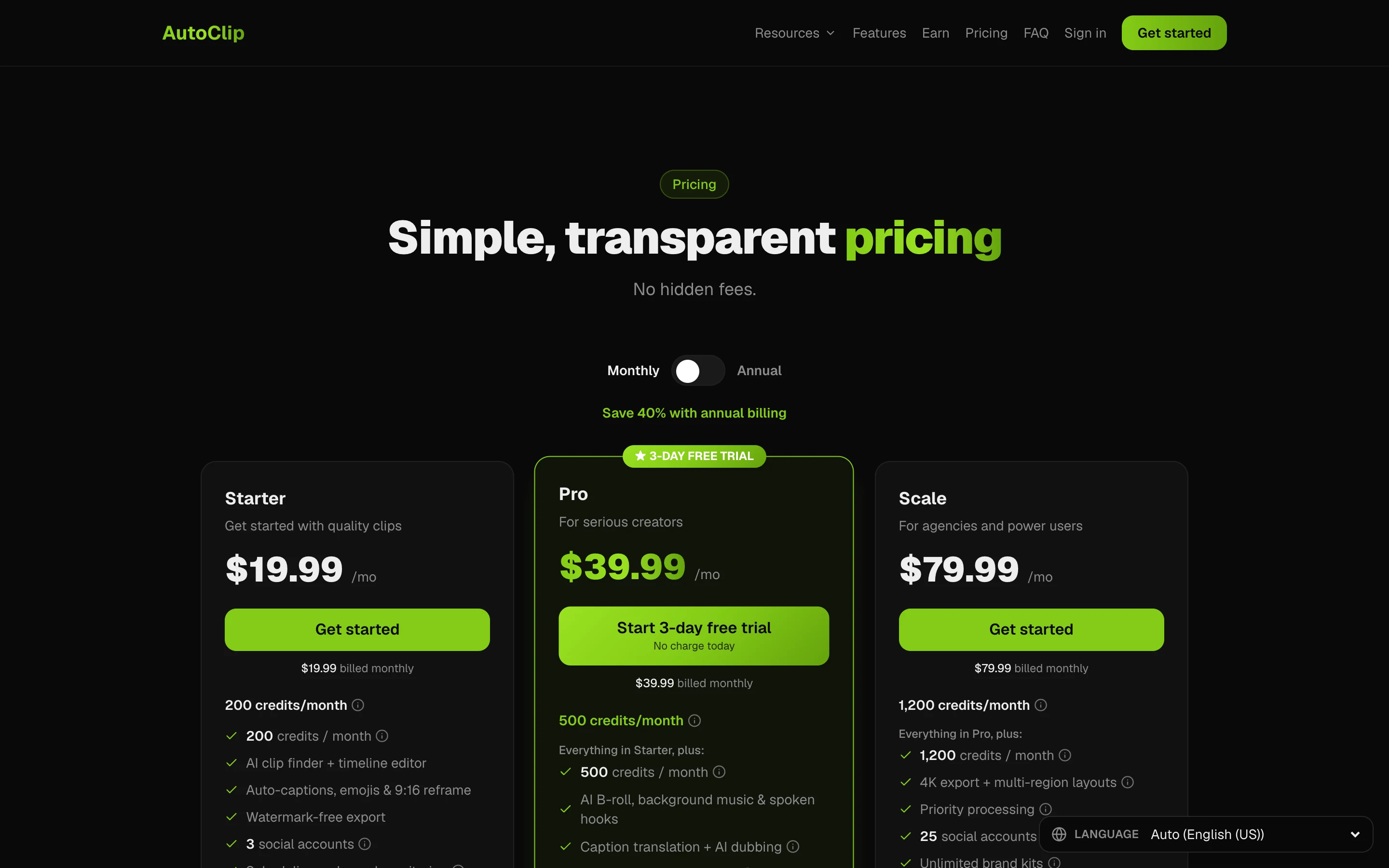
What each tier adds, per the page’s feature table:
- Starter: AI clip finder, timeline editor, captions with emojis and keyword highlights, 9:16 and 16:9 export, watermark-free export, scheduling and posting, 25 GB of storage.
- Pro: AI B-roll, background music, AI voiceover and spoken hooks, caption translation in 31 languages and AI dubbing in 25, 1:1 and 4:5 export, XML export to Premiere and DaVinci, bulk export and scheduling, teams, 2 brand templates, 100 GB of storage.
- Scale: 4K export, split-screen and multi-speaker layouts, A/B clip variants, priority processing, unlimited brand templates, 500 GB of storage.
Things the cards do not make obvious:
- “Save 40%” is closer to 37.5%. Twelve months of Starter at $19.99 is $239.88 against $149.99 a year, which is 37.5% off. Pro and Scale work out the same.
- Credits do not roll over. When they run out, new processing pauses until the next cycle. You can stack a second subscription mid-cycle at full price.
- The batch cap is per run, not per video forever. The page says there are “no monthly video or clip caps” and lists a “Find more clips” feature on every plan.
- Posting may touch your credits. The FAQ says that if a scheduled post fails, “the credits for that post are automatically refunded”. No page we read says what a post costs, so check your balance after your first scheduled post.
- Support is Discord on every plan, per the feature table. The support page also lists an email address and says replies usually come within 24 hours.
How do AutoClip credits work for Twitch and Kick streams?
Regular videos cost 1 credit per processed source minute. Stream VODs do not. The pricing FAQ says AutoClip pre-filters a broadcast, processes only its top highlight segments, and adds a length fee of 1 credit per 20 minutes of broadcast. It says a multi-hour stream typically bills 35 to 90 credits, and that a 9-hour stream runs about 90 credits.
Taking those figures at face value, Starter’s 200 credits cover about two 9-hour streams a month, and one such stream costs about $3.75 on yearly Scale. That is the strongest part of AutoClip’s pricing. The trade is that you do not choose which segments get processed; AutoClip’s pre-filter does. We cover a hands-on stream workflow in turning a Twitch stream into TikTok clips.
What does AutoClip cost per source minute?
For regular videos, here is what one source minute costs when you use every credit:
| Plan | Cost per source minute, monthly | Cost per source minute, yearly |
|---|---|---|
| AutoClip Starter | $0.10 | $0.062 |
| AutoClip Pro | $0.080 | $0.050 |
| AutoClip Scale | $0.067 | $0.042 |
| ScaleReach Pro | $0.045 | $0.031 |
| ScaleReach Agency | $0.020 | $0.0098 |
Calculated from AutoClip’s pricing page (2026-11-07) and our pricing. For uploaded podcasts, interviews and webinars, AutoClip costs more per minute than ScaleReach on every comparable tier. For long streams, its highlight billing changes the math, and the table above does not apply.
Is AutoClip free?
Not for clipping. The pages disagree on the details, so here is each version:
- The home page FAQ says AutoClip is “free to start with no credit card required”.
- The support page says it offers “a 3-day free trial on Pro with no credit card required to start”.
- The pricing page’s Pro button reads “Start 3-day free trial” with “No charge today” under it, and the FAQ says “No charge until your trial ends”.
- AutoClip’s own blog post on free auto clippers, updated 18 October 2026, says the free account “does not generate clips” and allows two connected social accounts. It says the Pro trial grants 100 credits, about 100 minutes of source video, with no watermark.
We did not start a trial, so we cannot say whether it asks for a card. The refund policy lists “forgetting to cancel before a renewal or trial deadline” among the cases it will not refund, so set a reminder if you try it.
ScaleReach’s free plan works differently: 100 free minutes once, watermarked, 30 minutes max per upload, and no card.
Which platforms does AutoClip post to?
TikTok, Instagram Reels and YouTube Shorts, per its multi-platform posting page, which says the integrations run on official platform APIs through a social posting partner. The home page FAQ adds “10+ other short-form platforms”, and its free clippers blog post mentions “9 destinations”, but no page we read names them. Treat the three named networks as the confirmed list.
Every plan includes posting and the scheduler. Bulk scheduling starts on Pro. ScaleReach publishes to YouTube Shorts and Instagram Reels today, with TikTok posts private until TikTok finishes auditing our app. I did not connect an account to AutoClip to test its posting. For how each tool handles TikTok’s audit, see which clip tools auto-post to TikTok, Reels and Shorts.
Does AutoClip have an API or MCP server?
AutoClip mentions an API, but we found no public documentation. The home page’s teams section says you can “Drive AutoClip from your own stack with the API”, and the terms cover “APIs” and “developer access”. The pricing table does not list API access on any plan, autoclip.dev/api leads to a sign-in page, and autoclip.dev/docs did not load. We found no MCP server for AutoClip as of November 2026.
Watch the name here. An open-source project also called AutoClip on GitHub has its own CLI and MCP server. It is a separate, MIT-licensed desktop tool, not autoclip.dev. Autoclips at autoclips.app is another unrelated product.
ScaleReach has an MCP server for Claude, ChatGPT, Cursor and Kiro, covered in clipping YouTube videos from Claude with our MCP server.
Does AutoClip offer refunds?
No. The refund policy opens with “All sales are final” and says AutoClip does not offer refunds. That covers subscriptions, renewals and credit purchases, used or not, including dissatisfaction, change of mind and accidental purchases. Only refunds required by law or by the billing provider’s binding rules are excepted. Apple and Google Play decide refunds for purchases made in their stores.
You cancel through whoever billed you: Whop for web purchases, Apple or Google Play for app purchases. Deleting the app does not cancel the subscription. Access continues to the end of the paid period. Failed processing does not use credits, per the pricing FAQ, and the policy says confirmed billing errors such as double charges are corrected separately.
On yearly Scale, that is $599.99 paid upfront with no refund path. A monthly Starter at $19.99 is the cheapest way to test it after the trial.
Is AutoClip built for clipping other people’s videos?
Partly, yes. The home page FAQ says it serves people “repurposing your own uploads or other creators’ videos”, the channel monitoring works on any public channel, and the Whop campaign integration pays clippers per accepted clip. The terms say AutoClip does not promise “copyright clearance” or “platform acceptance”. If you clip someone else’s channel, you need their permission, which paid clipping campaigns usually provide. AutoClip does not supply it.
Contradictions on AutoClip’s own pages
A few of its pages disagree, and I treated the pricing page as current where they overlap:
- Free tier. “Free to start” on the home page, a no-card Pro trial on the support page, and a free account that does not clip on its blog.
- Posting destinations. Three named networks on the posting page, “10+ other” on the home page FAQ, and “9 destinations” on the blog.
- Virality score. The home page scores hook, retention, shareability, trend fit and emotional pull. The features page lists hook strength, emotional intensity, information density, share-worthiness and replay value.
- B-roll on Starter. The Starter plan’s structured data mentions stock B-roll. The feature table marks the B-roll editor and stock library as not included on Starter.
- Split layouts. The home page says multi-speaker scenes “get split layouts automatically”. The feature table lists split-screen and multi-speaker layouts on Scale only.
What does AutoClip do better than ScaleReach?
Five things, and they are real:
- Channel monitoring. Point it at a YouTube, Twitch or Kick channel and it clips new uploads without you submitting anything. ScaleReach clips the links and files you give it.
- Stream billing. A long VOD costs a fraction of its runtime in credits.
- Longer uploads. Up to 5 hours on Pro and 10 hours on Scale, against our 3 hours.
- 4K export on Scale. ScaleReach exports at 1080p.
- Clipping campaigns. A built-in route to submit clips to paid Whop campaigns.
AutoClip vs ScaleReach: which should you pick?
| AutoClip | ScaleReach | |
|---|---|---|
| Cheapest paid plan | $19.99/month, or $12.49/month yearly, 200 credits | $18/month, or $12.50/month yearly, 400 minutes (Pro) |
| Usage unit | 1 credit per source minute; streams billed on highlights plus 1 credit per 20 min | 1 minute of source video |
| Best cost per source minute | $0.042 (Scale, yearly) | $0.0098 (Agency, yearly) |
| Free option | 3-day Pro trial; free account does not clip | 100 free minutes once, watermarked, 30 min max per upload |
| Max upload length | 2 h, 5 h or 10 h, by plan | 3 h on Pro and Agency |
| Export | 1080p; 4K on Scale | 720p free, 1080p paid |
| Channel monitoring | 1 to 10 channels, by plan | No |
| Auto-posting | TikTok, Instagram Reels, YouTube Shorts | YouTube Shorts and Instagram Reels (TikTok private until TikTok’s app audit) |
| Social accounts | 3, 8 or 25 | 5 on Pro, unlimited on Agency |
| Teams | Pro and Scale | 3 workspaces and 3 members on Pro, 10 and 10 on Agency |
| API or MCP | API mentioned, no public docs found; no MCP server found | MCP server |
| Refunds | None, all sales final | Not compared here |
AutoClip figures from its own pages, ScaleReach figures from our pricing page and product, verified 2026-11-07. “Not compared here” means I did not verify that row for our side.
Pick AutoClip if you run a clip channel or a stream, want uploads picked up and posted on autopilot, and are fine paying more per minute of regular video for that. Pick ScaleReach if you clip your own podcasts, interviews or webinars, want the lower cost per minute, want to try it free before paying, or want an AI agent to clip for you over MCP. For more options, see our roundup of free AI clip generators.
FAQ
Is AutoClip free?
No, not for making clips. AutoClip’s own blog says the free account lets you connect two social accounts but does not generate clips. You test clipping on a 3-day Pro trial, which its blog says includes 100 credits, about 100 minutes of source video, with no watermark. After that, plans start at $19.99 a month. Figures are from autoclip.dev, read on 7 November 2026.
How much does AutoClip cost?
Starter is $19.99 a month for 200 credits, Pro $39.99 for 500 and Scale $79.99 for 1,200. Billed yearly they are $149.99, $299.99 and $599.99, which works out to $12.49, $24.99 and $49.99 a month. One credit is one minute of source video. Prices are from autoclip.dev/pricing, read on 7 November 2026.
How do AutoClip credits work?
One credit processes one minute of a regular video. Twitch and Kick VODs bill only their top highlight segments plus 1 credit per 20 minutes of broadcast, which AutoClip says usually comes to 35 to 90 credits for a multi-hour stream. Credits reset monthly and do not roll over, and failed processing does not use them.
Does AutoClip post to TikTok, Instagram and YouTube Shorts?
Yes. Its posting page names TikTok, Instagram Reels and YouTube Shorts, connected through official APIs, and every paid plan includes posting and scheduling. The home page claims more platforms, but no page we read names them. I did not connect an account to test posting.
Does AutoClip offer refunds?
No. Its refund policy says all sales are final, including unused credits, accidental purchases and forgetting to cancel before a trial ends. Only refunds required by law or by the billing provider’s rules are excepted, and Apple or Google Play decide refunds for in-app purchases.
Is autoclip.dev the same as the open-source AutoClip on GitHub?
No. AutoClip at autoclip.dev is a paid web and mobile app from Autoclip LLC. The open-source AutoClip on GitHub is a separate MIT-licensed desktop app and CLI with its own MCP server, which runs on your computer with your own AI model keys. Autoclips at autoclips.app is a third, unrelated product.
The bottom line
AutoClip is built for people who want clipping to run without them: monitored channels, automatic clipping, scheduled posting, and stream billing that charges a fraction of a long VOD’s runtime. For clip channels, streamers and Whop campaign clippers, those are real advantages, and ScaleReach does not offer channel monitoring today.
For regular uploaded videos, even its cheapest rate, $0.042 a source minute on yearly Scale, costs more than ScaleReach Pro at $0.031. It has no free plan that clips, and every payment is final. Its own pages also disagree on the free tier, the posting list and the virality criteria. Use the 3-day trial on a video from your own niche, set a reminder before it ends, and start monthly.
If a number here looks wrong, tell us at hevin@scalereach.ai and we will check it against the source.
Changelog
November 2026. First published. All AutoClip pricing, limit, feature, posting and refund facts read off autoclip.dev’s home, pricing, features, multi-platform posting, support, terms, refund and free auto clipper blog pages on 7 November 2026.
Last reviewed: November 2026 Next planned refresh: February 2027

