
To make a Minecraft parkour video, decide first what goes on top of the gameplay, because that decides the tool. A script read by an AI voice needs a text-to-parkour generator. A clip from a video you already recorded needs a split-screen tool. The parkour itself is only the backdrop, and Mojang draws the same line: its usage guidelines let you earn from Minecraft footage only if you “add enough of your own unique content”. On our side, the 7 Minecraft parkour loops ScaleReach ships run 90 seconds each, so clip length matters more than you’d think.
Disclosure: ScaleReach makes a Minecraft parkour split-screen tool, so weigh the bias. It does one of the three jobs below, not all of them. ScaleReach facts come from a read-only query of our production database and from our source code on 12 October 2026. The other tools are described from their own pages and Mojang’s rules from minecraft.net, all read the same day. We did not test the other tools.
The short answer
Have a script, a story or a PDF? Use a text-to-parkour generator. An AI voice reads your text over parkour gameplay with captions. Revid, Zebracat and ClipTalk all describe this on their pages.
Have a video? Use a split-screen tool. Your clip goes on top, parkour plays underneath, and your audio carries it. That’s the job ScaleReach does.
Have only an idea? AI video generators such as Pixazo make Minecraft-style footage from a prompt, a few seconds at a time.
Bottom line: the gameplay holds the eye, but the voice or the clip on top is the content. That’s also where Mojang draws the line for making money from gameplay.
What is a Minecraft parkour video?
It’s a vertical short where continuous Minecraft parkour gameplay fills the screen or its bottom half, while something else carries the content: a narrated story, study notes, a podcast moment. Revid’s page defines it as “the split-attention short format where a narrator reads a story, facts or study notes over Minecraft parkour gameplay, with big captions on screen.”
- It’s 9:16 and 1080 × 1920, sized for TikTok, YouTube Shorts and Instagram Reels.
- It’s short. Revid says most “run 30 to 60 seconds”, and Zebracat tells you to “aim for 30 to 60 seconds”.
- The gameplay is usually silent. The voice or the clip’s own audio is what you hear.
- It’s the same family as the Subway Surfers and GTA versions. The layout basics, split ratios and loop lengths are in our Subway Surfers split-screen guide.
Which Minecraft parkour video generator do you need?
“Minecraft parkour video generator” names three different kinds of tool. Pick by what you’re starting with:
| You start with | What the tool makes | Kind of tool | Examples, from their own pages |
|---|---|---|---|
| A script, a Reddit story, study notes or a PDF | An AI voiceover and captions over parkour gameplay | Text-to-parkour generator | Revid, Zebracat, ClipTalk |
| A video you recorded: a podcast, a stream, an interview | Your clip on top, parkour gameplay below | Split-screen clip tool | ScaleReach, or any video editor by hand |
| A text prompt | New Minecraft-style footage made by AI | AI video generator | Pixazo |
Sources: Revid, Zebracat, ClipTalk and Pixazo tool pages (all verified 2026-10-12).
Each kind has its own catch. Text-to-parkour videos use a synthetic voice, so the script is the only part that’s yours. Split-screen needs footage with someone talking in it. And AI-generated footage isn’t gameplay at all: Pixazo’s own page says its videos “are AI interpretations, and not actual Minecraft gameplay recordings”, and that most of its models make clips “between 3-10 seconds”.
How do you make a Minecraft parkour video from text?
With a generator, you paste the text, pick a voice and a background, and download a 9:16 video. Here’s what three of them say they do:
- Revid: “Paste a script, a story or your notes, or upload a PDF”, or link a tweet, LinkedIn post or blog post. The default voice is a fast AI voice “at about 1.2x speed”, with 70+ languages to choose from. Meme GIFs and sound effects are on by default, and each has its own switch.
- Zebracat: takes a Reddit thread, a prompt, a PDF or a URL. Its parkour scenes cover “classic, sky island, neon, ice tower, jungle, and lava variants”, and it can clone your voice.
- ClipTalk: lets you write the script “free (no signup)”, then renders the video with “50 free credits, no card” once you create an account.
To do it by hand instead:
- Write a script that reads in 30 to 60 seconds. One story, one fact or one section of your notes per video.
- Make the voiceover. Any text-to-speech tool works, but recording your own voice is the version Mojang names as unique content.
- Record the parkour yourself. Play a parkour map and capture it. That keeps the footage yours.
- Stack it in a 1080 × 1920 project. Gameplay full screen, or in the bottom half under an image or text.
- Add word-by-word captions and export. Captions carry the story for anyone watching with the sound off.
ScaleReach can’t do this one. It starts from a video with someone speaking in it, so a script on its own gives it nothing to clip.
How do you put Minecraft parkour under your own video?
In ScaleReach, it’s a setting on the configure page:
- Paste a YouTube link or upload the file.
- Turn on Split screen. It’s on the Pro and Agency plans. Free and Starter show an upgrade prompt.
- Filter the backgrounds to Minecraft and pick one or more of the 7 loops. If you pick several, each clip draws one at random. If you pick none, every clip draws from all 27 loops in the library, so GTA 5 or ASMR footage can turn up. Of the 42 split-screen videos where someone picked loops by hand, 12 picked Minecraft.
- Set the split. The top share runs from 30% to 70%, and 88 of the 90 split-screen videos we’ve processed kept the default 50%.
- Generate. Every clip the AI finds comes out 1080 × 1920 with captions burned in. Only your clip’s audio plays.
Three things the code does that are easy to miss:
- Face tracking switches off. Turning split screen on forces 9:16 and turns off the face-tracking crop, so the top half is a centre crop of your original frame. How much of a 16:9 frame survives depends on the split:
| Top share | Top half | Width of a 16:9 frame kept |
|---|---|---|
| 30% | 1080 × 576 | 100% |
| 40% | 1080 × 768 | 79% |
| 50% (default) | 1080 × 960 | 63% |
| 60% | 1080 × 1152 | 53% |
| 70% | 1080 × 1344 | 45% |
Source: ScaleReach rendering code, 12 October 2026. Percentages are for a 1920 × 1080 source.
So if your source is a wide shot of two people, a 50/50 split can cut off whoever sits near the edge, and a smaller top half keeps more of the frame. Ordinary clips don’t have this problem because they track faces, as covered in how to convert landscape video to vertical.
- The Minecraft loops are 720p. All 7 are stored at 1280 × 720, so at a 50/50 split the gameplay is scaled up 1.33 times, to 1707 × 960, and cropped to the 1080 × 960 half.
- Clip length decides where the gameplay starts. A clip of 45 seconds or less starts at a random point in the 90-second loop, so clips from the same video open on different gameplay. A clip between 45 and 90 seconds starts at the beginning of the loop. A clip longer than 90 seconds plays the loop more than once.
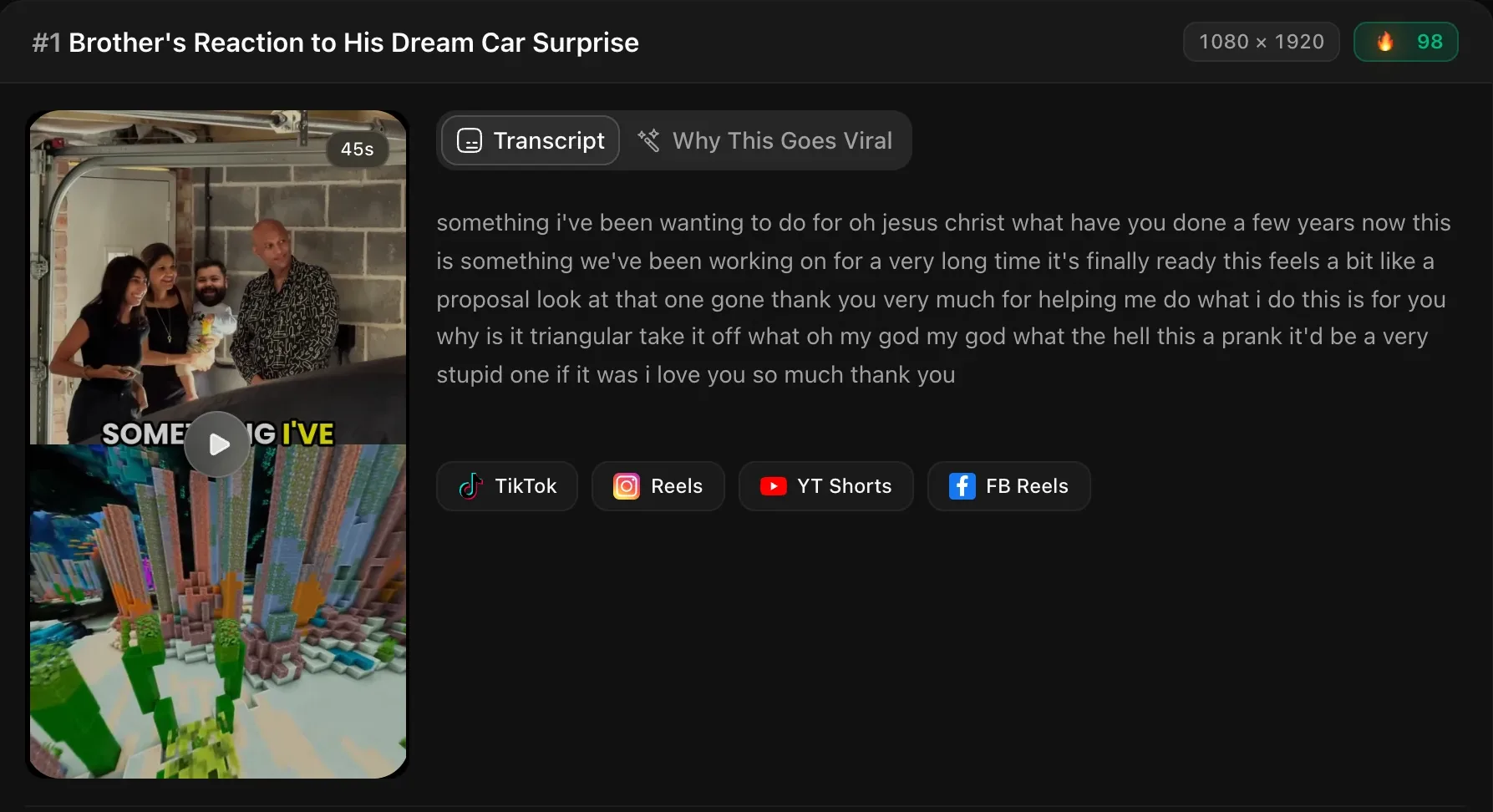
To do the same by hand in any layered editor, the manual method in our Subway Surfers split-screen guide works the same with Minecraft footage.
Where do you get Minecraft parkour footage?
From one of three places:
- Your own recording. Mojang’s guidelines start from “videos, streams, and screenshots of you playing or using Minecraft”. Footage you captured yourself is the cleanest kind to build on.
- A tool’s built-in library. Revid has a “built-in Minecraft parkour footage library”, Zebracat ships its own parkour scenes, ClipTalk says it supplies “its own clean parkour loops”, and ScaleReach has the 7 loops above.
- A “no copyright” download. That label is the uploader’s own statement. Read the terms they actually give before a channel depends on it. ClipTalk’s page calls “pulling someone else’s gameplay” exactly the step its tool removes.
Can you monetize Minecraft parkour videos?
Mojang says yes, with conditions. Its usage guidelines allow you to “put footage of our game on YouTube, Twitch, or any other website and make money from them”, so long as the videos are free to view, you don’t sell copies, and you “add enough of your own unique content to the video or stream to make it reasonable for you to make money through someone watching it”. The example Mojang gives of enough is “your own audio commentary to footage of your gameplay”.
The line that matters most for this format comes right after it: “You can’t just include your logo, web address, or overlays on top of our or someone else’s gameplay”. Mojang adds that “we reserve our right to decide on if your content is unique enough”. In practice, the voice or the clip on top has to be the reason someone watches. The parkour can’t be.
YouTube applies its own reused-content rules on top of Mojang’s. We quoted them in the monetization section of our Subway Surfers split-screen guide, and they point the same way: your own recording on top, gameplay as the backdrop.
FAQ
What is a Minecraft parkour video generator?
It’s a tool that puts Minecraft parkour gameplay behind other content, and the name covers three kinds. Text-to-parkour generators such as Revid, Zebracat and ClipTalk read your script or PDF in an AI voice over parkour footage. Split-screen tools such as ScaleReach put a clip from your own video on top of the gameplay. AI video generators such as Pixazo make new Minecraft-style footage from a prompt.
How do I turn text into a Minecraft parkour video?
Paste the text into a text-to-parkour generator, pick a voice and a parkour background, and export the 9:16 video. Revid and Zebracat both accept a script or a PDF, and Zebracat also takes Reddit threads. By hand, write a 30 to 60 second script, make a voiceover, record parkour gameplay, stack it in a 1080 × 1920 project and add word-by-word captions.
Is there a free Minecraft parkour video generator?
Partly. ClipTalk’s page says writing the script is free with no signup, and rendering uses “50 free credits, no card” once you have an account. Zebracat and Pixazo invite you to start free without stating the limits on those pages. ScaleReach’s split screen is on the Pro and Agency plans, not the free one. Making the video by hand costs nothing but time.
Can I use Minecraft gameplay in my videos?
Yes, under Mojang’s usage guidelines. They allow “videos, streams, and screenshots of you playing or using Minecraft”, and money from ad revenue if the videos are free to view and you add enough of your own unique content. Mojang’s example is your own commentary. It says you “can’t just include your logo, web address, or overlays” on top of someone’s gameplay, and it decides what counts as unique enough.
How long should a Minecraft parkour video be?
Aim for 30 to 60 seconds, which is the range Revid and Zebracat both give on their pages. ScaleReach’s split-screen clips run a median of 44 seconds, and 84.4% are a minute or shorter. Our Minecraft loops are 90 seconds long, so a clip of 45 seconds or less also gets a random start point in the gameplay, and nothing under 90 seconds repeats it.
Can you monetize Minecraft parkour videos on YouTube?
Mojang allows ad revenue on Minecraft footage if your video adds enough of your own content, such as your own commentary, and is free to view. YouTube’s reused-content rules apply on top of that. Both point the same way: the voice or the clip on top has to be yours, and a video where neither the gameplay nor the content on top is yours is what both sets of rules warn against.
The bottom line
Before you pick a Minecraft parkour video generator, check what you’re starting with. A script goes to a text-to-parkour generator that adds an AI voice. A video goes to a split-screen tool that keeps your own voice. A bare prompt goes to an AI video generator, and you get seconds of footage, not real gameplay.
Whichever route you take, the parkour is the backdrop. Mojang’s guidelines and YouTube’s rules both look at what you added on top, so put your effort into the script or the clip, and record your own gameplay if you can.
Every ScaleReach number here comes from our production database and source code, dated where it’s cited. If one looks wrong, tell us at hevin@scalereach.ai and we will correct it in the open.
Changelog
October 2026 update. First published. Background library details (7 Minecraft loops at 90 seconds and 1280 × 720), split ratios, background picks and split-screen clip lengths were measured from ScaleReach’s production database on 12 October 2026. Plan access, the face-tracking switch-off, crop behaviour and loop start points come from our production code as of that date. Other tools’ features were read from their own pages, and Mojang’s rules from minecraft.net, on 12 October 2026.
Last reviewed: October 2026 Next planned refresh: January 2027 Update hooks: whether Mojang changes its usage guidelines for videos; whether ScaleReach adds face tracking to split-screen clips, longer or higher-resolution Minecraft loops, or split screen on more plans; whether the other tools change what they accept or what’s free.
About the author
Hevin K runs ScaleReach, an AI clip maker that turns long videos into captioned vertical clips, including split-screen shorts with Minecraft parkour gameplay underneath. The figures in this post come from ScaleReach’s own production database and source code, dated where they are cited.
