
Opus Clip and Riverside both turn long recordings into short clips, but they sell different things. Opus Clip is a clip pipeline: 1 credit per minute of source video, 300 credits a month on Pro for $29 (or $14.50 a month billed yearly). Riverside is a recording studio with a clipper inside: Pro costs $24 a month billed yearly, recording is unlimited, and Magic Clips uses no credits at all. What limits Riverside’s clips is not minutes but sets: 3 sets of Magic Clips per recording on Pro, and 15 hours a month of uploads for footage you recorded somewhere else. Every price below was read from each vendor’s own page on 7 November 2026.
Disclosure: ScaleReach publishes this comparison and competes with Opus Clip, and with Riverside’s Magic Clips feature. I did not pay for either plan for this post, and I did not run the same video through both, so there is no output-quality verdict here. There are no affiliate links. Every fact comes from a page the vendor controls, linked and dated.
The 60-second verdict
Pick Riverside if you record the show yourself, especially remote interviews. You get separate audio and video tracks per guest, up to 4K, and Magic Clips runs on every recording at no extra cost. Clips are a bonus on top of the studio.
Pick Opus Clip if the recording already exists, on YouTube, in Zoom, or in Riverside, and clips are the whole job. It takes links, ranks clips with a Virality Score, offers clip lengths up to 15 minutes, and its Pro plan schedules posts to 6 social accounts.
Watch out for: Riverside’s monthly prices show differently in different parts of its own pricing page, and Magic Clips caps how many times you can re-run it per recording. Opus Clip’s cheapest plan has no scheduler and no yearly option.
Bottom line: Riverside is where you record. Opus Clip is where you clip what you already recorded. Opus Clip’s Pro plan even imports from Riverside, so many podcasters do not have to choose.
Opus Clip vs Riverside at a glance
| Opus Clip | Riverside | |
|---|---|---|
| What it is | Long-to-short AI clipper | Remote recording studio and editor, with Magic Clips |
| What you pay for | Source minutes (1 credit = 1 minute) | A plan; recording hours are unlimited on every plan |
| Cheapest paid, monthly | Starter $15, 150 credits | Pro $29 or $35 (the page shows both, see below) |
| Cheapest paid, yearly | Pro $14.50/month ($174 a year), 300 credits a month | Pro $24/month ($288 a year) |
| Free plan | 60 credits a month, watermark, up to 1080p, no editing | 2 hours of multi-track recording, 720p, watermark, Magic Clips |
| Footage from elsewhere | Local upload and YouTube links on every plan; Starter adds Google Drive, Zoom and StreamYard; Pro adds Riverside, LinkedIn, public .mp4 links and more | File upload or Google Drive, 15 hours a month on Pro, Grow and Webinar; unlimited on Business |
| Clip ranking | Virality Score, from Starter | Score from 99 to 70, relative to the other clips in the batch |
| Clip length | Ranges from 0 to 1 minute up to 10 to 15 minutes | Generally 30 to 90 seconds; duration adjustable on re-runs |
| How many clips | Limited by credits, not by runs | About 2 per 5 minutes; 1 automatic set per recording, 3 sets total on Pro, Grow and Webinar, 5 on Business |
| Posting | Starter auto-posts to YouTube Shorts, TikTok and Instagram Reels; Pro adds a scheduler and 6 accounts | Pro publishes to YouTube, Spotify, Apple, Instagram, LinkedIn and more; scheduling starts on Grow |
| Timeline export | Premiere Pro and DaVinci Resolve on Pro | Export to Premiere Pro, Final Cut Pro or any AAF editor is listed; non-destructive timeline export is Business only |
Sources: opus.pro/pricing and riverside.com/pricing, both read 2026-11-07; Riverside’s help centre on Magic Clips and upload limits, read 2026-11-07. Opus Clip’s 1 credit per minute rule is from its help centre on credits, read 28 October 2026.
How much does Riverside cost in 2026?
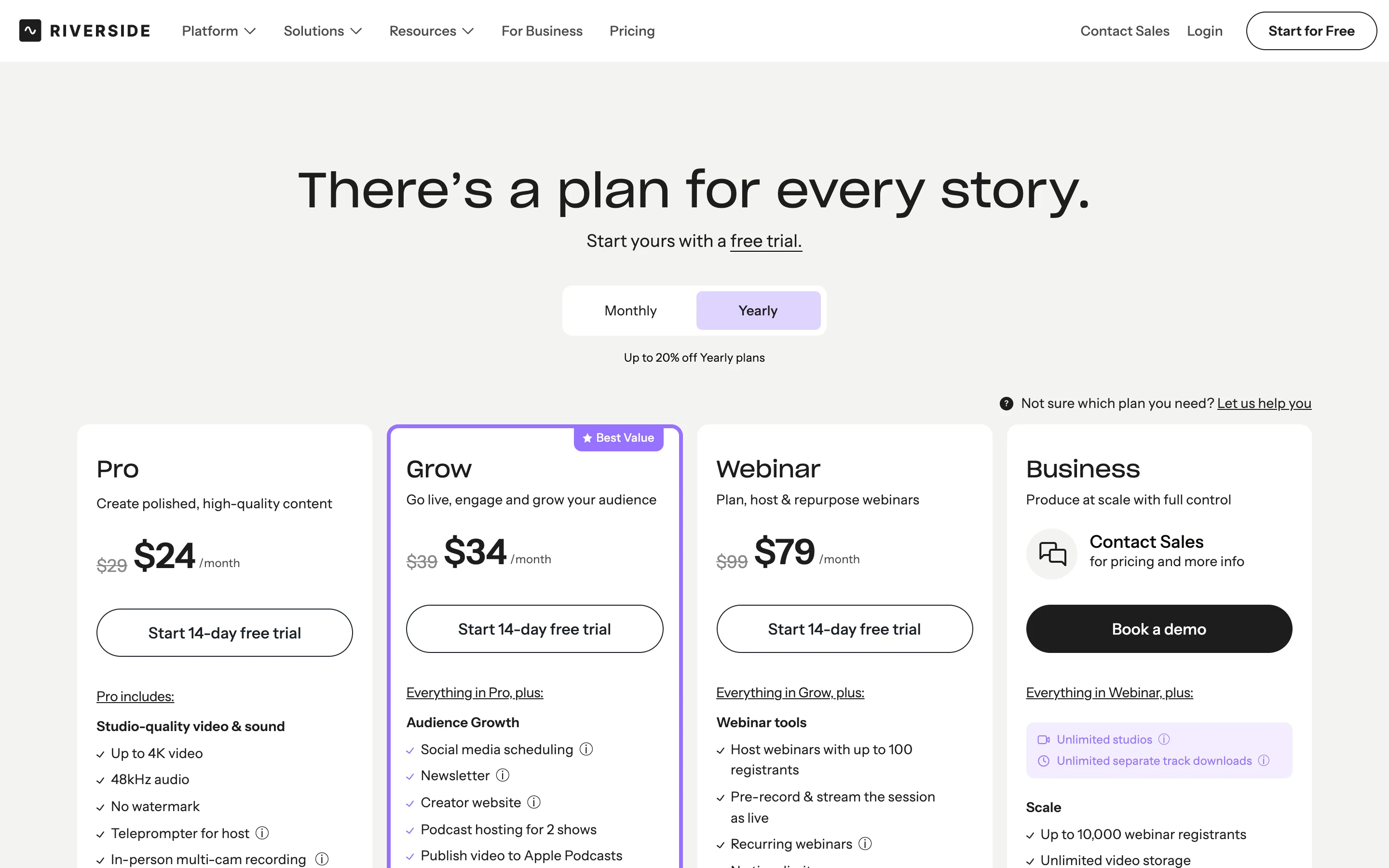
Riverside’s pricing page, read 7 November 2026, on the yearly toggle:
| Plan | Yearly | Monthly | Studios | Separate track downloads | Notable |
|---|---|---|---|---|---|
| Free | $0 | $0 | Not stated | 2 hours of multi-track recording to try | 720p, watermark, Magic Clips |
| Pro | $24/month ($288 a year) | $29 or $35 | 1 | 15 hours a month | Up to 4K, no watermark, Magic Clips and show notes, podcast hosting, publishing |
| Grow | $34/month ($408 a year) | $39 or $45 | 2 | 20 hours a month | Social media scheduling, newsletter, live streaming, Riverside MCP |
| Webinar | $79/month ($948 a year) | $99 | 3 | 25 hours a month | Webinars up to 100 registrants |
| Business | Custom | Custom | Unlimited | Unlimited | Unlimited uploads, API access, SSO |
The yearly prices were the same everywhere I read them. The monthly prices were not:
- In a US render of the page, the Monthly toggle showed $35 for Pro, $45 for Grow and $99 for Webinar. That render also showed a banner saying the page was a staging environment and “may not be up to date”.
- The FAQ on the same page says annual billing takes “Pro from $29 to $24/month, Grow from $39 to $34”. The screenshot below, taken the same day, shows the same $29 and $39 as struck-through prices.
I could not settle which monthly price checkout charges, so the tables show both. If you plan to pay monthly, check the price at checkout. The yearly figures are the safe ones to budget on.
Two meters sit under those prices, and neither is about clips. Separate track downloads (15 hours a month on Pro) cap how much studio-quality per-guest footage you can download; recording itself is unlimited. AI credits (2,000 to start on Pro, Grow and Webinar) pay for AI translation, AI B-roll and animated clips. Riverside’s FAQ says “Core AI features like Magic Clips, Magic Audio, and the AI Co-Creator don’t require credits.”
How much does Opus Clip cost in 2026?
| Plan | Monthly | Yearly | Credits | Notable |
|---|---|---|---|---|
| Free | $0 | $0 | 60 a month | Watermark, no editing, up to 1080p, clips not exportable after 3 days |
| Starter | $15 | Not offered | 150 a month | Virality Score, auto-post to Shorts, TikTok and Reels, no scheduler |
| Pro | $29 | $14.50 a month ($174 a year) | 300 a month (3,600 over 12 months on yearly) | Scheduler, 6 social accounts, 2 seats, 100GB storage, Premiere and DaVinci export, video dubbing, Riverside and Zoom import |
| Business | Custom | Custom | Custom | API, dedicated storage, SSO |
Source: opus.pro/pricing, read 7 November 2026. The prices have not changed since we first read them on 28 October, so the screenshot from that day still applies:
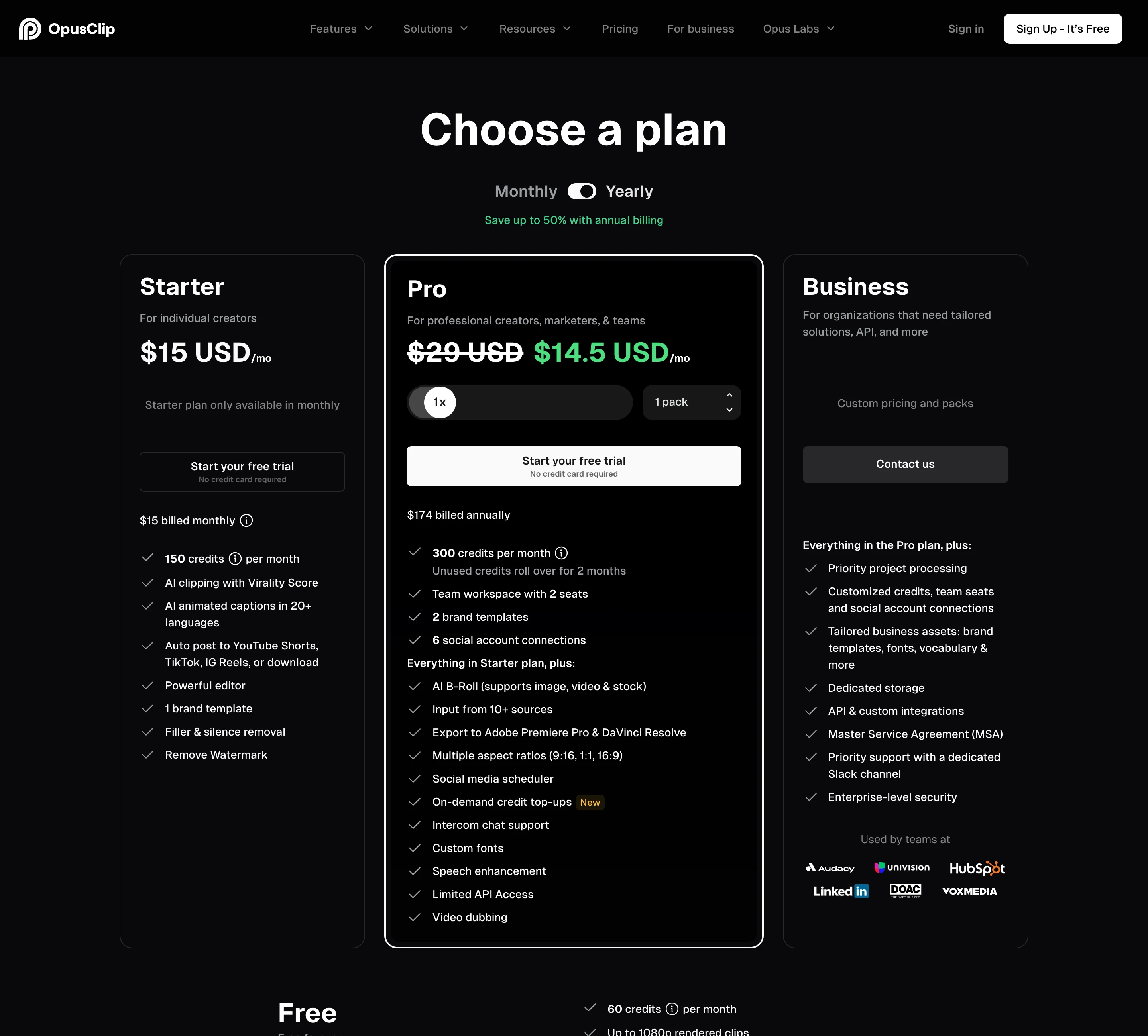
Unused Pro credits roll over for 2 months, per the pricing card. Our post on whether Opus Clip credits expire covers the rules in detail.
Which is cheaper per minute of footage?
Opus Clip meters every source minute. Riverside does not meter minutes for clips, so the only fair comparison is footage you recorded elsewhere and upload, which Riverside caps at 15 hours (900 minutes) a month on Pro.
| Plan | Price a month | Minutes of footage | Per minute |
|---|---|---|---|
| Riverside Pro, yearly | $24 | 900 uploaded, unlimited recorded | $0.027 |
| Riverside Pro, monthly | $29 or $35 | 900 uploaded, unlimited recorded | $0.032 or $0.039 |
| Opus Clip Pro, yearly | $14.50 | 300 | $0.048 |
| Opus Clip Pro, monthly | $29 | 300 | $0.097 |
| Opus Clip Starter | $15 | 150 | $0.100 |
On paper Riverside is cheaper per minute, and if you record in Riverside the footage costs nothing extra at all. Two catches:
- Riverside caps runs, not minutes. Every recording gets one automatic set of Magic Clips. On Pro, Grow and Webinar you can generate 2 more sets (3 in total), each with your own duration, speaker and keyword settings. Deleting clips does not give a run back. Opus Clip lets you clip the same video again as long as you have credits.
- You only use the 900 minutes if you fill them. Riverside’s help centre says “there’s no way to view your used upload hours”, so you cannot track how close you are to the cap.
Opus Clip is the more predictable meter: one number per video, visible before you start. Riverside is the cheaper one if you record there anyway.
How do Magic Clips and Opus Clip’s clipping differ?
Both find highlights with AI, add animated captions and let you edit the result. The differences are in control and volume.
Riverside Magic Clips, per its help centre and product page:
- Runs automatically on any recording or upload longer than 3 minutes that has a transcript.
- Typically finds 2 clips for every 5 minutes of conversation, each generally 30 to 90 seconds long. By that rule of thumb, a one-hour episode gives about 24 clips.
- Scores each clip from 99 down to 70, relative to the other clips in the same batch. Hover over the score for a short explanation. Scores only show on clips made after October 2025.
- Re-runs let you set duration, focus speakers and keywords. Riverside calls the feature “experimental” and says “results may vary”.
- Exports up to 4K on paid plans. Captions are styleable; the product page claims 99% accuracy, which I did not test.
Opus Clip, per its pricing page:
- A Virality Score on every clip from Starter up. We looked at how accurate the Opus Clip Virality Score is in a separate post.
- Clip length ranges from 0 to 1 minute up to 10 to 15 minutes on every plan, including Free.
- An AI copilot to pick the timeframe and clip length on every plan; topic search and prompt-to-clip on Pro.
- Reframing into 9:16 on every plan, with 1:1 and 16:9 added on Pro.
- On Pro, AI B-roll, a Viral Hook feature, motion graphics, speech enhancement and video dubbing.
If you want long clips (over 90 seconds), prompt-based clipping, or many runs on one episode, Opus Clip gives you more control. If you want clips to appear without doing anything after a recording ends, Magic Clips does that on every plan, Free included.
What does each tool do better?
Riverside is better at:
- Recording. Separate audio and video tracks per participant, up to 4K on desktop, 48 kHz audio and in-person multi-cam recording on Pro. Opus Clip does not record.
- One place for the whole show. Pro includes podcast hosting and analytics and publishes to YouTube, Spotify, Apple and Instagram. Grow adds a newsletter, a creator website and live streaming to unlimited destinations.
- Clips with no meter. Magic Clips uses no AI credits and runs on unlimited recordings.
- Editing the full episode. Text-based editing, audio enhancement, and filler and silence removal on Pro. The comparison table also lists export to Premiere Pro, Final Cut Pro or any AAF-supported editor, with non-destructive timeline export on Business.
Opus Clip is better at:
- Getting video in. It takes YouTube links on every plan, and Starter adds Google Drive, Zoom, StreamYard and Vimeo. Pro adds Twitch, LinkedIn, Loom, Frame.io, public .mp4 links and Riverside itself. Riverside’s help centre lists file upload and Google Drive import, not YouTube links.
- Clip control. Longer clips, prompt-to-clip, and as many runs as your credits allow.
- Getting clips posted cheaply. Starter at $15 auto-posts to YouTube Shorts, TikTok and Instagram Reels. On Riverside, scheduling starts on Grow at $34 a month yearly.
- Short-form extras. AI B-roll with stock footage, Viral Hook and dubbing on Pro.
Both have an MCP server: Opus Clip lists an MCP connector on Pro, and Riverside’s pricing page lists the Riverside MCP on its Grow card.
Can you use Riverside and Opus Clip together?
Yes, and for podcasters who record remote guests it is the most common answer. Record in Riverside for the separate tracks and audio cleanup, edit the episode there, then clip it. Opus Clip’s pricing table lists Riverside as an import source on Pro and Business, along with Zoom and StreamYard, so the episode does not have to be downloaded and re-uploaded.
The question is whether the second subscription earns its place. Magic Clips already gives you about 2 clips per 5 minutes on every Riverside plan. Add Opus Clip if you need what Magic Clips does not do: clips longer than 90 seconds, prompt-based clipping, more than 3 runs per episode, or scheduling to TikTok and Reels without moving up to Riverside’s Grow plan.
Take a one-hour weekly show, about 240 to 300 minutes of footage a month:
- Riverside alone: Pro at $24 a month yearly records it, edits it, hosts it and makes Magic Clips. Scheduling clips needs Grow at $34 a month yearly.
- Riverside plus Opus Clip: add Opus Clip Pro at $14.50 a month yearly, whose 300 credits cover the month. That is $38.50 a month on yearly billing for both.
- Opus Clip alone: works only if you record somewhere else, such as Zoom or StreamYard, both of which Opus Clip imports from Starter up.
Our earlier Riverside vs ScaleReach comparison covers the same record-then-clip split from our side, and is Opus Clip worth it for podcasters works through Opus Clip’s plans for a weekly show.
Where ScaleReach fits, briefly, since we publish this: it is a per-minute clipper like Opus Clip, at $18 a month for 400 minutes ($0.045 a minute) or $12.50 a month billed yearly ($0.031), with scheduling to YouTube Shorts and Instagram Reels included (TikTok posts stay private until TikTok finishes auditing our app). It does not record. The full ranking of Opus Clip alternatives by price per minute places every tool, and our pricing page has the plan details.
FAQ
Is Riverside’s Magic Clips as good as Opus Clip?
I did not run the same episode through both, so I cannot say which picks better moments. On paper, Opus Clip gives more control: a Virality Score, clip lengths up to 15 minutes, prompt-to-clip on Pro, and as many runs as your credits allow. Magic Clips makes clips of about 30 to 90 seconds automatically on every recording, scores them from 99 to 70 within the batch, and allows 3 sets per recording on Pro.
Is Riverside cheaper than Opus Clip?
Per minute of footage, yes. Riverside Pro costs $24 a month billed yearly with unlimited recording and 15 hours a month of uploads, about $0.027 per uploaded minute. Opus Clip Pro costs $14.50 a month billed yearly for 300 credits, about $0.048 a minute. But Riverside limits Magic Clips to 3 sets per recording on Pro. Prices read 7 November 2026.
Does Riverside Magic Clips cost credits?
No. Riverside’s pricing FAQ says core AI features “like Magic Clips, Magic Audio, and the AI Co-Creator don’t require credits.” AI credits, 2,000 to start on Pro, pay for AI translation, AI B-roll and animated clips. What limits Magic Clips is runs: one automatic set per recording, up to 3 sets in total on Pro, Grow and Webinar, and 5 on Business.
Can Opus Clip import recordings from Riverside?
Yes, on Pro and Business. Opus Clip’s pricing table lists Riverside among its video import sources on those plans, alongside Zoom, StreamYard, Google Drive, Vimeo and public .mp4 links. The Free and Starter plans take local uploads and YouTube links; Starter also takes Google Drive, Zoom and StreamYard, but not Riverside.
Can Riverside make clips from a video I did not record in Riverside?
Yes. Riverside’s help centre says Magic Clips works on uploaded files as well as recordings. Uploads are capped at 15 hours a month on Pro, Grow and Webinar, and are unlimited on Business. The help centre lists file upload and Google Drive as import options; it does not list YouTube links.
Can Riverside post clips to TikTok and Instagram?
Riverside’s Pro plan lists publishing to YouTube, Spotify, Apple, Instagram, LinkedIn and more, and its comparison table lists TikTok publishing. Social media scheduling starts on the Grow plan, $34 a month billed yearly. Opus Clip’s Starter plan auto-posts to YouTube Shorts, TikTok and Instagram Reels for $15 a month, and Pro adds a scheduler for 6 accounts.
The bottom line
Riverside is a recording studio first. If you record the show, especially with remote guests, it gives you separate tracks, editing, hosting and Magic Clips on every recording for $24 a month billed yearly, with no credits spent on clips. Its limits are how many times you can re-run clips per recording, a monthly upload cap for outside footage, and monthly prices its own page shows two ways.
Opus Clip is a clip pipeline. It takes the finished recording from YouTube, Zoom or Riverside itself, ranks clips with a Virality Score, makes them up to 15 minutes long, and posts them, with one credit per source minute telling you the cost upfront. If Magic Clips covers your needs, you do not need it. If you want more control over the clips than Magic Clips gives, it sits next to Riverside rather than replacing it.
If a number here looks wrong, email hevin@scalereach.ai and we will correct it and note the change.
Hevin K runs ScaleReach, an AI clip maker that competes with Opus Clip and with Riverside’s Magic Clips. There is no affiliate relationship with either. Every fact about them comes from pages they control, linked and dated, and neither tool was run on our own videos for this post.

