
Opus Clip and VEED both turn long videos into short clips, but they are different products. Opus Clip is a clipper: you pay per minute of video you feed it ($15 a month for 150 minutes), and it finds, reframes, captions and posts the clips. VEED is a full browser video editor that includes an AI Clips tool: you pay per user ($10 a month per user on yearly billing for Creator), and clipping is one feature among many. If clipping long videos is the whole job, Opus Clip is built for it. If you also edit, subtitle, translate and make other video in the same place, VEED covers more ground. Every figure below is the US price, read from each vendor’s own pages on 29 October 2026.
Disclosure: ScaleReach publishes this comparison and competes with both tools. I did not pay for either plan for this post, and I did not run the same video through both, so there is no output-quality verdict here. There are no affiliate links. Every fact comes from a page the vendor controls, linked and dated.
The 60-second verdict
Pick Opus Clip if your work is turning podcasts, webinars or streams into shorts and posting them. It meters source minutes, accepts sources up to 10 hours, and its $15 Starter plan auto-posts to YouTube Shorts, TikTok and Instagram Reels.
Pick VEED if you need a real editor (timeline, subtitles, translation, avatars, screen recording) and clipping is a side job. Its help centre lists AI Clips as unlimited on every paid plan, but it cannot import a YouTube link and it does not post to social networks.
Check first: VEED’s pricing page only showed yearly prices from a US view, and its plan set has changed during October. Confirm the monthly price at checkout.
Bottom line: Opus Clip is a clipper with an editor attached. VEED is an editor with a clipper attached. Choose by which half of the job takes most of your week.
Opus Clip vs VEED at a glance
| Opus Clip | VEED | |
|---|---|---|
| What it is | Long-to-short AI clipper | Browser video editor with AI tools |
| What you pay for | Minutes of source video (1 credit = 1 minute) | Seats (per user), plus AI credits for generation |
| Cheapest paid plan, yearly | Pro $14.50/month ($174 a year) | Creator $10/month per user, billed yearly |
| Cheapest paid plan, monthly | Starter $15, 150 credits | Not shown from a US view (see below) |
| AI clipping allowance | 150 (Starter) or 300 (Pro) source minutes a month | ”Unlimited access” on paid plans, per the help centre |
| Longest source | Up to 10 hours, per the help centre | 1 minute to 3 hours of speech per video |
| YouTube link import | Auto-import from a verified YouTube account (Starter and up) | No, upload a file |
| Highest export | Highest available on Starter and Pro, 4K on Business | 1080p (Creator), 4K (Pro) |
| Social posting | Starter: auto-post to Shorts, TikTok, Reels. Pro: scheduler, 6 accounts | None. Download and upload yourself |
| Free option | Free plan, 60 credits a month, watermarked | Free plan, watermarked 720p, AI Clips once per account |
| Refunds | Credits back per project on Pro, within 14 days, before any download | Consumers only, within 14 days, and only if never used |
Sources: opus.pro/pricing, help.opus.pro, veed.io/pricing, VEED’s Clips article and VEED’s Terms of Sale (all verified 2026-10-29).
What is the difference between Opus Clip and VEED?
Opus Clip does one job. You give it a long video, it picks the moments, reframes them to vertical, adds animated captions, scores each clip with a Virality Score and lets you post or schedule them. Its editor, B-roll and dubbing all sit around that job.
VEED is a general-purpose online video editor. It has a timeline, subtitles and translation, a screen and webcam recorder, AI avatars, text-to-speech, AI video generation and an AI Clips tool. Its own Clips article describes the clipper the way a clip tool would: it “automatically find[s] highlights, add[s] subtitles, center[s] the speaker, remove[s] filler words, and format[s] the video for social.”
The pricing models follow from that. Opus Clip meters the thing it is built for, minutes of long video. VEED charges per editor seat and meters the expensive generative features (avatars, AI video, voice) with AI credits.
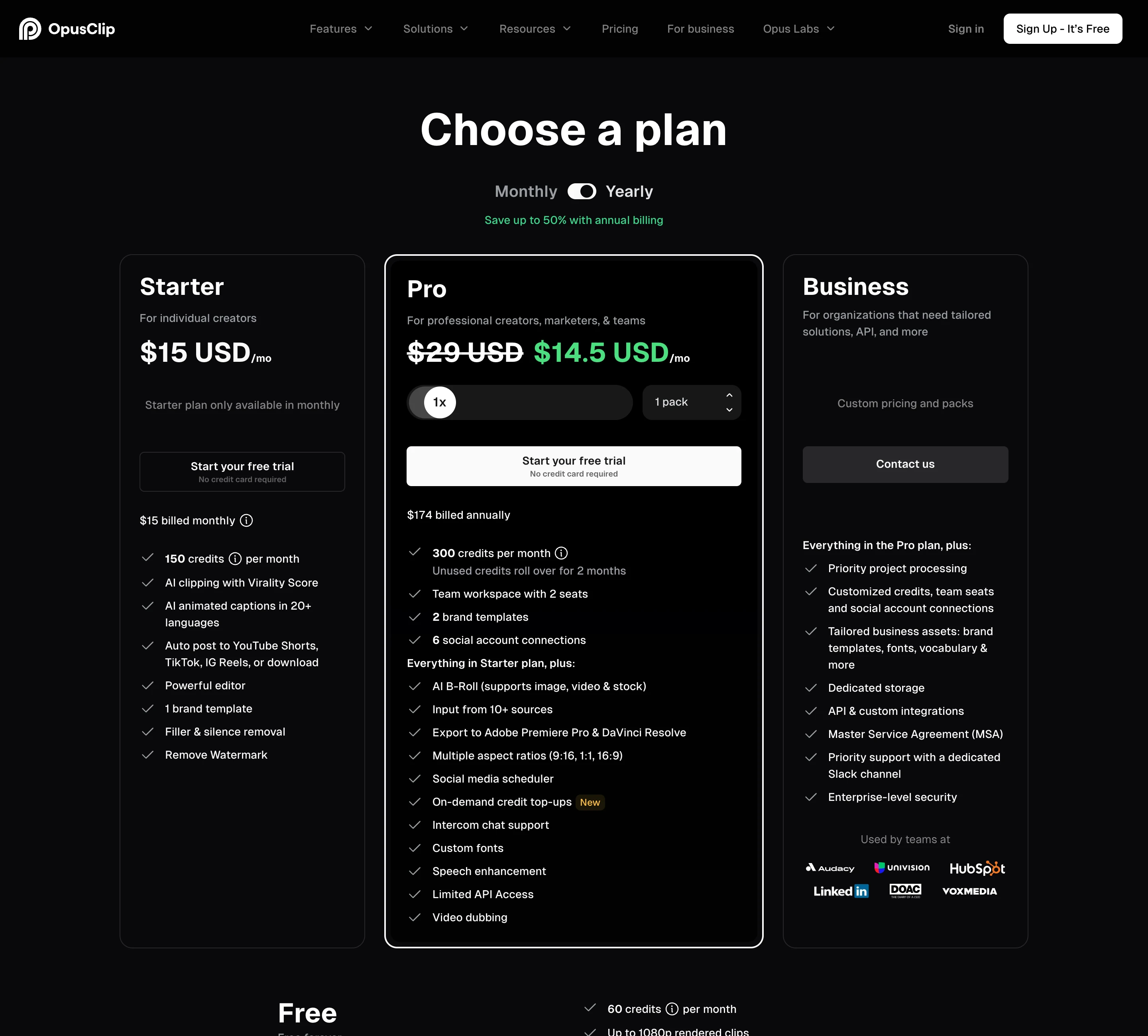
How much does Opus Clip cost in 2026?
US prices on opus.pro/pricing, read 29 October 2026 from the page’s server-rendered US defaults:
| Plan | Monthly | Yearly | Credits | Notable |
|---|---|---|---|---|
| Free | $0 | $0 | 60 a month | Watermark, up to 1080p, clips exportable for 3 days |
| Starter | $15 | Not offered | 150 a month | Auto-post to Shorts, TikTok and Reels, no scheduler |
| Pro | $29 | $14.50 a month ($174 a year) | 300 a month | Scheduler, 2 seats per pack, 6 social accounts, 9:16, 1:1 and 16:9, MCP connector |
| Business | Custom | Custom | Custom | 4K schedule and download, SSO, full API |
Source: opus.pro/pricing (verified 2026-10-29). The page says Starter is “only available in monthly”.
The help centre defines the unit: processing costs “1 credit per minute of the original video imported”. Videos under a minute round up to 1 credit and partial minutes round down, so a 42.5-minute podcast costs 42 credits. Posting to X costs 3 credits per clip per X account.
Monthly-plan credits expire after 60 days, so they roll over for one extra month. Yearly Pro grants all 3,600 credits up front, valid for 12 months. That figure is a year’s total, not a monthly allowance. What happens to leftover credits when you cancel is in do Opus Clip credits expire.
Opus Clip also prices by country: the US, UK, Canada, Australia and the euro area pay the figures above, and some countries, India among them, see lower prices.
How much does VEED cost in 2026?
VEED prices in local currency. From an Indian address its page shows rupees, so the figures below were read from a US render of veed.io/pricing on 29 October 2026. That render opens on yearly billing, and the monthly prices did not load, so this post publishes only the yearly figures rather than estimate the rest.
| Plan | Yearly billing, per user | AI credits | Notable |
|---|---|---|---|
| Free | $0 | Region dependent | Watermark, 720p export, 1 GB per uploaded file, AI Clips once |
| Creator | $10 a month | 6,000 (~1,500 AI videos) | No watermark, 1080p, “unlimited video length”, subtitles 120 hr/yr |
| Pro | $19 a month | 18,000 (~4,500 AI videos) | 4K, 50 GB storage, translate to 50+ languages, multiple brand kits, unlimited auto subtitles |
| Enterprise | Custom | Custom | Team management, review mode, privacy controls |
Sources: veed.io/pricing, VEED’s export article and upload article (all verified 2026-10-29). The page says yearly billing saves “up to 60%”.
Three things to know before you budget for VEED:
- Every price is per seat. The FAQ says the plan price “is multiplied by the number of editors in your workspace”. Three editors on Creator is $30 a month on yearly billing.
- AI credits are not for clipping. VEED’s help articles tie credits to generation: AI video, avatars, text-to-speech and AI Playground models. Credits “do not carry over” and refresh at renewal. Clipping has its own allowance (next section).
- The plan lineup moves. Several of VEED’s help articles, updated August and September 2026, refer to a Creator, Pro and Studio lineup. The US page on 29 October showed Creator, Pro and Enterprise. On 26 October we saw two different plan sets on separate loads, and one put Creator at about $147 a user a year. Read the price at checkout, not here.
One inconsistency on the page itself: the Creator card lists “Subtitles 120 hr/yr”, while the FAQ says “all paid plans include unlimited subtitle generation, subject to a fair use limit of 50 hours per month”.
Is VEED cheaper than Opus Clip for clipping?
On paper, for heavy use, yes. Opus Clip bills every source minute; VEED’s help centre lists its Clips tool as “Unlimited access” on Creator, Pro, Studio and Enterprise.
| Opus Clip | VEED | |
|---|---|---|
| Lowest yearly cost, one person | $174 a year (Pro, 3,600 source minutes) | $120 a year (Creator, $10 x 12) |
| Cost per source minute, yearly | $0.048 | Not metered by minute, per the help centre |
| Cost per source minute, monthly | $0.100 (Starter), $0.097 (Pro) | Monthly price not shown from a US view |
Calculated from the two pricing pages and the Clips help article (2026-10-29).
Two cautions before you treat VEED’s clipping as free:
- The pricing page’s own feature table has a “Clips” row with a per-month and per-year allowance for each plan. The numbers did not render, so I cannot tell you what they are. VEED’s dashboard article says Plan Limits shows usage for “Subtitles, Translation, Text to Speech, Dubbing, Avatars, and Clips”. Check that screen before relying on “unlimited”.
- The seat multiplies. For a team of three, VEED Creator is $360 a year; one Opus Clip Pro pack is $174 a year and includes 2 seats.
Can VEED clip long podcasts like Opus Clip?
Yes, within limits that matter for some workflows. Per VEED’s Clips article (21 August 2026):
- Length: the video needs between 1 minute and 3 hours of speech. The file can be longer, but the speech must fall inside that range.
- Input: upload only. “The YouTube import option is not available”, and Clips cannot run on videos already in your VEED library or on exported projects.
- Settings: language, portrait or landscape, a goal, an optional description of what to capture, a subtitle style and a maximum clip length.
- Output: clips are “mainly a minute or shorter”. Each gets ratings on several aspects, which you can trim by editing the transcript or open in the full editor.
Opus Clip accepts sources up to 10 hours, uploads of up to 10 GB on Free and Starter and 30 GB on Pro, and clip lengths from under a minute up to 15 minutes. Starter and Pro can auto-import from a verified YouTube account, and Pro adds “Topics search” and “Prompt to clip” to steer what it picks.
So for a weekly one-hour podcast, both work. For a four-hour stream, or for clips longer than a minute, Opus Clip’s limits fit and VEED’s stated limits do not. I did not run the same video through both tools, so I cannot tell you which picks better moments. Our test of the Opus Clip Virality Score covers how far its scores can be trusted.
Which is the better editor, Opus Clip or VEED?
VEED, by a wide margin in scope. It is a full editor: timeline editing, subtitles and translation, brand kits, screen and webcam recording, eye contact correction, clean audio, AI avatars and AI video generation. Uploads have no per-file size limit on paid plans, though VEED recommends keeping a project under 5 GB and around 4 to 5 hours.
Opus Clip’s editor exists to finish clips. Starter has text and timeline editing, filler and silence removal, text overlays and limited B-roll. Pro adds bad-take removal, eye contact correction, music, transitions, dubbing and export to Adobe Premiere Pro and DaVinci Resolve, so you can finish elsewhere.
If you will edit anything other than short clips, VEED is the tool that does it. Our VEED review goes further into the editor itself.
Do Opus Clip and VEED post to TikTok, Instagram and YouTube?
Opus Clip does, VEED does not.
- Opus Clip Starter ($15) auto-posts to YouTube Shorts, TikTok and Instagram Reels, with no scheduler.
- Opus Clip Pro ($29, or $14.50 yearly) adds a social scheduler, 6 social account connections and posting to multiple profiles per platform. X posts cost 3 credits each.
- VEED answers this directly in its sharing article: “Veed requires users to manually upload exported videos to external platforms.” It offers share links, email sharing and, from Pro, website embeds.
If you post clips every day, that is a real difference in time per week, not a feature checkbox.
Is there a free version of Opus Clip or VEED?
Both have a free plan.
- Opus Clip Free: 60 credits a month (60 source minutes), watermarked clips rendered up to 1080p, exportable for 3 days, no editing. Starter and Pro also offer a free trial with no card required.
- VEED Free: watermarked exports at 720p, 1 GB per uploaded file, and AI Clips as a one-time try per account. VEED’s FAQ says paid-plan trials are only for enterprise teams of at least 3 users.
For trying the clipper itself, Opus Clip’s free plan renews monthly. VEED’s lets you run Clips once.
Can you get a refund from Opus Clip or VEED?
VEED’s Terms of Sale (clause 7.3) give consumers a refund within the first 14 days only if they “have never used” the service, where usage “includes uploading media, editing media, adding subtitles among other things”. Business buyers and anyone who has used it are not entitled to one. To avoid a renewal, cancel at least 2 business days before the renewal date.
Opus Clip refunds credits, not money, and only in narrow cases: on Pro you can refund a single project within 14 days of upload, as long as you have not downloaded a clip from it. The full mechanics are in how to cancel Opus Clip.
On a yearly plan, either way, you are paying up front with little route back. Use the free plans first.
Do Opus Clip and VEED work with Claude and other AI agents?
Both have MCP servers, for different jobs. Opus Clip lists an “MCP connector” on Pro and Business, alongside its clipping and scheduler APIs. VEED’s MCP server runs on its Fabric 1.0 model and generates talking-avatar videos from a script; it works with Claude, ChatGPT and Make.com and uses your AI credits. It is not a clipping tool.
Opus Clip or VEED: which should you choose?
| Your situation | Pick | Why |
|---|---|---|
| Weekly podcast or webinar, clipped and posted | Opus Clip | Per-minute billing, auto-post from $15, scheduler on Pro |
| Streams or recordings over 3 hours | Opus Clip | VEED Clips caps speech at 3 hours |
| You edit full videos, ads or tutorials too | VEED | A complete editor; clipping included on paid plans |
| Lots of clipping, one person, yearly budget | Compare carefully | VEED Creator is $120 a year with Clips listed as unlimited, but check its Clips allowance in Plan Limits |
| Team of 3 or more | Opus Clip Pro | 2 seats per pack, up to 4; VEED charges every editor |
| Subtitles and translation into many languages | VEED | Translate to 50+ languages on Pro |
A worked example. A weekly 60-minute podcast is about 260 source minutes a month. On Opus Clip that needs Pro: $29 a month, or $14.50 on yearly billing, and Starter’s 150 credits run out by the third episode. On VEED, Creator at $10 a month (yearly) covers the clipping if “unlimited” holds, but you download every clip and upload it to each platform by hand.
Where ScaleReach fits, briefly, since we publish this: it is a per-minute clipper like Opus Clip, at $12 a month for 200 minutes ($0.060 a minute) or $10 a month yearly, with scheduling included from that plan. It publishes to YouTube Shorts and Instagram Reels; TikTok posts stay private until TikTok finishes auditing our app. The full ranking of Opus Clip alternatives by price per minute covers the rest of the category, and what 10 hours of podcast a month costs to clip works the numbers for heavier volumes.
FAQ
Is Opus Clip or VEED better for podcasts?
Opus Clip is the better fit if clipping and posting are the job. It bills per source minute, accepts videos up to 10 hours, auto-posts to Shorts, TikTok and Reels from $15 a month, and makes clips up to 15 minutes. VEED’s AI Clips handles 1 minute to 3 hours of speech, makes clips “mainly a minute or shorter”, cannot import YouTube links and does not post to social networks.
Is VEED cheaper than Opus Clip?
For one person clipping a lot, it can be. VEED Creator costs $10 a month per user on yearly billing, and its help centre lists AI Clips as unlimited on paid plans. Opus Clip Pro costs $14.50 a month yearly for 300 source minutes a month. VEED charges per editor seat, so for teams of three or more Opus Clip Pro, with 2 seats per pack, is usually cheaper.
Does VEED have an AI clip generator?
Yes. VEED’s AI Clips tool turns a video with 1 minute to 3 hours of speech into short clips, adding subtitles, centring the speaker, removing filler words and rating each clip. It is a one-time try on the free plan and listed as unlimited on Creator, Pro, Studio and Enterprise, per VEED’s help centre on 21 August 2026.
Can VEED post directly to TikTok or YouTube?
No. VEED’s help centre says it “requires users to manually upload exported videos to external platforms”. Opus Clip auto-posts to YouTube Shorts, TikTok and Instagram Reels from its $15 Starter plan and adds a scheduler on Pro.
How do VEED AI credits work?
VEED’s AI credits pay for generation: AI video, avatars, text-to-speech and AI Playground models. Creator includes 6,000 and Pro 18,000 on yearly billing. Credits do not carry over and refresh when the subscription renews. Subtitles, translation and Clips have their own allowances.
Does VEED offer refunds?
Only narrowly. VEED’s Terms of Sale give consumers a refund within the first 14 days if they have never used the service, including uploading or editing anything. Otherwise subscriptions are not refunded. Opus Clip refunds credits for a single project on Pro within 14 days, if no clip from it has been downloaded.
The bottom line
Opus Clip and VEED overlap on one feature and differ on everything around it. Opus Clip meters minutes of long video, finds clips in sources up to 10 hours and posts them for you from $15 a month. VEED is a per-seat editor whose AI Clips tool is included on paid plans, capped at 3 hours of speech, upload only, with no posting.
Start from how you spend the week. If it is clipping and posting, Opus Clip, or a cheaper per-minute clipper, is built for it. If it is editing and clips are a by-product, VEED earns its seat. Check VEED’s monthly price and Clips allowance in the app before you pay for a year.
Changelog
October 2026. First published. Prices and limits read from both vendors’ pricing pages, help centres and terms from a US view on 29 October 2026. VEED’s monthly prices did not render from that view and are not published.
Last reviewed: October 2026 Next planned refresh: January 2027
If a number here looks wrong, email hevin@scalereach.ai and we will correct it and note the change.
Hevin K runs ScaleReach, an AI clip maker that competes with Opus Clip and VEED. There is no affiliate relationship with either. Every fact about them comes from pages they control, linked and dated, and neither tool was run on our own videos for this post.
