
Bottom line: Vizard is the cheaper per source minute: its Creator plan lists 600 credits a month at $29, or $14.50 a month billed yearly. Opus Clip’s Pro plan lists 300 credits for the same $29 and $14.50. Opus Clip adds a Virality Score, prompt-based clipping and a Starter tier at $15. Vizard adds a free plan with a 60 minute upload cap and a Business plan with unlimited storage.
Disclosure: ScaleReach publishes this comparison and competes with both tools. I did not pay for either plan for this post, and I did not run the same video through both, so there is no output-quality verdict here. There are no affiliate links. Every figure below was read from the vendor’s own pricing page on 30 October 2026.
Opus Clip vs Vizard at a glance
| Opus Clip | Vizard | |
|---|---|---|
| Free plan | 60 credits a month, watermarked, exports kept 3 days | 60 credits a month, 720p export, 3-day storage |
| Cheapest paid, monthly | Starter $15, 150 credits | Creator $29, from 600 credits |
| Cheapest paid, yearly | Pro $14.50/month ($174 a year), 300 credits | Creator $14.50/month ($174 a year), from 600 credits |
| Top self-serve plan | Pro $29/month | Business $39/month ($19.50 yearly, $234 a year) |
| Unit of billing | 1 credit = 1 minute of source video | 1 credit = 1 minute of video uploaded |
| Upload length | Up to 10 hours per the help centre | 60 min (Free), 600 min (paid) |
| Upload size | Local video up to 10GB | 1GB (Free), 30GB (paid) |
| Scheduler | Pro and Business | Creator and Business |
| Social accounts | 6 on Pro | 6 on Creator, 20 on Business |
| Storage | 3 days (Free), 29 days (Starter), 100GB (Pro) | 3 days (Free), 100GB (Creator), unlimited (Business) |
| Virality Score | Starter and up | Not listed on the pricing page |
Sources: opus.pro/pricing and vizard.ai/pricing, both read 2026-10-30. Opus Clip’s 10 hour limit is from its help centre, as cited in our Opus Clip vs Submagic comparison.
How much does Vizard cost in 2026?
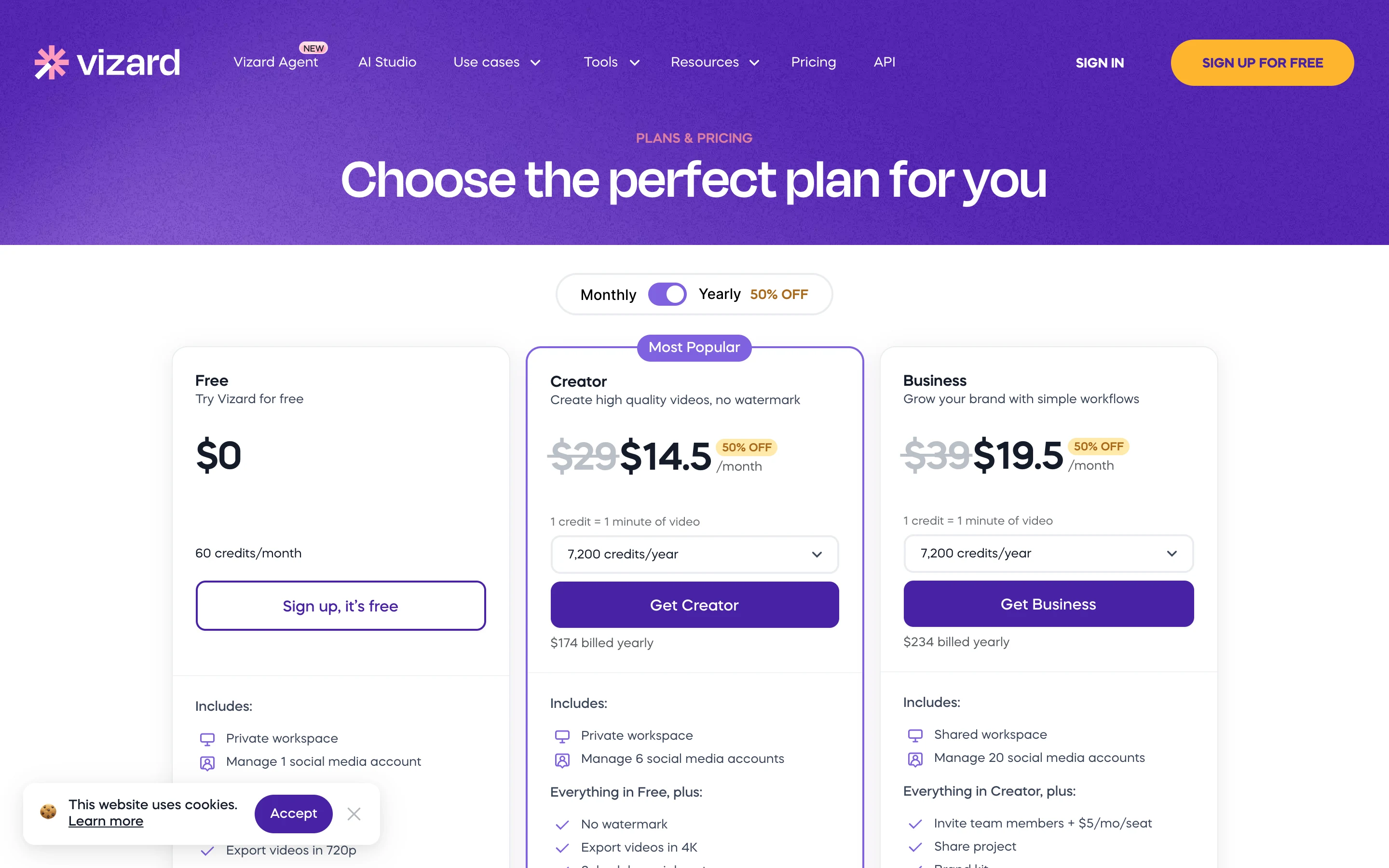
US prices on vizard.ai/pricing, read 30 October 2026:
| Plan | Monthly | Yearly | Credits | Notable |
|---|---|---|---|---|
| Free | $0 | $0 | 60 a month | 720p export, 10 minute export length, 3-day storage, 1 social account |
| Creator | $29 | $14.50 a month ($174 a year) | From 600 a month | No watermark, 4K export, scheduler, 6 social accounts, 100GB storage |
| Business | $39 | $19.50 a month ($234 a year) | From 600 a month | Shared workspace, 20 social accounts, brand kit, unlimited storage, seats at $5 a month each |
The pricing page shows a credit selector on both paid plans, from 7,200 credits a year (600 a month) up to 74,400 a year. 600 a month is the entry point and the figure I use below. Larger tiers cost more.
How much does Opus Clip cost in 2026?
| Plan | Monthly | Yearly | Credits | Notable |
|---|---|---|---|---|
| Free | $0 | $0 | 60 a month | Watermark, up to 1080p, exports kept 3 days |
| Starter | $15 | Not offered | 150 a month | Virality Score, auto-import from a verified YouTube account, no scheduler |
| Pro | $29 | $14.50 a month ($174 a year) | 300 a month | Scheduler, 6 social accounts, 100GB storage, MCP connector, up to 2 custom fonts |
| Business | Custom | Custom | Custom | Unlimited storage, SSO, full API |
Source: opus.pro/pricing, read 30 October 2026. The full Opus Clip breakdown, with a screenshot of the page, is in Opus Clip vs Submagic.
Which is cheaper per minute?
Divide the price by the credits on the cheapest tier that includes a scheduler and no watermark.
| Plan | Price | Source minutes | Per minute |
|---|---|---|---|
| Vizard Creator, monthly | $29 | 600 | $0.048 |
| Vizard Creator, yearly | $14.50 | 600 | $0.024 |
| Opus Clip Starter | $15 | 150 | $0.100 |
| Opus Clip Pro, monthly | $29 | 300 | $0.097 |
| Opus Clip Pro, yearly | $14.50 | 300 | $0.048 |
Vizard gives you twice the minutes for the same money at every billing cycle. The gap is largest at the low end: Opus Clip’s cheapest paid plan costs about four times as much per minute as Vizard’s yearly Creator plan.
Two cautions. Opus Clip’s Starter has no scheduler, so the like-for-like comparison to Vizard Creator is Pro. And Vizard’s page says “From 600”, so check the number the selector shows you before you pay.
Free plans: same credits, different limits
Both give 60 credits a month, which is one hour of source video. The limits differ.
- Vizard Free caps uploads at 60 minutes and 1GB, exports at 720p and 10 minutes, and keeps files 3 days. It includes AI clipping and the full editor.
- Opus Clip Free accepts local video up to 10GB, exports up to 1080p with a watermark, and keeps media 3 days. It does not include the Virality Score or scheduling.
A single 90 minute podcast does not fit Vizard’s free upload cap. It does fit Opus Clip’s free credits only if you split it, since 60 credits cover 60 minutes.
Features that differ
- Clip selection: Opus Clip offers a Virality Score from Starter, plus a copilot that lets you pick the clipping timeframe and length, with topic search and prompt-to-clip on Pro. Vizard’s pricing page lists “AI clipping” and “AI post suggestions” but no scoring. Our write-up of how accurate the Opus Clip Virality Score is covers what the number means.
- Editing extras: Both list AI emojis, keyword highlights and B-roll. Opus Clip’s free plan lacks AI voice-over and filler removal, which sit on paid plans.
- Team and brand: Vizard puts a brand kit and shared workspace on Business. Opus Clip’s Pro includes team seats and Business is custom-priced with unlimited storage and SSO.
- API: Vizard lists an API with rate limits from 1 request a minute on Free to 10 a minute on Business. Opus Clip lists video and scheduler APIs, which its free plan does not include.
- Transcript export: Vizard exports TXT on Free and TXT plus SRT on paid plans.
Which one should you pick?
- Pick Vizard if you clip a lot of long video and price per minute matters. 600 credits at $14.50 a month yearly is the cheapest entry in this pair, and the paid plans accept uploads up to 600 minutes.
- Pick Opus Clip if you want the Virality Score or prompt-based clipping, or you want a month-to-month plan at $15.
- Pick neither yet if you only want to test. Both free plans give an hour of source video, so run the same episode through each and compare the clips yourself.
Our own earlier reviews give more on each tool: Vizard review for podcast and webinar clips and the Opus Clip review. Prices there may predate this page, so treat the table above as current.
Where ScaleReach fits, briefly, since we publish this: it is a per-minute clipper at $12 a month for 200 minutes ($0.060 a minute) or $10 a month yearly, with scheduling included from that plan. The full ranking of Opus Clip alternatives by price per minute places every tool, including these two.
FAQ
Is Vizard cheaper than Opus Clip?
Yes, per source minute. On vizard.ai/pricing the Creator plan lists 600 credits a month at $29 monthly or $14.50 a month billed yearly. Opus Clip’s Pro plan lists 300 credits at the same two prices. Read 30 October 2026.
Do Vizard and Opus Clip both have free plans?
Yes. Both include 60 credits a month, which is 60 minutes of source video. Vizard Free caps uploads at 60 minutes and exports at 720p. Opus Clip Free adds a watermark to exports.
Does Vizard have a Virality Score?
Not on its pricing page. Vizard lists AI clipping and AI post suggestions. Opus Clip’s Virality Score starts on the Starter plan.
Can I schedule posts on both?
Yes, on paid plans. Vizard includes scheduling on Creator and Business. Opus Clip includes its scheduler on Pro and Business, not Starter.
Which has the longer upload limit?
Opus Clip’s help centre says up to 10 hours. Vizard’s paid plans accept 600 minutes (10 hours) per upload and its free plan 60 minutes.
If a number here looks wrong, email hevin@scalereach.ai and we will correct it and note the change.
Hevin K runs ScaleReach, an AI clip maker that competes with Opus Clip and Vizard. There is no affiliate relationship with either. Every fact about them comes from pages they control, linked and dated, and neither tool was run on our own videos for this post.
