
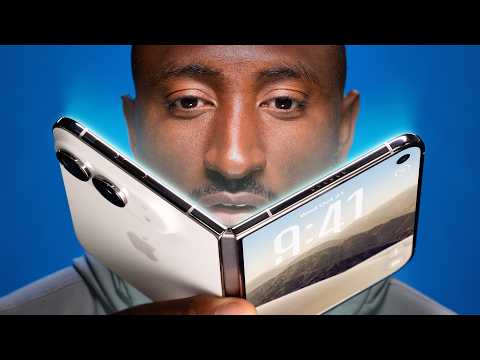
iPhone Duo Review: First Generation Fun!
15 clips from a 29:05 video · top score 95
Get clips like these, freeWhy it works
Connects the dots between Vision Pro, AirPods Max, and the iPhone Duo to expose a fundamental flaw in Apple's hardware philosophy, directly rebutting an Apple executive's quote.
Transcript
And I just keep replaying in my head that Time magazine interview quote where John Turnus recently called a bunch of the other foldables cheap and crappy. And maybe this is a hot take, but making everything uh metal and glass and heavy doesn't necessarily make it better to use. Like, it feels good in the hand, but it's like that sometimes works against them. It's just kind of like the permanent Apple design default. And that's great for like a MacBook Pro or an old Mac tower when you want it to feel metal and substantial, great. But it sometimes backfires like Vision Pro. Vision Pro is all metal, super heavy in a world of all plastic VR headsets. So does a Vision Pro feel premium and significant to hold? Yes. Does it kind of at first glance make the other plastic ones feel cheap and crappy? Kind of, yeah. But then when you're wearing it on your face for a while, do you also kind of wish it was lighter? Also, yeah. And same with over-ear headphones. Like most are plastic for a reason. It's lightweight. You're wearing it on your literal head for a while. AirPods Max comes along, very premium, feels solid, it's metal, very heavy. Maybe a little bit too heavy. Now you're not wearing an iPhone Duo on your face, so obviously it's not as dramatic, but the point still stands.
Why it works
Testing double-scrolling TikTok and Instagram Reels side-by-side is peak internet humor ('brainrot maxing') that guarantees comments and shares on short-form platforms.
Transcript
The obvious one is two apps side by side. Why would you do that? Well, there's actually tons of good reasons to. You just have to remember that you can do it, and then you'll just start doing it more. Like, YouTube open on one side, and note taking open on the other side. Very useful. Or maybe just replace YouTube with something else, like a video call, or anything, really. Also, copying and pasting, like an email confirmation code from one side into a login portal on the other side. Also, extremely clutch. And just replace whatever copying and pasting you want to be doing. If you have two apps open side by side and then tap on the divider in the middle, it locks them together in a pair and visually looks like a book. And so, sort of intuitively makes sense. Anytime you open one, they both open up together. And then you can unpair it the same way. And then the back and forth with all the different windows is super intuitive. You can go home on one side, not the other. Then you can swipe between recent apps on one side, but not the other. It's all super clean. You can't do a third window and you can't do anything other than two apps side by side half screen, but that's of course still better than a regular iPhone. I also have to try, just for the memes, to scroll Instagram Reels and TikTok at the same time. And technically you can do it, but it actually does kind of bug out a little sometimes cuz it wants to only play the audio from one and then it kind of gets weird. I'm going to turn the volume on. It might get crazy. But this is the TikTok audio. And then it switches back. You see how it switched back to the Instagram? And then back to TikTok. So, you you can't hear both at once and maybe that's a good thing. Um, but you can you can this could this could be you, but don't
Why it works
Exposes the hilarious reality of spending $2,000 on a cutting-edge foldable only to have major apps like Spotify and Twitter display with giant black bars or tiny centered windows.
Transcript
So, the app situation on the iPhone Duo is its biggest downside right now. Like, right now, as I released this video at launch. See, the idea of the iPhone Duo, while it's closed, is it's basically a normal iPhone on the left-hand side, but anything that would typically be at the very top or the bottom is moved over to the right, where it's reachable with your right thumb. So, on the home screen, for example, there's a normal grid of apps on the left, but the dock from the bottom moves over to the right, and the time and the battery and cell signal, all that stuff, is also over to the right in this clever little glyph. Makes sense? You open one of Apple's own apps, and that theme continues. The main content is on the left, and then the buttons that used to be on the bottom or the top are over to the right, where they're reachable. So, it's a brilliant concept. It's cool. It's It's sort of the blueprint for an optimized app. The problem is most apps, at least most of the ones I use right now, are not optimized yet, which means they look like this. Just a regular app with the buttons still at the top and the bottom, and then a black bar down the right-hand side where the buttons are supposed to be. So, Spotify looks like this, Google Maps, Waze, Discord, and Twitter are all like this. Google Calendar is like this. Like tons and tons of apps, big apps. Most of them are currently like this. And then when you open up the phone, they're mostly still just small, unoptimized iPhone apps in the middle of this huge screen, which is hilarious. Even if you turn it vertical, still very small. Very reminiscent of the old iPad days where you could just hit the 2x button and it just made it bigger.
Why it works
Rapid-fire list of tiny Apple Easter eggs (shrinking pixels over the camera, side Dynamic Island, aspect ratio math) that triggers high re-watch rates as viewers look closely at the animations.
Transcript
But most of all, the polish I keep talking about at the edges, it's just it helps people to understand what is happening on the phone. So, the opening closing animation like I talked about, the two apps next to each other animation that I also talked about, also the new dynamic island animation since it's over here on the side now. Did you catch that? Also, the inner display selfie camera, when you close the camera app, sh- just shrinks up the pixels to hide the camera. That is so clean. The condensed battery time and signal strength indicator over in the corner has become very easy to read and I've gotten used to it. The dots at the bottom are your cell signal strength. It's all very well put together. And it's not a coincidence that the camera viewfinder fills up the whole display perfectly with no black bars because the camera sensor is the same aspect ratio as the outer screen, which is also the same aspect ratio as the inner screen rotated 90°. So, it always fills up your display. Such a nice touch.
Why it works
"Spouse mode" and the Snoopy "Kid mode" have massive mainstream appeal beyond tech nerds, making this highly shareable among couples and parents.
Transcript
Also, like other foldables, it gains the ability to turn on the rear display for the camera. So, with this button up here, you can fire up the preview, which just shows the people you're taking pictures of the exact framing that you're using. I think I'll call this one spouse mode. So, when your spouse asks you to take a picture of them, they don't have to ask five or six times. They can just give you the instructions to get it perfect the first time. Spouse mode. And then there's kid queue, which plays colorful Snoopy-themed animations on the back, which should ideally get little kids to kind of look in the general direction of the phone while you're taking a picture of them. Cool. Kid mode. But, if you flip the phone around, you'll see they've also added this slide-to-open camera control. You slide that, and it not only gives you the preview, but it gives you all of the controls to take the highest-quality possible selfie with the main camera on the back. And it also disables the back display to reduce accidental touches. Wow. Self-portrait mode. They did it. Nice.
Why it works
Calls out a universally recognized Apple trope (pretending to invent things Android had years ago) and immediately flips it with a smart consumer psychology insight, sparking Android vs. iPhone debate in the comments.
Transcript
So, Apple does this annoying thing when they come out with new products where they kind of ignore the rest of the world and pretend the competition just doesn't exist. So, it can be kind of brutal listening to them go up on stage and pretend that they're inventing something and explaining something we've never seen before. But, the honest truth is for a lot of people, they really actually haven't yet seen this before. So, we know, like you and I know that this first folding iPhone is years behind, like eight generations behind the first folding phones we saw back in like 2019. But, for a whole massive people, this is the first one they've ever really even considered buying. So, it kind of forces them to think very deliberately about that question and forming a cohesive, understandable reason why they should spend $2,000 on this.
Why it works
The ultimate buyer's guide summary—framing it as a '$2,000 pocket OLED iPad Mini' and clearly listing who should NOT buy it—which viewers save and send to friends considering the upgrade.
Transcript
your finger is hovering over the order button and you just need someone to tell you if it's good or not. Just someone please tell us if we should buy this thing or not. Okay, first of all, I do think that by the time you actually get your Duo, if you're just now going to order, in a couple weeks and months, there should be way more apps optimized for the Duo, so that's nice. But, yeah, the idea is is really simple in concept, right? It's It's $2,000 to get an iPad Mini that can fit in your pocket. 120 Hz iPad Mini OLED fits in your pocket. Have you ever wanted that? They made it. They did it. Great. This is the first generation. It's made for you. But, also, yeah, it is it is polished but rough. Am I making any sense? There's going to be a lot of attention on this phone because it's a new iPhone. And people with other iPhones are always curious if they should be getting the newest iPhone. And for most of those people, the answer is probably actually no. Like, if you're just a regular person who doesn't do much more than texting and social media on their phone, some occasional web browsing here and there, like, yeah, probably no. If you are the iPhone filmmaker who wants the absolute best cameras to go shoot their next thing, no. Uh if you're the type of person who breaks your phone every like 9 months cuz you drop it all the time, yep, probably no. But if the $2,000 or the difference between 35 and 55 bucks a month doesn't mean much to you and you just kind of like the idea and want to jump in, I think after the learning curve and and getting used to not having Face ID, this is a really fun phone to use.
Why it works
Combines a cool microscope visual of the nano-texture screen with a brutally blunt verdict ('The photo quality is trash') on the under-display selfie camera.
Transcript
Now, the inside screen is the part of the Duo that does not feel first generation at all. They did an incredible job with it. I love it. This is a 7.6-in OLED. It's a 120-Hz display. It matches the 3,000 nits of the outside display. And this nano texture finish is so good. Obviously, it does a great job of hiding the already mostly imperceptible crease, but it also it just feels nice to slide your finger across it. I did just for fun put it under a microscope to try to see if I could see the microlenses that make up the nano texture, but they are absolutely tiny. That over there on the right is the cutout in the nano texture for the under-display selfie camera. You can clearly see the nano texture does slightly diffuse the light, so there's a little bit less sharpness when reading text or watching videos, but at no point did I find that bad. But speaking of that selfie camera, yeah, that is that is very first gen and it is bad. The photo quality is trash. It looks a little better on like a FaceTime call with video than just straight-up taking pictures with it, but yeah, Apple clearly has done the math. Like they've assumed people won't use this camera very much, and they've accepted the trade-off of image quality versus having this big dramatic uninterrupted inner display.
Why it works
Breaks down hidden UI/UX psychology using a tangible physical prop (a lenticular sheet), which is peak MKBHD content that design and tech fans love to share.
Transcript
So, like this animation everyone's been talking about since the launch between the closed and opened Duos displays, it's not just good because it's smooth. I mean, it is smooth, but it's good because it's literally teaching first-time foldable users what is happening. My theory, and a lot of people have also shared this, is I think it was inspired by this lenticular sheet, which obviously is pretty cool. I could be wrong, but it's nearly the exact same visual effect. When the sheet is on top of something, you start to lift it up and it slowly diffuses what's underneath it, right? So, now enter iPhone Duo. When you start opening it up, it slowly diffuses what's underneath it. And it's super responsive to the hinge angle as you open or close more for realism. Makes sense. But not only that, then you get to the open half and all of this reflection and this diffusion implies that there is more underneath that. So, it's all designed to help people intuitively understand that they're opening to reveal an extended display.
Why it works
Side-by-side comparison with Samsung's 8th-gen foldable highlights a massive 20% weight difference, fueling classic Samsung vs. Apple rivalry in the comments.
Transcript
Why do I also say that this feels very first gen, right? Well, thick and heavy. Right? So, look at this. This is a Samsung Z Fold 8. Same idea, obviously, passport-shaped foldable, but it's now Samsung's eighth year doing this. And say what you want about Samsung, but they've clearly iterated quite a bit on this stuff. So, this phone is significantly thinner and like 20-something percent lighter. And that stuff makes a big difference in daily use. Also, the sides being flatter, I think makes it much easier to pry open than the slick, rounded titanium sides. The Duo feels significant and solid, and that's what you want when you're spending 2,000-plus dollars, obviously, but I'm telling you, after you use this thing for like a week or two, you would be happy if it was 20% lighter.
Why it works
Reveals a secret real-world camera test hidden in a previous viral video while calling out the irony that the most expensive iPhone lacks Pro camera features.
Transcript
But, guess what? I also shot the entire Tesla Roadster reaction video on the iPhone Duo, believe it or not. And there were almost no comments about it. Now, that doesn't mean nobody noticed, and certainly I noticed as I was editing what very much looks like iPhone footage, but the Duo, despite having a Pro chip, doesn't have any of the Pro camera features. There's no ProRes, there's no log. It's just good old-fashioned 4K 30, and it generally looks fine. It's outdoors. Of course, the footage is usable. This is not the iPhone you would choose if you are the iPhone filmmaker who wants the absolute best possible Pro tools and image quality, which is a little hard to swallow at first because this is the most expensive, therefore most premium iPhone, but yeah, it's not targeted at that group of people.
Why it works
Showcases visually satisfying software magic—split keyboards, wireless tent standby mode, underglow alarm clock, and mid-scroll continuity—that makes viewers want the phone.
Transcript
But the other thing it's actually really good at, better than a lot of other foldables, is the halfway open state. Because this hinge is so sturdy in the middle, that it's probably the best foldable at just being partially open and they've planned around that. So, if you're typing, but then like sort of partially close it, the keyboard splits in half to avoid you having to touch the middle. There's also apps that let you type or control on one half of the screen while you have content playing on the other half. We've seen that before. But then, this is the first iPhone that automatically enters standby mode, even when it's not connected to power, when you just put it up in like a tent formation. So, when it's vertical, it'll just show two different customizable screen savers. And when it's in horizontal, it'll show one big screen saver like your clock or weather or calendar or whatever you want. It's really nice. And the phone has more than enough battery to sort of just sit on a desk all day showing notifications and not have any issues. And there is of course the sort of awesome underglow alarm clock. And then I just have to say it does the continuity thing incredibly well. Like the speed that it goes from open to closed and closed to open and picks up exactly where you left off. Like you could be in the middle of writing an email with an attachment, this whole big thing, and you realize, you know, I want to do a little more multitasking to get this done. You just open the phone and keep it going. Just picks up right where you left off. You could be in the middle of reading something, open the phone mid-scroll, and it finishes that scroll and keeps going. It's so good.
Why it works
Gives viewers a tactile, sensory breakdown of the #1 thing everyone wonders about a foldable iPhone: how the hinge feels to open and close.
Transcript
So, this is a very pretty phone. And even though we've seen folding phones for years, it's still pretty striking to finally see a folding iPhone. The back glass is one piece and curves up smoothly onto the camera plateau where the dual cameras sit. That's nice. And the side rails are titanium. Very shiny, very premium feeling, also very finger printy. But then yeah, you open it up and it feels solid because the hinge weight is actually variable. So, right at the point of opening when you're prying the magnets apart, it's really sturdy, then it smoothly opens to like halfway, then it slows down again, so it can stop at various half-open states for certain apps, which I'll also get to in a second. And then the last bit snaps open. That's nice. And then the same thing when you're closing it, there's some real effort required at first, and then the reward is that satisfying clap shut with the magnets. All that's not even mentioning the IP68 dust and water resistance rating that this has, which is pretty elite for a foldable.
Why it works
Shows practical, everyday usability quirks—like volume buttons on top and unreachable notifications—that buyers never realize until they hold the phone.
Transcript
Other things I've noticed that are just kind of nitpicky, but totally real. Uh this is a very right-handed phone. So your thumb naturally rests right on the fingerprint reader {slash} power button when you hold it this way. But then they kept camera control all the way down near the bottom right corner. It's this little cutout, by the way. And it's a little out of the way, but maybe you're also rotating it into taking a photo or a video, so it's not bad. But then that also means there's not quite enough room for the volume buttons on that side. So they put them at the top of the phone. Again, just slightly out of the way. And then in iOS, so this launches with 27.1 out the box, you pull down from the right corner for Control Center still. You pull down from the middle anywhere, and that's Siri. Which means all the way to the left, that top left corner, is where you pull down to get notifications. And even with big hands, that's just a little bit of extra hand gymnastics.
Why it works
Answers one of the biggest anxieties around thin foldable phones—battery capacity and real-world drain—with concrete numbers and daily percentages.
Transcript
So, we finally actually got the quantity, the size of the battery. It's about a 4,900 mA hour combined battery split between the two sides. And it's really good. Like if you use this phone, let's say the normal ratio is like 75% closed, 25% big screen open, this is going to be an all-day phone and then some. That 2 nanometer A20 Pro chip is doing a lot of heavy lifting and performs great, but it's also super efficient. It feels right on par with the 17 Pro I came from, and with a ton of high brightness use, I am regularly ending the day with like 30-plus percent left. Now, if you do decide to do way more big screen use, of course it'll be a bit more battery cuz it's the bigger display, but honestly not much. It's a very efficient phone.
